Access denied for DB user in Spring Boot tests
I am trying to perform integration tests with Spring Boot, JUnit, and Mockito. When I run the tests, I get a bunch of exceptions, but it frequently mentions:
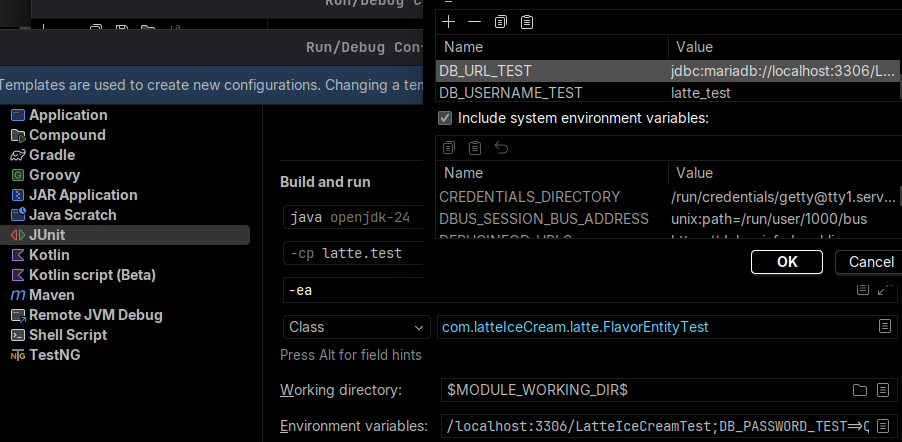
Access denied for user 'latte_test'@'localhost' (using password: YES) or similar. In application-test.yml, I have set the database credentials as environment variables. In IntelliJ IDEA Community, I have set their correct values in each test execution configuration (Run > Edit configurations for the test class and its @Test method). In MariaDB, I have granted the necessary permissions to the user for the database in question. Outside of the tests (in the main package), everything works correctly; it connects to the database by setting the values of the environment variables in Run > Edit configurations.
/test/resources/application-test.yml
28 Replies
⌛ This post has been reserved for your question.
Hey @Franscis123$#! Please useTIP: Narrow down your issue to simple and precise questions to maximize the chance that others will reply in here./closeor theClose Postbutton above when your problem is solved. Please remember to follow the help guidelines. This post will be automatically marked as dormant after 300 minutes of inactivity.
The endpoint merely directs to the service layer, and the breakpoint occurs when it attempts to use the save() method of JPARepository.
This the all output and exceptions
what happens if you set the credentials manually
without the use of env tables
Hardcoding its values in
application-test.yml works.can you show how you set the variables
no i mean how you set it within your idea
did you set the variables for each class or global configuration
also i would use test containers instead of a real database but thats up to you
No, just in IntelliJ
Run configurations > FlavorEntityTest:
Environment vairables field:
DB_USERNAME_TEST=latte_test;DB_URL_TEST=jdbc:mariadb://localhost:3306/LatteIceCreamTest;DB_PASSWORD_TEST="passwd_example"i would say you should set it up as a global config for junit instead of a single class
it looks like its not seeing the variables
And how I could do that?
i cant screenshot cuz im on mobile but heres a link
https://stackoverflow.com/questions/32760584/in-intellij-how-do-i-set-default-environment-variables-for-new-test-configurati
Thank you
If you are finished with your post, please close it.
If you are not, please ignore this message.
Note that you will not be able to send further messages here after this post have been closed but you will be able to create new posts.
that should work but if it doesnt try to print the environment variable values
Now says me that the url must start with 'jdbc' and I tried to print they but nothing:
It could mean that is not getting the vaules?
@dan1st | Daniel avengers assemble
env variable doesnt work for tests
but works on app run
💤 Post marked as dormant
This post has been inactive for over 300 minutes, thus, it has been archived.
If your question was not answered yet, feel free to re-open this post or create a new one.
In case your post is not getting any attention, you can try to use /help ping.
Warning: abusing this will result in moderative actions taken against you.Can you show the stack trace?
What?
also if you are writing integration tests, you might want to consider testcontainers for things like the DB
I possibly opt to do this, I can leverage to learn Docker, besides I will flash my SSD and do a clean installation of an other Linux distro, Is so suitable to try transfer my project dockerizing it.
Can you try an environment variable
SPRING_DATASOURCE_URL?
I think the double quotes might be the issueHey!
SPRIN_DATASOURCE_URL works: SPRING_DATASOURCE_URL=jdbc:mariadb://localhost:3306/LatteIceCreamTest;DB_USERNAME_TEST=latte_test;DB_PASSWORD_TEST=passwd This in Run > Edit configurations... for test class work. And in application-test.yml I have they as env variables e.g.${BD_PASSWORD}nice
so i guess it works now right
yeah you can just use environment variables in that format instead of properties:)
Fine, thank you guys
If you are finished with your post, please close it.
If you are not, please ignore this message.
Note that you will not be able to send further messages here after this post have been closed but you will be able to create new posts.
Post Closed
This post has been closed by <@1117467821270650921>.