Add GPU Nvidia PhysX to .exe Benchmark/Steam game prefixes
Hello there!
My laptop has an RTX3060, and I wanted to play some older games with PhysX. They all run fine but I noticed PhysX is running on CPU mode, so there's a ton of performance left in the table. I know I can just disable it, but I really wanted to see the effects.
I found this tutorial which I'm unable to follow. When I found it, I thought it'd be nice to see it working on FluidMark before trying on games.
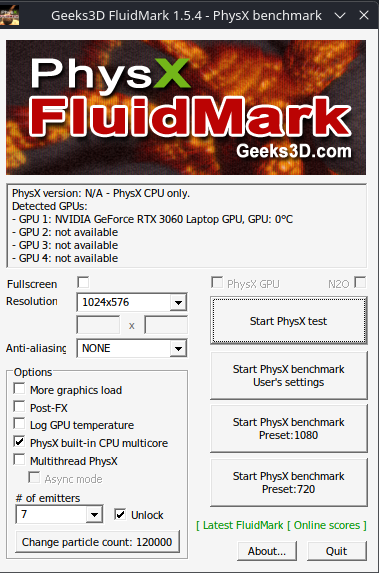
I got it installed through many ways: Adding to Steam as a non-steam game, using Protontricks, using Winetricks via Lutris. It will run just fine with any of these methos, but this is the result I always get (Picture 1).
It detects both the 3060 and the PhysX driver installed. Still, only CPU PhysX is available.
When trying Step 3, it either complains "It's not a wine executable", or does nothing.
When trying steps 4/5, it complains "PhysX is broken since Wine 9.5", and when using --force, it says "PhysX is installed, nothing to do".
But I still can't get it to work. I've lost the entire weekend trying to make this work, without success so far. Any help would be much, much appreciated. I'm this close to ditching Windows entirely thanks to Bazzite.
0 Replies