Valorant Not Launching
Pls help me I had this problem for a month now I can’t open valorant when I open my riot client and press play the button becomes grey then red but you can’t press it but valorant and valorant win 64 shipping is running in the background is there any way to fix this I have tried reinstalling 5 times did the services vgc thing everything possible but still not working pls help me
Solution:Jump to solution
I would try this as well.
Press windows key
Search “msconfig”
And open “System Configuration”
...
77 Replies
pls help
@naaidu :) What does the error code say?
no error
Nothing pops up
@naaidu :)
yes
install this app called
cpuz
CPU-Z | Softwares | CPUID
CPU-Z for Windows® x86/x64 is a freeware that gathers information on some of the main devices of your system :
Processor name and number, codename, process, package, cache levels. Mainboard and chipset. Memory type, size, timings, and module specifications (SPD). Real time measurement of each core's internal frequency, memo...
Processor name and number, codename, process, package, cache levels. Mainboard and chipset. Memory type, size, timings, and module specifications (SPD). Real time measurement of each core's internal frequency, memo...
here is the link
and send a screen shot of the cpu page
ok
i might be able to help u
Solution
I would try this as well.
Press windows key
Search “msconfig”
And open “System Configuration”
Head to “Services” tab
Check “Hide all Microsoft services”
And then “Disable all”
And find “vgc” and enable that only
Open “Task Manager”
Then head to “Startup Apps”
And disable all
Then enable all riot related
Then restart your pc
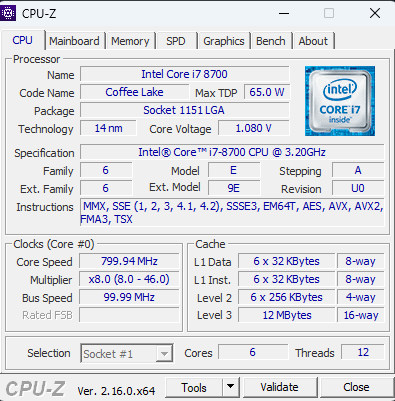
Alright
@Just_Chai
yea ur cpu is cool
usually games crash
i have done that bfr
bcause ur cpu lacks a instruction
how to fix it
Did you do it after your game stopped launching ?
yes
now i am reinstalling it for the 6th time
🤦
trying again
is your grahpics drivers upto date?
yes
Reinstalling 6th time wouldn’t fix anything if it didn’t work the first time 💀
fr
😭
idk what to do
since when did u start facing the issue?
last month
since last month??
woah
yea
^ just do this 1 more time rq
And only launch valorant
let it finish downloading i will text back
Right-click Valorant.exe > Properties > Compatibility tab
Check: Disable fullscreen optimizations
Also check: Run this program as administrator
and tag yall
try this too
donne
hm
already did this
can someone help with the new thing i opened?
watched around 20 yt vids
??
Press Windows + R → type: services.msc
Find vgc in the list
If not running → Right-click → Start
If missing, reinstall Vanguard:
Go to: C:\Program Files\Riot Vanguard → run uninstall.exe
Then relaunch Valorant to reinstall Vanguard fresh
try this
ok
I opened a new community help and asking if anyone can help or know the solution to it
can u send that cpuz same thing for gpu, ram and tell me whats your os?
ok
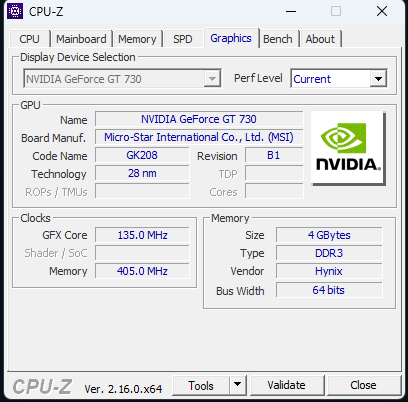
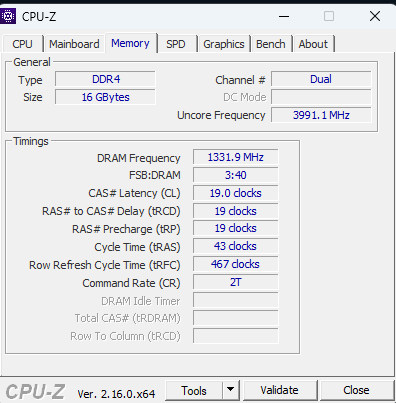
windows 11
god daym u have beast pc
bro ik its a lie
my gpu is shit
yeaa
its ddr3 so yea
but valorant runs before
yea yea
your hardware is perfect
seems like a interal problem
yes
and i need to find that little shit]
lol
the thing is valorant doesnt show u an error screen right?
yess
in task manager it runs
yea so like after doing all of this
and it doesnt work
yes
but i am gonnna try everything one last time'
after it finishes downnloading'
use this
ok
it will tell u what is wrong
lemme finish installing
basically creats a crash log
more 10 gbs
oh
send it to me if u dont really understand
ill debugg it for u
ok bro tq
nw
jsut dm me if i dont reply here
okayy
cuz ima go now i have some work
just download it
let’s see
it dosent launnch
i just opened the riot repair tool
Do this and try the game rq
YESSS
FINALLY
THANK YOU
I LOVE YOU
Nope problem
it worked?
For the future, please don’t download and install random exes people send
Only from trusted links