Error on hydrating without changing the code

Hey guys. In this morning I got this without changing anything on files like root.tsx or App.tsx. It's this coming from some internal changes?
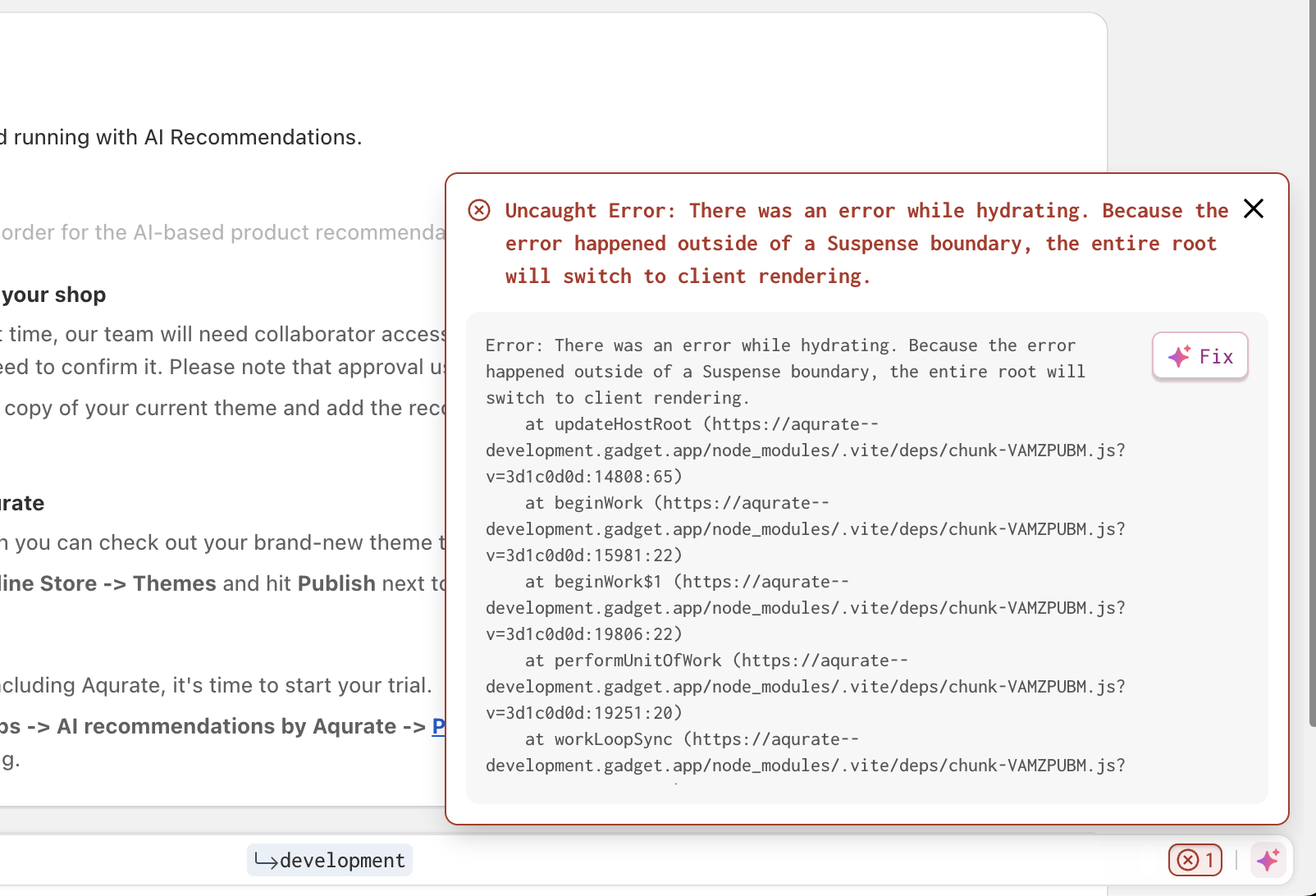
No description
13 Replies
Smelvin
Smelvin2mo ago
Hi Sorin, We will investigate
The Duke
The Duke2mo ago
We have been battling the same all day and finally concluded it is an issue in the gadget platform. Seems to impact development and not production for us. It's sporadic too - if you close the message then it sometimes reappears and sometimes doesn't - it's like you have an error on one of your servers as the behavior is not consistent Please can this be escalated. FYI @[Gadget] Mark
Sorin
SorinOP2mo ago
Ah okay, make sense now
The Duke
The Duke2mo ago
It is still impacting us this morning - surprised more people have not raised thie issue
Chocci_Milk
Chocci_Milk2mo ago
Hello folks, Could you please share some app URLs so that we can take a closer look?
The Duke
The Duke2mo ago
Here you go: store-unity.gadget.app
Valdek
Valdek2mo ago
One of our app - https://ribbn.gadget.app
airhorns
airhorns2mo ago
we're working on getting a fix out for this ASAP, will let y'all know when it is out ok, the majority of these errors should have stopped, please let me know if you're still seeing some that you weren't seeing a couple days ago! the issue was an errant proxy injecting a change that caused the hydration errors which we have reverted and will test much deeper to ensure this can't happen again! there shouldnt have been any impact to any production apps -- just these errors in development we found one more hydration error that can only be corrected in your app's code, and only happens for Shopify apps when you're using the in-Gadget editor preview of or the full-page mock embedded preview. it comes from Gadget's replacement of the Shopfiy App Bridge CDN script to power the mock mode. the error looks like this:
react-dom-client.development.js:5439 A tree hydrated but some attributes of the server rendered HTML didn't match the client properties. This won't be patched up. This can happen if a SSR-ed Client Component used:

- A server/client branch `if (typeof window !== 'undefined')`.
- Variable input such as `Date.now()` or `Math.random()` which changes each time it's called.
- Date formatting in a user's locale which doesn't match the server.
- External changing data without sending a snapshot of it along with the HTML.
- Invalid HTML tag nesting.

It can also happen if the client has a browser extension installed which messes with the HTML before React loaded.

https://react.dev/link/hydration-mismatch

...
<RouterProvider flushSync={function} router={{basename:"/", ...}} unstable_onError={undefined}>
<Router basename="/" location={{pathname:"/", ...}} navigationType="POP" navigator={{...}}>
<DataRoutes routes={[...]} future={{...}} state={{...}} unstable_onError={undefined}>
<RenderErrorBoundary location={{pathname:"/", ...}} revalidation="idle" component={<Layout>} error={undefined} ...>
<RenderedRoute match={{params:{}, ...}} routeContext={{...}}>
<Layout>
<html lang="en">
<head>
<Meta>
<script
+ src="https://cdn.shopify.com/shopifycloud/app-bridge.js"
- src="https://assets.gadget.dev/assets/app-bridge-cdn-mock.min.js"
>
...
...
react-dom-client.development.js:5439 A tree hydrated but some attributes of the server rendered HTML didn't match the client properties. This won't be patched up. This can happen if a SSR-ed Client Component used:

- A server/client branch `if (typeof window !== 'undefined')`.
- Variable input such as `Date.now()` or `Math.random()` which changes each time it's called.
- Date formatting in a user's locale which doesn't match the server.
- External changing data without sending a snapshot of it along with the HTML.
- Invalid HTML tag nesting.

It can also happen if the client has a browser extension installed which messes with the HTML before React loaded.

https://react.dev/link/hydration-mismatch

...
<RouterProvider flushSync={function} router={{basename:"/", ...}} unstable_onError={undefined}>
<Router basename="/" location={{pathname:"/", ...}} navigationType="POP" navigator={{...}}>
<DataRoutes routes={[...]} future={{...}} state={{...}} unstable_onError={undefined}>
<RenderErrorBoundary location={{pathname:"/", ...}} revalidation="idle" component={<Layout>} error={undefined} ...>
<RenderedRoute match={{params:{}, ...}} routeContext={{...}}>
<Layout>
<html lang="en">
<head>
<Meta>
<script
+ src="https://cdn.shopify.com/shopifycloud/app-bridge.js"
- src="https://assets.gadget.dev/assets/app-bridge-cdn-mock.min.js"
>
...
...
and you can suppress it like this:
export const Layout = ({ children }: { children: React.ReactNode }) => {
return (
<html lang="en">
<head>
<Meta />
- <script src="https://cdn.shopify.com/shopifycloud/app-bridge.js"></script>
+ <script src="https://cdn.shopify.com/shopifycloud/app-bridge.js" suppressHydrationWarning={true}></script>
<Links />
</head>
<body>
<Suspense fallback={<FullPageSpinner />}>{children}</Suspense>
<ScrollRestoration />
<Scripts />
</body>
</html>
);
};
export const Layout = ({ children }: { children: React.ReactNode }) => {
return (
<html lang="en">
<head>
<Meta />
- <script src="https://cdn.shopify.com/shopifycloud/app-bridge.js"></script>
+ <script src="https://cdn.shopify.com/shopifycloud/app-bridge.js" suppressHydrationWarning={true}></script>
<Links />
</head>
<body>
<Suspense fallback={<FullPageSpinner />}>{children}</Suspense>
<ScrollRestoration />
<Scripts />
</body>
</html>
);
};
Ricardo
Ricardo2mo ago
Still seeing the issue - It worked for like an hour and suddenly stopped working again (not in the preview) Working now - I had to delete all the localstorage / session storage / cookies.
The Duke
The Duke2mo ago
Thanks Gadget team! Seems to be working fine for us now. 👍
Sorin
SorinOP2mo ago
All good here too. Thank you guys!
Ricardo
Ricardo2mo ago
I still get this error from time to time I have to delete the local and session storage to make it work again

Did you find this page helpful?