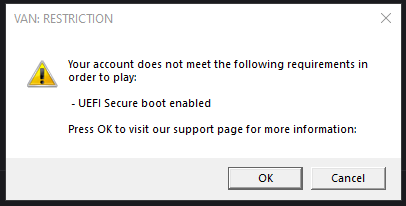
VAN: RESTRICTION ERROR
Keep getting this error -- I've enabled it in BIOS just now and enabled TPm as well but still receiving this error as soon as game launches.
Could I please get some help!
17 Replies
Any help is greatly appreciated 🙂
Sup
Press win+r
Solution
Type msinfo32
Show screenshot
@junimo 🙏
Is that safe to share
Yes its just pc specs
It says SBS: OFF but I did just enable it in BIOS
Go into bios again
Secure boot
Key management
restore factory keys
Then install defualt secure boot keys
Press f10 save and exit
trying
brb
My OS type should be set to “Windows UEFI Mode” right?
Yes
Also after I click Key Management there is no Restore, I just see this
Just click Install?
Yes
Once your pc up send this
Press windows key + r
Type msinfo32
Show ss
Kk, when I saved it said I didn’t change anything just a heads up but still rebooting now after installing
showing as on now
should I try booting up valo?
Done
Lunch val
Works now!! Thanks guys 🙏
@Mahan help fixing this
Thanks!
You did everything 🙂