Forbiden access to Nginx Proxy Manager with ServerIP:81
Hello,
I have Self-Hosted Supabase with Docker and i have Nginx Proxy Manager inside. Probelm is no matter that i have Add Proxy Host(https://proxy.mydomain.com) and it work ok, i am still able to opne Nginx Proxy Manager with http://serverip:81, Which i dont want.
Also when i open http://serverip it gives me:
Congratulations!
You've successfully started the Nginx Proxy Manager.
If you're seeing this site then you're trying to access a host that isn't set up yet.
Log in to the Admin panel to get started.
So my question is: How to forbide not secure http access, or better to redirect tham to https.
Thank you in advance
6 Replies
In every web server I have used (nginx included) you need to forward the http to https.
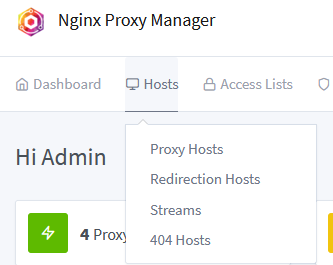
Yes. I just want to know how. With Redirection Host?
That would be outside of the scope of Supabase and Google will probably get you a better answer to that.
One of the co-creator of nginx is on here, maybe when he comes online he will see your post and be able to help though. But I still think Google will be quicker.
Thank you very much
Solved with blocking access instead of redirect:
1. Opne docker-compose.yml
2. Under service: find nginx:
And change '81:81' # Admin Web Port to '127.0.0.1:81:81' # Admin Web Port
docker compose up -d
This way you can not access Nginx Proxy Manager with serverip:81, but still can access it through your domain but for this you need to Add Proxy Host in this way:
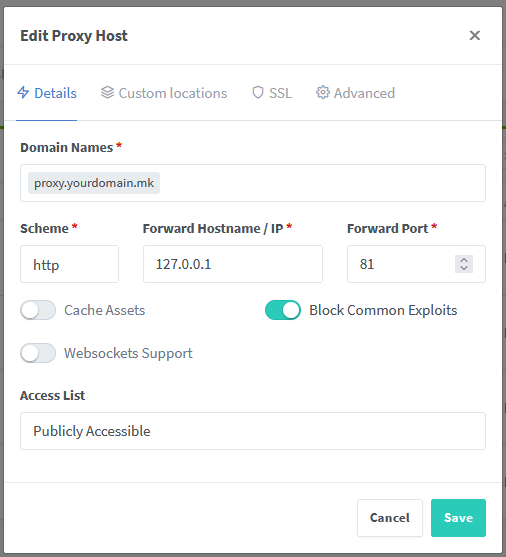
and on SSL tab under SSL Certificate you select: Request a new SSL certificate and turn on: Force SSL, HTTP/2 Support and HSTS Enabled