Dynamic Maven Artifact using ASM - Module not found

I generate a maven artifact dynamicly. In order to modularize the Artifact I need to generate a module-info.class. This is my code to generate the bytecode:
public class BytecodeHelper {
public static final String MODULE_INFO = "module-info";

public static byte[] buildModuleClass(String moduleName, String exportPackage) throws IOException {
ClassWriter classWriter = new ClassWriter(0);
classWriter.visit(Opcodes.V9, Opcodes.ACC_MODULE, MODULE_INFO, null, null, null);
ModuleVisitor mv = classWriter.visitModule(moduleName, 0, null);
mv.visitExport(exportPackage, 0);
mv.visitEnd();
classWriter.visitEnd();
return classWriter.toByteArray();
}
}
public class BytecodeHelper {
public static final String MODULE_INFO = "module-info";

public static byte[] buildModuleClass(String moduleName, String exportPackage) throws IOException {
ClassWriter classWriter = new ClassWriter(0);
classWriter.visit(Opcodes.V9, Opcodes.ACC_MODULE, MODULE_INFO, null, null, null);
ModuleVisitor mv = classWriter.visitModule(moduleName, 0, null);
mv.visitExport(exportPackage, 0);
mv.visitEnd();
classWriter.visitEnd();
return classWriter.toByteArray();
}
}
Unfortunately maven is unhappy with the module-info.class. Message is:
[INFO] ------------------------------------------------------------------------
[INFO] BUILD FAILURE
[INFO] ------------------------------------------------------------------------
[INFO] Total time: 12.795 s (Wall Clock)
[INFO] Finished at: 2025-11-18T18:57:23+01:00
[INFO] ------------------------------------------------------------------------
[ERROR] Failed to execute goal org.apache.maven.plugins:maven-compiler-plugin:3.11.0:compile (default-compile) on project de.xx: Compilation failure
[ERROR] /home/xx/workspace/xx/de.xx/src/main/java/module-info.java:[17,18] module not found: xxdb
[INFO] ------------------------------------------------------------------------
[INFO] BUILD FAILURE
[INFO] ------------------------------------------------------------------------
[INFO] Total time: 12.795 s (Wall Clock)
[INFO] Finished at: 2025-11-18T18:57:23+01:00
[INFO] ------------------------------------------------------------------------
[ERROR] Failed to execute goal org.apache.maven.plugins:maven-compiler-plugin:3.11.0:compile (default-compile) on project de.xx: Compilation failure
[ERROR] /home/xx/workspace/xx/de.xx/src/main/java/module-info.java:[17,18] module not found: xxdb
15 Replies
JavaBot
JavaBot2w ago
This post has been reserved for your question.
Hey @Peter Rader! Please use /close or the Close Post button above when your problem is solved. Please remember to follow the help guidelines. This post will be automatically marked as dormant after 300 minutes of inactivity.
TIP: Narrow down your issue to simple and precise questions to maximize the chance that others will reply in here.
dan1st
dan1st2w ago
Can you elaborate on what you mean with creating an artifact dynamically? When do you create it? How do you add the created artifact to the build? Can you run the (failing) Maven build with -X and show the output? Can you show the final module-info.class? btw the Class-File API exists as well, just saying
Peter Rader
Peter RaderOP2w ago
Oh just create a jar-file having the bytecodes that has been generated from the buildModuleClass-call in the root-file named "module-info.class". The rest of the jar could remain empty. Then install the jar usingmvn install:install-file -Dfile=<path-to-file> -DgroupId=<group-id> -DartifactId=<artifact-id> -Dversion=<version> -Dpackaging=<packaging> I create the jar on demand.
dan1st
dan1st2w ago
so the JAR is created in a distinct Maven build Can you run jar tf <jarfile>.jar on the JAR in the local Maven repo? And then extract it and run javap module-info.class
Peter Rader
Peter RaderOP2w ago
grim@ubuntudev:~/.m2/repository/de/xxx/xx/2025.11.18.17.34.40$ jar tf rm-2025.11.18.17.34.40.jar
META-INF/
META-INF/maven/
META-INF/maven/de.xxx/
META-INF/maven/de.xxx/rm/
META-INF/maven/de.xxx/rm/pom.xml
META-INF/MANIFEST.MF
de/
de/xxx/
de/xxx/xx
module-info.class
grim@ubuntudev:~/.m2/repository/de/xxx/xx/2025.11.18.17.34.40$ jar tf rm-2025.11.18.17.34.40.jar
META-INF/
META-INF/maven/
META-INF/maven/de.xxx/
META-INF/maven/de.xxx/rm/
META-INF/maven/de.xxx/rm/pom.xml
META-INF/MANIFEST.MF
de/
de/xxx/
de/xxx/xx
module-info.class
grim@ubuntudev:~/.m2/repository/de/xxx/rm/2025.11.18.17.34.40$ javap module-info.class
module xxdb {
exports de.xxx;
}
grim@ubuntudev:~/.m2/repository/de/xxx/rm/2025.11.18.17.34.40$
grim@ubuntudev:~/.m2/repository/de/xxx/rm/2025.11.18.17.34.40$ javap module-info.class
module xxdb {
exports de.xxx;
}
grim@ubuntudev:~/.m2/repository/de/xxx/rm/2025.11.18.17.34.40$
dan1st
dan1st2w ago
What exact files are in the repo for that version? and what is the output of the failing Maven build with -X? btw you censored the package name here but not in the jar tf output if you want to edit it
Peter Rader
Peter RaderOP2w ago
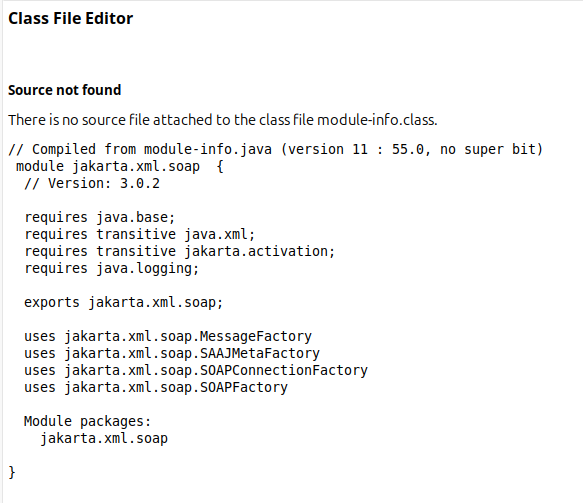
By the way, other module-info.class show this structure in eclipse:
No description
Peter Rader
Peter RaderOP2w ago
I may miss the "module packages:" scope....
dan1st
dan1st2w ago
hm? oh right
Peter Rader
Peter RaderOP2w ago
As you can see in the class-file-editor, the module-name is mentioned twice. In the first and last line. Hm, the ModuleVisitor have a method "visitPackage". I think I need to call it. I dont know how to write a unit test for that!
dan1st
dan1st2w ago
https://docs.oracle.com/javase/specs/jvms/se25/html/jvms-4.html#jvms-4.7.26 It's just a class file attribute
The ModulePackages attribute is a variable-length attribute in the attributes table of a ClassFile structure (§4.1). The ModulePackages attribute indicates all the packages of a module that are exported or opened by the Module attribute, as well as all the packages of the service implementations recorded in the Module attribute. The ModulePackages attribute may also indicate packages in the module that are neither exported nor opened nor contain service implementations. There may be at most one ModulePackages attribute in the attributes table of a ClassFile structure.
but first try using it with the javac/java command line and see whether that allows using your module and then check the Maven build with the -X argument which includes more information on the compilation I wouldn't be surprised if a missing POM in the local repo causes the issue
Peter Rader
Peter RaderOP2w ago
modules have no package-declaration. Since the ModuleVisitor have such method, I think it is reused for the "module packages:" scope.
dan1st
dan1st2w ago
they have a list of opened and exported packages So in your case, it would include de.xxx btw you can also use javap -v
Classfile /tmp/module-info.class
Last modified 18 Nov 2025; size 148 bytes
SHA-256 checksum 305a95e648ea4c504aae7bedf34b4a5cc9f5ad212ac3ac02b35db3f3f0b6374c
Compiled from "module-info.java"
module Test
minor version: 0
major version: 69
flags: (0x8000) ACC_MODULE
this_class: #1 // module-info
super_class: #0
interfaces: 0, fields: 0, methods: 0, attributes: 2
Constant pool:
#1 = Class #2 // "module-info"
#2 = Utf8 module-info
#3 = Utf8 SourceFile
#4 = Utf8 module-info.java
#5 = Utf8 Module
#6 = Unknown #7 // Test
#7 = Utf8 Test
#8 = Unknown #9 // "java.base"
#9 = Utf8 java.base
#10 = Utf8 25
{
}
SourceFile: "module-info.java"
Module:
#6,0 // Test
#0
1 // requires
#8,8000 // "java.base" ACC_MANDATED
#10 // 25
0 // exports
0 // opens
0 // uses
0 // provides
Classfile /tmp/module-info.class
Last modified 18 Nov 2025; size 148 bytes
SHA-256 checksum 305a95e648ea4c504aae7bedf34b4a5cc9f5ad212ac3ac02b35db3f3f0b6374c
Compiled from "module-info.java"
module Test
minor version: 0
major version: 69
flags: (0x8000) ACC_MODULE
this_class: #1 // module-info
super_class: #0
interfaces: 0, fields: 0, methods: 0, attributes: 2
Constant pool:
#1 = Class #2 // "module-info"
#2 = Utf8 module-info
#3 = Utf8 SourceFile
#4 = Utf8 module-info.java
#5 = Utf8 Module
#6 = Unknown #7 // Test
#7 = Utf8 Test
#8 = Unknown #9 // "java.base"
#9 = Utf8 java.base
#10 = Utf8 25
{
}
SourceFile: "module-info.java"
Module:
#6,0 // Test
#0
1 // requires
#8,8000 // "java.base" ACC_MANDATED
#10 // 25
0 // exports
0 // opens
0 // uses
0 // provides
Peter Rader
Peter RaderOP2w ago
Yeeees, solved! The correct implementation is:
public class BytecodeHelper {
public static final String MODULE_INFO = "module-info";

public static byte[] buildModuleClass(String moduleName, String exportPackage) throws IOException {
ClassWriter classWriter = new ClassWriter(0);
classWriter.visit(Opcodes.V9, Opcodes.ACC_MODULE, MODULE_INFO, null, null, null);
ModuleVisitor mv = classWriter.visitModule(moduleName, 0, null);
mv.visitExport(exportPackage, 0);
mv.visitEnd();
mv.visitPackage(moduleName);
mv.visitEnd();
classWriter.visitEnd();
return classWriter.toByteArray();
}
}
public class BytecodeHelper {
public static final String MODULE_INFO = "module-info";

public static byte[] buildModuleClass(String moduleName, String exportPackage) throws IOException {
ClassWriter classWriter = new ClassWriter(0);
classWriter.visit(Opcodes.V9, Opcodes.ACC_MODULE, MODULE_INFO, null, null, null);
ModuleVisitor mv = classWriter.visitModule(moduleName, 0, null);
mv.visitExport(exportPackage, 0);
mv.visitEnd();
mv.visitPackage(moduleName);
mv.visitEnd();
classWriter.visitEnd();
return classWriter.toByteArray();
}
}
Works like a charm!
JavaBot
JavaBot2w ago
Post Closed
This post has been closed by <@574922348642172929>.

Did you find this page helpful?