How to create Roact Components (and animate them properly)
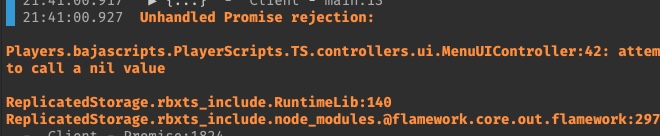
I've created a component (or so I think) that uses flipper to animate. However, I get an error when trying to call new Component.
Here is my attempt, am I on the right track?
I am trying to get the image label to tween to 0.5,1.5 scale when clicked.
Here is how I call the component:
Here is my attempt, am I on the right track?
I am trying to get the image label to tween to 0.5,1.5 scale when clicked.
import Roact, { setGlobalConfig } from "@rbxts/roact";
import Flipper from "@rbxts/flipper";
export interface slotElementProps {
    title: string;
    saved: string;
    usage: string;
    key: string;
    position: UDim2;
}
export default class SlotComponent extends Roact.Component {
    public properties: slotElementProps | undefined;
    public updatePosition!: Roact.BindingFunction<number>;
    public currentPosition!: Roact.Binding<number>;
    public positionMotor!: Flipper.SingleMotor | undefined;

    public constructor(newProps: slotElementProps) {
        super(newProps);
    }
    public init(newProps: slotElementProps) {
        this.properties = newProps;
        this.positionMotor = new Flipper.SingleMotor(0);
        [this.currentPosition, this.updatePosition] = Roact.createBinding(this.positionMotor.getValue());
        this.positionMotor.onStep(this.updatePosition);
    }
    public playClick() {
        this.positionMotor?.setGoal(
            new Flipper.Spring(1, {
                frequency: 4,
                dampingRatio: 0.75,
            }),
        );
        //this.updatePosition(UDim2.fromScale(0.5, 1.5));
    }
    public wipeClick() {}

    public render() {
        return (
            <imagelabel
                Key={this.properties?.key}
                Image="rbxassetid://8886612491"
                ScaleType={Enum.ScaleType.Fit}
                AnchorPoint={new Vector2(0.5, 0.5)}
                BackgroundTransparency={1}
                Position={this.currentPosition.map((value) => {
                    return UDim2.fromScale(0.5, 0.5).Lerp(UDim2.fromScale(0.5, 1.5), value);
                })}
                // Position={this.currentPosition.map(() => {
                //     return this.currentPosition.getValue();
                // })}
                Size={UDim2.fromScale(0.16, 1)}
            >


                <imagebutton
                    Key="Play"
                    Image="rbxassetid://8886622444"
                    ScaleType={Enum.ScaleType.Fit}
                    AnchorPoint={new Vector2(0.5, 0.5)}
                    BackgroundTransparency={1}
                    Position={UDim2.fromScale(0.65, 0.437)}
                    Size={UDim2.fromScale(0.306, 0.278)}
                    Event={{
                        MouseButton1Down: (rbx, x, y) => {
                            this.playClick();
                        },
                    }}
                ></imagebutton>

            </imagelabel>
        );
    }
}
import Roact, { setGlobalConfig } from "@rbxts/roact";
import Flipper from "@rbxts/flipper";
export interface slotElementProps {
title: string;
saved: string;
usage: string;
key: string;
position: UDim2;
}
export default class SlotComponent extends Roact.Component {
public properties: slotElementProps | undefined;
public updatePosition!: Roact.BindingFunction<number>;
public currentPosition!: Roact.Binding<number>;
public positionMotor!: Flipper.SingleMotor | undefined;
public constructor(newProps: slotElementProps) {
super(newProps);
}
public init(newProps: slotElementProps) {
this.properties = newProps;
this.positionMotor = new Flipper.SingleMotor(0);
[this.currentPosition, this.updatePosition] = Roact.createBinding(this.positionMotor.getValue());
this.positionMotor.onStep(this.updatePosition);
}
public playClick() {
this.positionMotor?.setGoal(
new Flipper.Spring(1, {
frequency: 4,
dampingRatio: 0.75,
}),
);
//this.updatePosition(UDim2.fromScale(0.5, 1.5));
}
public wipeClick() {}
public render() {
return (
<imagelabel
Key={this.properties?.key}
Image="rbxassetid://8886612491"
ScaleType={Enum.ScaleType.Fit}
AnchorPoint={new Vector2(0.5, 0.5)}
BackgroundTransparency={1}
Position={this.currentPosition.map((value) => {
return UDim2.fromScale(0.5, 0.5).Lerp(UDim2.fromScale(0.5, 1.5), value);
})}
// Position={this.currentPosition.map(() => {
// return this.currentPosition.getValue();
// })}
Size={UDim2.fromScale(0.16, 1)}
>
<imagebutton
Key="Play"
Image="rbxassetid://8886622444"
ScaleType={Enum.ScaleType.Fit}
AnchorPoint={new Vector2(0.5, 0.5)}
BackgroundTransparency={1}
Position={UDim2.fromScale(0.65, 0.437)}
Size={UDim2.fromScale(0.306, 0.278)}
Event={{
MouseButton1Down: (rbx, x, y) => {
this.playClick();
},
}}
></imagebutton>
</imagelabel>
);
}
}Here is how I call the component:
import SlotComponent, { slotElementProps } from "client/components/ui/menu/MenuSlotUI";
const slotUIConfig: slotElementProps = {
  title: "Slot",
  key: tostring(key),
  saved: "0",
  position: UDim2.fromScale(0.5, 0.5),
  usage: "0",
};

const newSlot = new SlotComponent(slotUIConfig);

const render = newSlot.render();Ï
import SlotComponent, { slotElementProps } from "client/components/ui/menu/MenuSlotUI";
const slotUIConfig: slotElementProps = {
title: "Slot",
key: tostring(key),
saved: "0",
position: UDim2.fromScale(0.5, 0.5),
usage: "0",
};
const newSlot = new SlotComponent(slotUIConfig);
const render = newSlot.render();Ï