Double check if an object is one of provided types

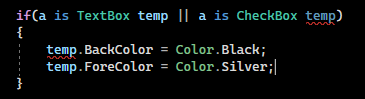
Is there a way to quickly check that? I mean a can be either TextBox or CheckBox, doesn't matter which one, I want this condition to success if one of these

44 Replies
❓𝙌𝙪𝙚𝙨𝙩𝙞𝙤𝙣 𝙈𝙖𝙧𝙠 🩷
void OnLoad(object? sender, EventArgs e)
{
foreach(var a in Controls)
{
if(a is TextBox temp)
{
temp.BackColor = Color.Black;
temp.ForeColor = Color.Silver;
}
}
}
void OnLoad(object? sender, EventArgs e)
{
foreach(var a in Controls)
{
if(a is TextBox temp)
{
temp.BackColor = Color.Black;
temp.ForeColor = Color.Silver;
}
}
}
Here is where I use it
Angius
Angius4y ago
temp cannot be one of two types Algebraic data types are not a thing in C#
Angius
Angius4y ago
Or you could maybe do a is { BackColor: _, ForeColor: _ } But that won't allow for a cast either
❓𝙌𝙪𝙚𝙨𝙩𝙞𝙤𝙣 𝙈𝙖𝙧𝙠 🩷
void OnLoad(object? sender, EventArgs e)
{
foreach(var a in Controls)
{
if(a is TextBox temp )
{
temp.BackColor = Color.Black;
temp.ForeColor = Color.Silver;
}

if(a is CheckBox temp1) // will have to copy paste this for each type
{
temp1.BackColor = Color.Black;
temp1.ForeColor = Color.Silver;
}
}
}
void OnLoad(object? sender, EventArgs e)
{
foreach(var a in Controls)
{
if(a is TextBox temp )
{
temp.BackColor = Color.Black;
temp.ForeColor = Color.Silver;
}

if(a is CheckBox temp1) // will have to copy paste this for each type
{
temp1.BackColor = Color.Black;
temp1.ForeColor = Color.Silver;
}
}
}
As I check they don't have any common class that they derive from so I guess I'll have to create an if for each type e.g. if(a is Button temp2) then if(a is MenuItem temp3) and so on...
❓𝙌𝙪𝙚𝙨𝙩𝙞𝙤𝙣 𝙈𝙖𝙧𝙠 🩷
This doesn't seem to work and this also not
Angius
Angius4y ago
x is {A, B} checks if x is of type that has properties A and B
❓𝙌𝙪𝙚𝙨𝙩𝙞𝙤𝙣 𝙈𝙖𝙧𝙠 🩷
Yeah but that's going to affect probably entire form as everything here derives from Control class (Windows Forms) I rather wanted to specify to which particular classes I want to compare with
❓𝙌𝙪𝙚𝙨𝙩𝙞𝙤𝙣 𝙈𝙖𝙧𝙠 🩷
It fails, needs a cast probably
Thinker
Thinker4y ago
Just do
if (a is TextBox t)
{
t.BackColor = Color.Black;
t.ForeColor = Color.Silver;
}
if (a is CheckBox b)
{
b.BackColor = Color.Black;
b.ForeColor = Color.Silver;
}
if (a is TextBox t)
{
t.BackColor = Color.Black;
t.ForeColor = Color.Silver;
}
if (a is CheckBox b)
{
b.BackColor = Color.Black;
b.ForeColor = Color.Silver;
}
Easiest way without any nonsense
❓𝙌𝙪𝙚𝙨𝙩𝙞𝙤𝙣 𝙈𝙖𝙧𝙠 🩷
Yeah, this is the only option that comes to my mind but I didn't want that "naive" approach to copy paste bunch of lines that is the same inside each if statement
Thinker
Thinker4y ago
You could use a switch
❓𝙌𝙪𝙚𝙨𝙩𝙞𝙤𝙣 𝙈𝙖𝙧𝙠 🩷
That seemed like a great idea but also fails
Thinker
Thinker4y ago
Btw, OfType<Control> and not Cast<Control>
Thinker
Thinker4y ago
stare doesn't even implement IEnumerable??
❓𝙌𝙪𝙚𝙨𝙩𝙞𝙤𝙣 𝙈𝙖𝙧𝙠 🩷
Yeah, these are the only options probably
Thinker
Thinker4y ago
(OfType is slightly better than Cast) Afaik it sometimes fails in weird places because it can't cast OfType also makes sure everything actually is of the type, which is especially relevant with non-generic collections
MODiX
MODiX4y ago
thinker227#5176
REPL Result: Success
var xs = new object[] {"a","b","c"};
(xs.Cast<string>(), xs.OfType<string>())
var xs = new object[] {"a","b","c"};
(xs.Cast<string>(), xs.OfType<string>())
Result: ValueTuple<IEnumerable<string>, IEnumerable<string>>
{
"item1": [
"a",
"b",
"c"
],
"item2": [
"a",
"b",
"c"
]
}
{
"item1": [
"a",
"b",
"c"
],
"item2": [
"a",
"b",
"c"
]
}
Compile: 508.973ms | Execution: 35.374ms | React with ❌ to remove this embed.
❓𝙌𝙪𝙚𝙨𝙩𝙞𝙤𝙣 𝙈𝙖𝙧𝙠 🩷
Uhm... so there is no way to do that?
ero
ero4y ago
Why not just...
foreach (Control control in Controls)
{

}
foreach (Control control in Controls)
{

}
...? Can't believe no one has suggested this... It's a collection of controls nonetheless
❓𝙌𝙪𝙚𝙨𝙩𝙞𝙤𝙣 𝙈𝙖𝙧𝙠 🩷
Wow, great, that seems to be really working...
ero
ero4y ago
It doesn't need to be generic
❓𝙌𝙪𝙚𝙨𝙩𝙞𝙤𝙣 𝙈𝙖𝙧𝙠 🩷
But I want to distinguish only certain control types that all derive from Control for example TextBox or CheckBox
ero
ero4y ago
You can then do if (control is TextBox or CheckBox or ...) and do your control.ForeColor anyway
❓𝙌𝙪𝙚𝙨𝙩𝙞𝙤𝙣 𝙈𝙖𝙧𝙠 🩷
And the original variable has type object @Ero so it is unknown what type it is I tried that and I can't
❓𝙌𝙪𝙚𝙨𝙩𝙞𝙤𝙣 𝙈𝙖𝙧𝙠 🩷
Hm that's also some solution 🤔 But what if an object is neither of Control type? 😄 The app might crash
❓𝙌𝙪𝙚𝙨𝙩𝙞𝙤𝙣 𝙈𝙖𝙧𝙠 🩷
Actually that didn't work in my case
ero
ero4y ago
That's why you specify the type in he loop head
❓𝙌𝙪𝙚𝙨𝙩𝙞𝙤𝙣 𝙈𝙖𝙧𝙠 🩷
But if I put there Controls I will not use sender variable at all, right?
ero
ero4y ago
It entirely depends on what you want this event to do Nevermind the fact that this is a pretty bad way to set the styling for controls You should be setting this in a resource dictionary and access the colors from there, at least for xaml based GUI frameworks
❓𝙌𝙪𝙚𝙨𝙩𝙞𝙤𝙣 𝙈𝙖𝙧𝙠 🩷
Let's say I have 30 text buttons in a form, how do I setup the same back and fore color for them all without doing that one by one?
ero
ero4y ago
I'm not sure if WinForms has a similar thing By doing it one by one, the correct way
ACiDCA7
ACiDCA74y ago
ive got no clue about winforms but i hope there is a way to use reusable styles, right? right???
ero
ero4y ago
That way allows you to add theming much easier As in, light and dark themes You bind the colors to a resource, and just change the resource
❓𝙌𝙪𝙚𝙨𝙩𝙞𝙤𝙣 𝙈𝙖𝙧𝙠 🩷
I think it exists but not for all controls Hmm thank you all for your help I honestly didn't expect so much attention and how active will become here pepetense I'll try playing with that, I guess there must be some way 😄
ero
ero4y ago
But yeah if you're planning on putting this event on multiple controls instead of putting a loop into it, then you don't have many choices i think
❓𝙌𝙪𝙚𝙨𝙩𝙞𝙤𝙣 𝙈𝙖𝙧𝙠 🩷
I thought about putting an event on the form to execute it after it loads Hmm to find all controls of a particular type and change their colors
ero
ero4y ago
if (sender is not (TextBox or CheckBox or Button))
return;

Control ctrl = (Control)sender;

// ...
if (sender is not (TextBox or CheckBox or Button))
return;

Control ctrl = (Control)sender;

// ...
Or an array of types, then types.Contains(sender.GetType())... But that's pretty ugly imo...
❓𝙌𝙪𝙚𝙨𝙩𝙞𝙤𝙣 𝙈𝙖𝙧𝙠 🩷
public ServerProviderForm()
{
InitializeComponent();

foreach(var control in Controls.Cast<Control>().Where(x => x is CheckBox or Button or TextBox))
{
control.BackColor = Color.Red;
control.ForeColor = Color.Blue;
}
}
public ServerProviderForm()
{
InitializeComponent();

foreach(var control in Controls.Cast<Control>().Where(x => x is CheckBox or Button or TextBox))
{
control.BackColor = Color.Red;
control.ForeColor = Color.Blue;
}
}
Aight, so actually that code worked. And I did a mistake by trying to put that in some OnEvent method, the easiest way was to put that in the form constructor method and use Controls property so right after the initialization selected controls of the specified class (CheckBox, Button, TextBox in my example) received Fore and Back color as I specified. Thank you @calledude if I saw correctly that was probably your idea do use .Cast<Control>().Where() Also thank you @Ero#1111@ACiDCA7#8219@thinker227#5176@Angius#1586 I can't ping you because I got timed out I haven't seen such engagement before catpog

Did you find this page helpful?