✅ Iteration through a list in csproj
I have a csproj file with a next section
This is how I pass environments
It works correctly only for the first value from environments.
On the second iteration it shows me an error
I'm wondering how to make it work for the rest of the environments?
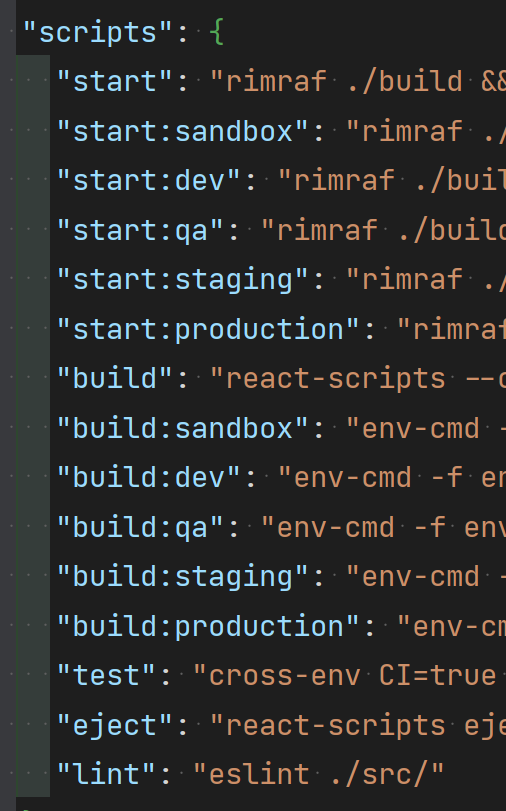
My package.json file contains all env-specific commands
<Target Name="PublishRunWebpack" AfterTargets="ComputeFilesToPublish" Condition="'$(BuildingDocker)' == ''">
<!-- As part of publishing, ensure the JS resources are freshly built in production mode -->
<Exec WorkingDirectory="$(SpaRoot)" Command="yarn install" />
<!-- Iterate over each environment in the Environments variable and run yarn run build:<ENVIRONMENT> -->
<ItemGroup>
<Environment Include="$(Environments)" />
</ItemGroup>
<Message Importance="high" Text="Started building %(Environment.Identity) versions of the spa ..." />
<Exec WorkingDirectory="$(SpaRoot)" Command="yarn run build:%(Environment.Identity)" />
<!-- Include the newly-built files in the publish output -->
<ItemGroup>
<DistFiles Include="$(SpaRoot)%(Environment.Identity)\**" />
<ResolvedFileToPublish Include="@(DistFiles->'%(FullPath)')" Exclude="@(ResolvedFileToPublish)">
<RelativePath>%(DistFiles.Identity)</RelativePath>
<CopyToPublishDirectory>PreserveNewest</CopyToPublishDirectory>
<ExcludeFromSingleFile>true</ExcludeFromSingleFile>
</ResolvedFileToPublish>
</ItemGroup>
</Target> <Target Name="PublishRunWebpack" AfterTargets="ComputeFilesToPublish" Condition="'$(BuildingDocker)' == ''">
<!-- As part of publishing, ensure the JS resources are freshly built in production mode -->
<Exec WorkingDirectory="$(SpaRoot)" Command="yarn install" />
<!-- Iterate over each environment in the Environments variable and run yarn run build:<ENVIRONMENT> -->
<ItemGroup>
<Environment Include="$(Environments)" />
</ItemGroup>
<Message Importance="high" Text="Started building %(Environment.Identity) versions of the spa ..." />
<Exec WorkingDirectory="$(SpaRoot)" Command="yarn run build:%(Environment.Identity)" />
<!-- Include the newly-built files in the publish output -->
<ItemGroup>
<DistFiles Include="$(SpaRoot)%(Environment.Identity)\**" />
<ResolvedFileToPublish Include="@(DistFiles->'%(FullPath)')" Exclude="@(ResolvedFileToPublish)">
<RelativePath>%(DistFiles.Identity)</RelativePath>
<CopyToPublishDirectory>PreserveNewest</CopyToPublishDirectory>
<ExcludeFromSingleFile>true</ExcludeFromSingleFile>
</ResolvedFileToPublish>
</ItemGroup>
</Target>This is how I pass environments
dotnet publish --configuration Release -p:Environments=sandbox;dev;qa;stagingdotnet publish --configuration Release -p:Environments=sandbox;dev;qa;stagingIt works correctly only for the first value from environments.
On the second iteration it shows me an error
dev: The term 'dev' is not recognized as a name of a cmdlet, function, script file, or executable program.
Check the spelling of the name, or if a path was included, verify that the path is correct and try again.
qa: The term 'qa' is not recognized as a name of a cmdlet, function, script file, or executable program.
.....dev: The term 'dev' is not recognized as a name of a cmdlet, function, script file, or executable program.
Check the spelling of the name, or if a path was included, verify that the path is correct and try again.
qa: The term 'qa' is not recognized as a name of a cmdlet, function, script file, or executable program.
.....I'm wondering how to make it work for the rest of the environments?
My package.json file contains all env-specific commands
