❔ How To Use Saved String Data As ButtonLabel Content
Hi
I'm fairly new to C#/XAML, however not necessarily new to coding in general (using Visual Studio).
I'm building a game launcher of some sort, and I'm trying to display a button content with saved string data, so that its displayed to the user each time the window is displayed.
I get my string data from my SQL database
And I want to use the data inside char1/char2/char3 as button content
However in doing this, I have failed multiple times
My code starting off, basically what I expected the end result to be:
where UserIDLoggedIn = Label and CharSlot1,2,3 = Buttons, and UGCLauncher.userId, UGCLauncher.char1... = strings with stored values inside
I've tried multiple attempts at binding but none seem to generate the end result I need.
Here is the XAML code:
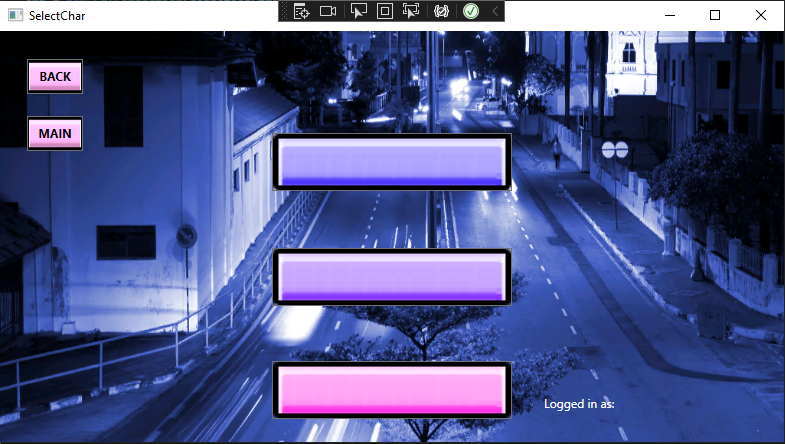
Attached is picture of what happens in the application (char1, char2, and char3 data isnt displayed as content)
im fairly new and i feel like its something really obvious im missing ;;
I'm fairly new to C#/XAML, however not necessarily new to coding in general (using Visual Studio).
I'm building a game launcher of some sort, and I'm trying to display a button content with saved string data, so that its displayed to the user each time the window is displayed.
I get my string data from my SQL database
And I want to use the data inside char1/char2/char3 as button content
However in doing this, I have failed multiple times
My code starting off, basically what I expected the end result to be:
where UserIDLoggedIn = Label and CharSlot1,2,3 = Buttons, and UGCLauncher.userId, UGCLauncher.char1... = strings with stored values inside
I've tried multiple attempts at binding but none seem to generate the end result I need.
Here is the XAML code:
Attached is picture of what happens in the application (char1, char2, and char3 data isnt displayed as content)
im fairly new and i feel like its something really obvious im missing ;;