❔ Suppress Visual Studio IDE0270 style rule without adding '.editorconfig'
I have some cases in my code where I have if statements like the following:
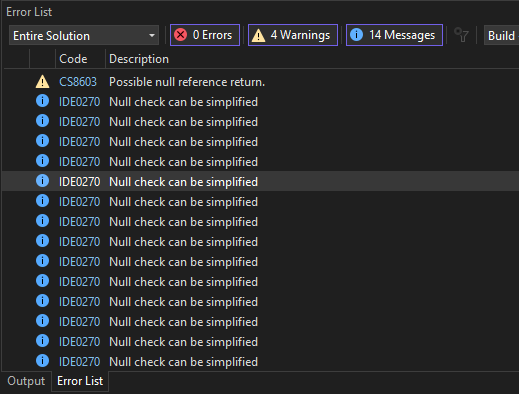
But the visual studio 'Error List' shows 'messages' that say 'Null check can be simplified' (fg. 1) which in some cases I am ok with simplifying but with the above example it would want to make it like this:
Which I personally don't like in this case.
So how can I suppress this specific rule style code? I know you can configure code style within the code style section of the settings (fg. 2) but I have the 'perfer throw-expression' already set to 'no' so I don't know why this message still shows up.
Obviously you can add a .editorconfig to the actual project but I do not want to do that. I want it as part of the permanent code style within my visual studio.
Maybe this is just bugged? If you click the link in the error list for this error code 'IDE0270' it takes you to a 404... (https://learn.microsoft.com/en-us/dotnet/fundamentals/code-analysis/style-rules/ide0270).
But the visual studio 'Error List' shows 'messages' that say 'Null check can be simplified' (fg. 1) which in some cases I am ok with simplifying but with the above example it would want to make it like this:
Which I personally don't like in this case.
So how can I suppress this specific rule style code? I know you can configure code style within the code style section of the settings (fg. 2) but I have the 'perfer throw-expression' already set to 'no' so I don't know why this message still shows up.
Obviously you can add a .editorconfig to the actual project but I do not want to do that. I want it as part of the permanent code style within my visual studio.
Maybe this is just bugged? If you click the link in the error list for this error code 'IDE0270' it takes you to a 404... (https://learn.microsoft.com/en-us/dotnet/fundamentals/code-analysis/style-rules/ide0270).