
❔ Issues applying Padding in WPF
I have the following xaml code for a HamburgerMenu.
Dont wonder about weird choice of Images / Icons, those are just placeholders.
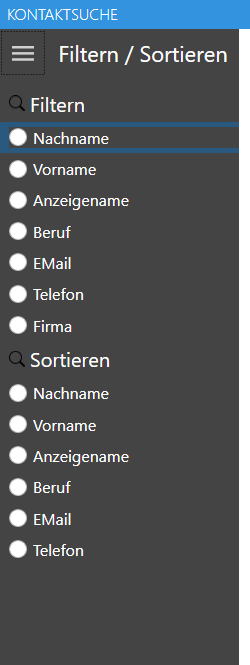
it looks as desired but it seems I applied the padding wrong / in a bad way, cuz it's possible to click on the Border (highlighted blue on hover) rather than on a radio button which is very annonying. I don't want the Border to be visible at all or clickable, I want any click in there to be on the RadioButton. What am I doing wrong?
I did it how I am used to in webdev, I put an element (border in this case) around it which should act as an empty div container pretty much and applied padding on that but it's not working as expected.
Also when hovering the HamburgerMenuImageItems "Filtern" and "Sortieren" I can see the Border getting highlighted blue on hover there too.
Dont wonder about weird choice of Images / Icons, those are just placeholders.
it looks as desired but it seems I applied the padding wrong / in a bad way, cuz it's possible to click on the Border (highlighted blue on hover) rather than on a radio button which is very annonying. I don't want the Border to be visible at all or clickable, I want any click in there to be on the RadioButton. What am I doing wrong?
I did it how I am used to in webdev, I put an element (border in this case) around it which should act as an empty div container pretty much and applied padding on that but it's not working as expected.
Also when hovering the HamburgerMenuImageItems "Filtern" and "Sortieren" I can see the Border getting highlighted blue on hover there too.
message.txt4.89KB

