Save an array state on a Custom Field
I'm trying to integrate a Google map drawing field that can draw polylines.
However, I can't figure out a way to save the data once the
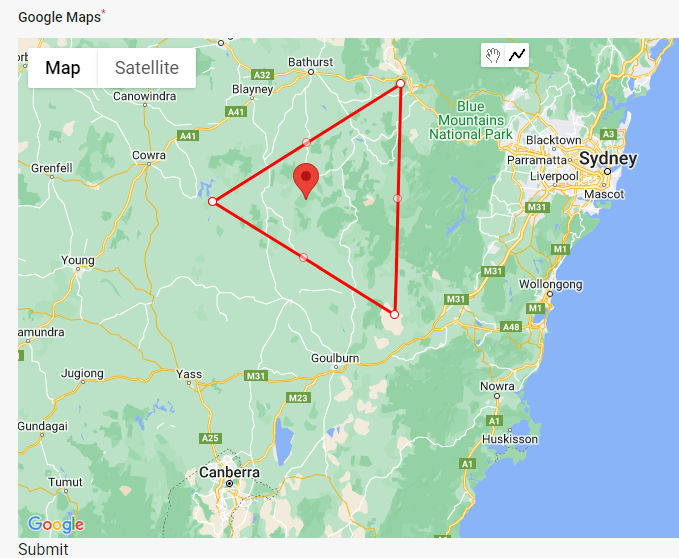
I can now draw the polylines (like the image attached).
My state consist of:
This is the code of my field view
Can you please shed some light?
However, I can't figure out a way to save the data once the
polylinecompletepolylinecompleteI can now draw the polylines (like the image attached).
My state consist of:
[
  polylines: [
    [
      coordinates: [
        [ lat, long ],
        [ lat, long ],
        [ lat, long ],
        [ lat, long ],
      ],
      marker: [
        title: 'Some Map Title'
      ]
    ]
  ]
]
[
polylines: [
[
coordinates: [
[ lat, long ],
[ lat, long ],
[ lat, long ],
[ lat, long ],
],
marker: [
title: 'Some Map Title'
]
]
]
]This is the code of my field view
<x-dynamic-component
        :component="$getFieldWrapperView()"
        :field="$field"
>
  <div
    x-data="{ state: $wire.{{ $applyStateBindingModifiers("\$entangle('{$getStatePath()}')") }} }"
    x-init="async function() {
        const map = new google.maps.Map($refs.googleMap, {
            center: {lat: -34.397, lng: 150.644},
            zoom: 8
        });

        const drawingManager = new google.maps.drawing.DrawingManager({});

        drawingManager.setMap(map);

        google.maps.event.addListener(drawingManager, 'polylinecomplete', (polyline) => {
            const path = polyline.getPath();
            const coordinates = path.getArray().map(coord => {
                return { lat: coord.lat(), lng: coord.lng() };
            });

            const center = computeCentroid(coordinates);
            const marker = {
                position: center,
                title: 'Center of Polyline'
            };
            new google.maps.Marker({
                position: center,
                map: map,
                title: 'Center of Polyline'
            });
            var entry = [ coordinates, marker ];
            state.polylines.push(entry);
        });

        function computeCentroid(coords) {}
    }"
  >
    <div
        wire:ignore
        x-ref="googleMap"
        class="w-full" style="height: 500px; min-height: 30vh; z-index: 1 !important;">
    </div>
</div>
</x-dynamic-component>
<x-dynamic-component
:component="$getFieldWrapperView()"
:field="$field"
>
<div
x-data="{ state: $wire.{{ $applyStateBindingModifiers("\$entangle('{$getStatePath()}')") }} }"
x-init="async function() {
const map = new google.maps.Map($refs.googleMap, {
center: {lat: -34.397, lng: 150.644},
zoom: 8
});
const drawingManager = new google.maps.drawing.DrawingManager({});
drawingManager.setMap(map);
google.maps.event.addListener(drawingManager, 'polylinecomplete', (polyline) => {
const path = polyline.getPath();
const coordinates = path.getArray().map(coord => {
return { lat: coord.lat(), lng: coord.lng() };
});
const center = computeCentroid(coordinates);
const marker = {
position: center,
title: 'Center of Polyline'
};
new google.maps.Marker({
position: center,
map: map,
title: 'Center of Polyline'
});
var entry = [ coordinates, marker ];
state.polylines.push(entry);
});
function computeCentroid(coords) {}
}"
>
<div
wire:ignore
x-ref="googleMap"
class="w-full" style="height: 500px; min-height: 30vh; z-index: 1 !important;">
</div>
</div>
</x-dynamic-component>Can you please shed some light?