B
blendOS2y ago
Oreo

blendOS v3 live USB frozen when booting

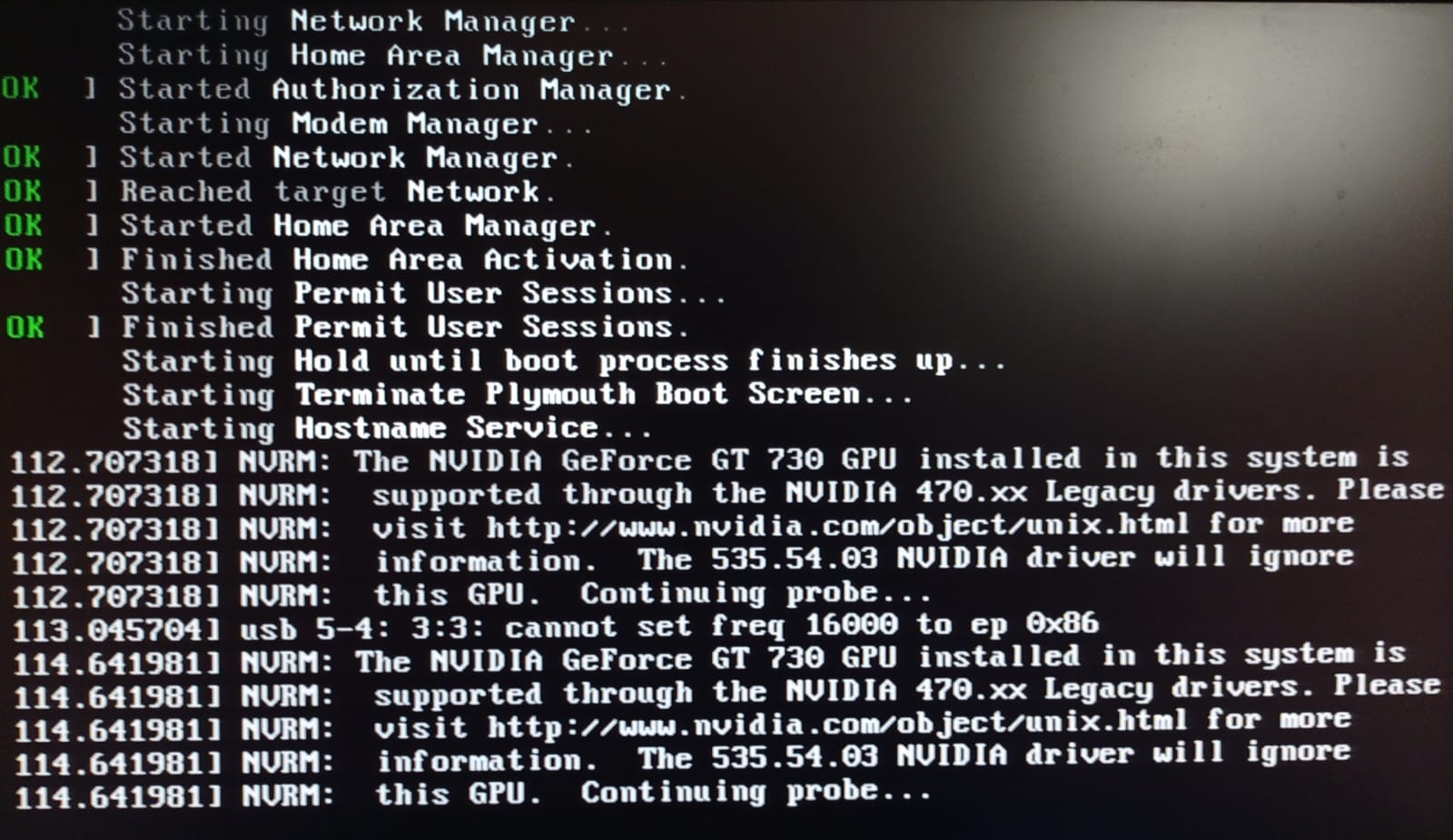
Hello everyone, I'm a Linux Mint user trying to learn blendOS for the first time. Interested with its UI, I downloaded blendOS v3 Deepin and burnt the ISO using Linux Mint's USB Image Writer with no errors. When I tried to boot the live USB, it's frozen at this Plymouth stage (screenshot). It seems something related to nVidia driver, but I found no such topics in the FAQ page of blendOS Documentation. ISO: - blendOS v3 Deepin live USB Desktop PC specs: - Intel Core2Duo 3.06 GHz - nVidia Geforce GT 730 GPU Since it's a live USB, I'm wondering how to fix this issue, whether I can bypass this GPU check, or any other workaround. Thanks in advance for your help.
No description
28 Replies
Thomas
Thomas2y ago
Maybe you can use nomodeset in grub. Also Deepin is not ideal because its broken. I suggest you try Cinnamon instead, because thats what linux Mint uses.
Oreo
OreoOP2y ago
Thanks, I'll put 'nomodeset' and see the result. By the way, I'm aware of BlendOS' warning about broken Deepin, but I'm not sure if this frozen booting screen is a part of the Deepin issue. I also intentionally chose Deepin to study the UI.
Valkyrja
Valkyrja2y ago
thomas07374 received a thank you Jao!
Asterisk
Asterisk2y ago
if you want to study deepin, try Deepin Linux
Oreo
OreoOP2y ago
Thanks, I did it in the past. But Deepin Linux doesn't blend package management like blendOS does.
Valkyrja
Valkyrja2y ago
ム丂イ乇尺ノ丂ズ received a thank you Jao!
Oreo
OreoOP2y ago
No description
Oreo
OreoOP2y ago
@Thomas I added 'nomodeset' like this, but it didn't fix the issue. I also tried it with Mate ISO with no luck, so I guess it's not a Deepin issue. It said something about nVidia 535, even after I added 'nomodeset' to the kernel parameters in the Live USB ISO.
Thomas
Thomas2y ago
Thats unfortunate, im afraid I cant help you.
Oreo
OreoOP2y ago
Thanks anyway Thomas, I appreciate it 🙏
Thomas
Thomas2y ago
No problem!
Oreo
OreoOP2y ago
With Mate ISO, after adding 'nomodeset', it still freezes at the stage: 'Failed to start Light Display Manager'
Thomas
Thomas2y ago
Maybe you should ask a BlendOS developer to help. Thats the best option.
Valkyrja
Valkyrja2y ago
@Thomas, you've gained the level 2
Oreo
OreoOP2y ago
Thanks, where can I reach them? I just got this Discord server link from the official blendOS website.
Thomas
Thomas2y ago
@ム丂イ乇尺ノ丂ズ Could you please help Oreo? He is offline, he wil react to you when he is online. So I suggest you just wait.
Oreo
OreoOP2y ago
Thanks again everyone!
Thomas
Thomas2y ago
No problem!
Asterisk
Asterisk2y ago
Seems the driver is too new The one bundled in the ISO
Oreo
OreoOP2y ago
Yes, my PC is 10+ years old, with Geforce GT 730 GPU. I'm wondering if it can run blendOS too, just like Linux Mint 21.3, Fedora 40, and Manjaro (last Stable release). The ones that run on my PC use kernel 5.15.* and 6.1.*
Asterisk
Asterisk2y ago
If you read the text at the end of the screenshot The driver isn’t working with your card Which might be an issue if that’s your only GPU On v4 you could probably get around this via a track
Oreo
OreoOP2y ago
Yes, I read that part too. How do I bypass the nVidia 535 driver probe? It should use nVidia 470 instead.
Asterisk
Asterisk2y ago
The ISO package set is fixed best to wait for v4 You’d need to build your own ISO this is documented but not well
Oreo
OreoOP2y ago
Too bad, I don't have the required skillsets. I think I'll just wait for the v4 Stable release, thanks again for clarifying.
Valkyrja
Valkyrja2y ago
ム丂イ乇尺ノ丂ズ received a thank you Jao!
Asterisk
Asterisk2y ago
You don’t need special knowledge That’s the genius of it It’s YAML a list Easy to understand
Oreo
OreoOP2y ago
Ok I'll try to study it if my end user brain can comprehend, thanks 🙏

Did you find this page helpful?