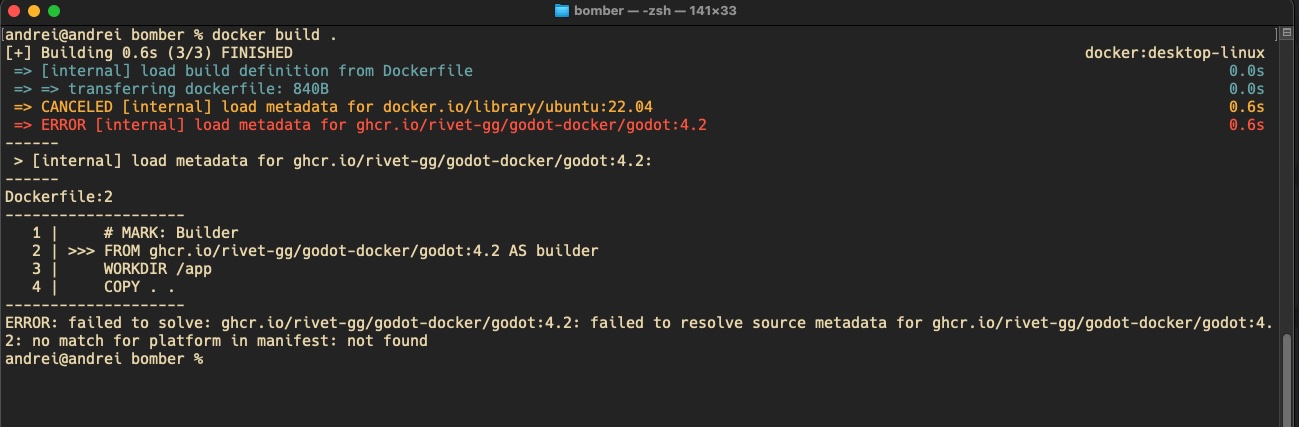

Trying to run docker locally
Do I miss something for local testing?

23 Replies
ah, looks like the arm image didn't get pushed for apple silicon
the Rivet CLI will automatically run this for the correct platform instead of having you run
docker build, are you following one of our guides?what should I do then? I do not have
rivet.yaml even rivet init inside of bomber folder says I have one already Config file already exists at rivet.yaml did you run
rivet init in a parent folder by any chance? it'll look for rivet.yaml in every parent directoryI did run at parent by mistake, but manually deleted after. so there is no
rivet.yaml at parent level as wellhmm, that's odd
can you run
ls or send a screenshot of the folder?
ah you're set up correctly, you have a rivet.json. the cli doesn't print out the correct extension.
are you getting stuck at a further step?
ok, so its rivet.json or rivet.yaml?
need to update docs and cli :))
but how to run then?
yes haha. where did you see "rivet.yaml" in regards to godot?
i tried
rivet run ./rivet.json, no successare you trying to deploy to rivet or run the game locally?
and ofc when i run
rivet init when there is the rivet.json already
yes, i want to start with totally local testing without cloud and etc. so no deployment
got it. at the moment, you need to add some logic in your code to decide wether to connect to localhost or rivet servers, the tutorial assumes you're deploying to our servers. we have an example of this floating around somewhere, @AngelOnFira thoughts?
but before that, i suppose that should run container locally?
you can run the server locally without using docker with:
ehhh...ok, but it will not have rivet then?
I probably miss something here, still trying to figure out how everything is interconnected and working. was sure that container is pretty much the only thing I need to run as single server without scaling and other "cloud/high load" features
it's possible to run it with rivet locally, but it's not documented for godot yet. it's something we're working on very soon.
you only need a container if running in the cloud, it's slow to build the container every time you test changes when devving locally. what you're saying sounds correct.
ok, let me try manually run godot as headless
ok, its working. what is the purpose of
play test/this machine buttons in rivet panel then?it's meant for exactly what you're trying to d, as in connecting to localhost. i need to check with @AngelOnFira, i don't think the "start local server" button was ever enabled.
i think you can do
rivet run "/Applications/Godot.app/Contents/MacOS/Godot --path /path/to/project --headless -- --server" then connect to localhost.yeah, if start regular godot headless then its working. was confused by these buttons and lack of info about local testing
rivet run expects something different btw CLI_SCRIPT_NOT_FOUND The given script was not found.ah mv
rivet exec "/Applications/Godot.app/Contents/MacOS/Godot --path /path/to/project --headless -- --server"Ya, the "this machine" button very much make the assumption that you're running a headless server locally. The "play test" option means that when you press play in Godot, it will connect to Rivet servers instead of local. The idea is that it makes it easier to "play test" your game with other devs or players remotely