Help styling an component via props using TailwindCss.
Reusable button component:
usage:
I feel like there is something i'm not aware of.
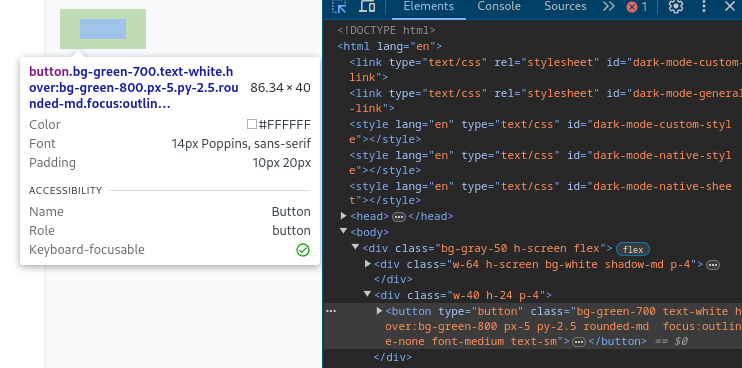
At the browser nothing is being properly rendered, it does says it have the necessary classes, but the style isn't being applied:
export type ButtonProps = {
    children: JSX.Element | string;
    variant?: ButtonVariant;
    color?: ButtonColor;
    size?: ButtonSize;
    rounded?: ButtonRounded;
    leadingIcon?: JSX.Element;
    trailingIcon?: JSX.Element;
    disabled?: boolean;
};

export function Button(props: ButtonProps): JSX.Element {
    const base = (): ClassName => {
        const colorVariant = buttonVariantStr(buttonColorStr(props.color), props.variant);
        const size = buttonSizeStr(props.size);
        const rounded = buttonRoundedStr(props.rounded);
        const disabledClass = props.disabled ? 'cursor-not-allowed' : '';
        return `${colorVariant} ${size} ${rounded} ${disabledClass} focus:outline-none font-medium text-sm`;
    };

    //const baseClass = `button-${props.color}-${props.variant} button-rounded-${props.rounded} button-size-${props.size}`;

    return (
        <button
            class={base()}
            type='button'
            disabled={props.disabled}
        >
            {props.leadingIcon && <span class='me-2'>{props.leadingIcon}</span>}
            {props.children}
            {props.trailingIcon && <span class='ms-2'>{props.trailingIcon}</span>}
        </button>
    );
}
export type ButtonProps = {
children: JSX.Element | string;
variant?: ButtonVariant;
color?: ButtonColor;
size?: ButtonSize;
rounded?: ButtonRounded;
leadingIcon?: JSX.Element;
trailingIcon?: JSX.Element;
disabled?: boolean;
};
export function Button(props: ButtonProps): JSX.Element {
const base = (): ClassName => {
const colorVariant = buttonVariantStr(buttonColorStr(props.color), props.variant);
const size = buttonSizeStr(props.size);
const rounded = buttonRoundedStr(props.rounded);
const disabledClass = props.disabled ? 'cursor-not-allowed' : '';
return `${colorVariant} ${size} ${rounded} ${disabledClass} focus:outline-none font-medium text-sm`;
};
//const baseClass = `button-${props.color}-${props.variant} button-rounded-${props.rounded} button-size-${props.size}`;
return (
<button
class={base()}
type='button'
disabled={props.disabled}
>
{props.leadingIcon && <span class='me-2'>{props.leadingIcon}</span>}
{props.children}
{props.trailingIcon && <span class='ms-2'>{props.trailingIcon}</span>}
</button>
);
}usage:
<div class={'w-40 h-24 p-4'}>
    <Button
        color='success'
        variant='filled'
        size='md'
        rounded='md'
    >
        Button
    </Button>
</div><div class={'w-40 h-24 p-4'}>
<Button
color='success'
variant='filled'
size='md'
rounded='md'
>
Button
</Button>
</div>I feel like there is something i'm not aware of.
At the browser nothing is being properly rendered, it does says it have the necessary classes, but the style isn't being applied: