Java Errors

https://sourceb.in/7HPeL01Jtk Hey, I am currently learning java for the first time, and I was experiencing some errors, and I was hoping if I could get assistance regarding them. Thanks!
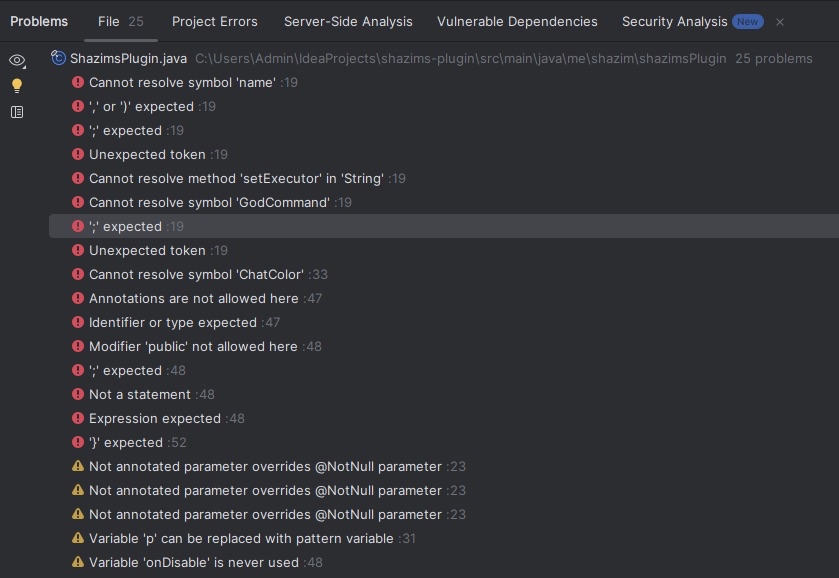
No description
68 Replies
JavaBot
JavaBot6mo ago
This post has been reserved for your question.
Hey @shazim! Please use /close or the Close Post button above when your problem is solved. Please remember to follow the help guidelines. This post will be automatically marked as dormant after 300 minutes of inactivity.
TIP: Narrow down your issue to simple and precise questions to maximize the chance that others will reply in here.
Shazim
ShazimOP6mo ago
I was following a tutorial and I got these errors. Lmk what I did wrong, along with a guide to fix it (would really help!)
The Iron Moo
The Iron Moo6mo ago
Send your code bro
Shazim
ShazimOP6mo ago
I did
Shazim
ShazimOP6mo ago
No description
Shazim
ShazimOP6mo ago
sourcebin is like pastebin
Dexter
Dexter6mo ago
package me.shazim.shazimsPlugin; import org.bukkit.command.BlockCommandSender; import org.bukkit.command.Command; import org.bukkit.command.CommandSender; import org.bukkit.command.ConsoleCommandSender; import org.bukkit.entity.Player; import org.bukkit.event.Listener; import org.bukkit.plugin.java.JavaPlugin;
public final class ShazimsPlugin extends JavaPlugin implements Listener {

@Override
public void onEnable() {
// Plugin startup logic
getServer().getPluginManager().registerEvents(new JoinLeaveListener(), this);
System.out.println("[shazims-plugin] has been enabled!");

getCommand(name: "godmode".setExecutor(new GodCommand()))
}

@Override
public boolean onCommand(CommandSender sender, Command command, String label, String[] args) {


// /die - kills the player
if (command.getName().equalsIgnoreCase("die")) {

if (sender instanceof Player) {

Player p = (Player) sender;
p.setHealth(0.0);
p.sendMessage(ChatColor.RED + "You have opted to die. Don't do it again!");
}else if(sender instanceof ConsoleCommandSender){

System.out.println("The command was ran by the console.");

}else if(sender instanceof BlockCommandSender){

System.out.println("The command was ran by a command block.");

}

}


@Override
public void onDisable() {
System.out.println("[shazims-plugin] has been disabled!");

}
}
public final class ShazimsPlugin extends JavaPlugin implements Listener {

@Override
public void onEnable() {
// Plugin startup logic
getServer().getPluginManager().registerEvents(new JoinLeaveListener(), this);
System.out.println("[shazims-plugin] has been enabled!");

getCommand(name: "godmode".setExecutor(new GodCommand()))
}

@Override
public boolean onCommand(CommandSender sender, Command command, String label, String[] args) {


// /die - kills the player
if (command.getName().equalsIgnoreCase("die")) {

if (sender instanceof Player) {

Player p = (Player) sender;
p.setHealth(0.0);
p.sendMessage(ChatColor.RED + "You have opted to die. Don't do it again!");
}else if(sender instanceof ConsoleCommandSender){

System.out.println("The command was ran by the console.");

}else if(sender instanceof BlockCommandSender){

System.out.println("The command was ran by a command block.");

}

}


@Override
public void onDisable() {
System.out.println("[shazims-plugin] has been disabled!");

}
}
This message has been formatted automatically. You can disable this using /preferences.
Shazim
ShazimOP6mo ago
Kody Simpson
YouTube
Spigot Plugin Development - 6 - Commands Part 2
In this episode, I show you how to make commands for your Minecraft plugins in classes outside of the main plugin class. #Spigot #SpigotTutorial #MinecraftPlugins Code: https://github.com/Spigot-Plugin-Development-Tutorial/commands-part-2 ⭐ Kite is a free AI-powered coding assistant that will help you code faster and smarter. The Kite plugin...
The Iron Moo
The Iron Moo6mo ago
Ok gimme like an hour I can't do anything while on my phone. Gonna have lunch, Mark my practice exam then help you, sorry I can't do it now
Shazim
ShazimOP6mo ago
Lol all good
reiwa
reiwa6mo ago
@shazim please forgive my tone, I mean no disrespect. the first thing I see is
getCommand(name: "godmode".setExecutor(new GodCommand()));
that's not quite how Java works. contrary to many languages, Java doesn't have named parameters, so you can't do name: "godmode".... some IDEs show the parameter names but this is just for your convenience. also, trying to call the setExecutor() method on a String object wont work, as the method doesn't belong to the String class. instead you should pass "godmode" as the parameter to the getCommand() method and then call the setExecutor() method on that
getCommand("godmode").setExecutor(new GodCommand());
also, Java is having an issue with the GodCommand class itself, it can't find it. make sure you have a file called GodCommand.java with a class GodCommand. presumably, you'll need the GodCommand class to implement the org.bukkit.command.CommandExecutor interface and override its onCommand() method. at least thats how paper does it so I'm assuming its the same. next is an easy fix. you used ChatColor.RED but haven't imported the ChatColor class. add import org.bukkit.ChatColor; to the top of your file and you'll be all good. also your code has some extra whitespace. remove the unnecessary empty lines. you missed a closing bracket } at the end of the onCommand() method, making Java think the onDisable() method is also a part of it, and that goes against a million Java syntax rules hence the multiple warnings. some of the other things your IDE is warning you about are things like your use of
if (sender instanceof Player) {
Player p = (Player) sender;
...
}
if (sender instanceof Player) {
Player p = (Player) sender;
...
}
which is a little convoluted. a little tip for you, you can actually combine these into just one line:
if (sender instanceof Player p) { ... }
hope that helps somewhat 🙂 let me know if you're still having problems after you fix these issues, I'll be happy to help! also, may I just say that your work is mighty impressive. learning Java for the first time and you start with a bukkit mod? crazy! I take my hat off to you!
JavaBot
JavaBot6mo ago
💤 Post marked as dormant
This post has been inactive for over 300 minutes, thus, it has been archived. If your question was not answered yet, feel free to re-open this post or create a new one. In case your post is not getting any attention, you can try to use /help ping. Warning: abusing this will result in moderative actions taken against you.
Shazim
ShazimOP6mo ago
thanks so much man!
JavaBot
JavaBot6mo ago
If you are finished with your post, please close it. If you are not, please ignore this message. Note that you will not be able to send further messages here after this post have been closed but you will be able to create new posts.
Shazim
ShazimOP6mo ago
Thank you so much for the support, at the moment it is a bit early for me, however I’ll definitely try this out! I did have one question I wanted to follow-up once I can review and fix my code. Again, thank you so much for the support. Hey @reiwa, thanks for the support again. I am still getting some errors regarding this.
JavaBot
JavaBot6mo ago
If you are finished with your post, please close it. If you are not, please ignore this message. Note that you will not be able to send further messages here after this post have been closed but you will be able to create new posts.
Shazim
ShazimOP6mo ago
let me send the errors
Shazim
ShazimOP6mo ago
SourceBin
Main File
Instantly share your code with the world.
reiwa
reiwa6mo ago
hey! no worries 🙂 I'll take a look when I get some time today 👍
Shazim
ShazimOP6mo ago
alr, thanks so much
Shazim
ShazimOP6mo ago
I forgot to put the bracket in, which fixed alot of the errors for the main file - Im still have issues with it trying to find the GodCommand class - "Missing return statement" at the bracket - Warnings within public boolean onCommand(CommandSender sender, Command command, String label, String[] args)
No description
ayylmao123xdd
ayylmao123xdd6mo ago
missing return statement means you got to return something even though you covered all the if cases so you can just add at the end of your on command function
return true;
return true;
or false depending on your use case as for cannot resolve symbol god command it means the code cant see the godcommand class so you either need to import it or make it
reiwa
reiwa6mo ago
・yes, you need to add import me.shazim.shazimsPlugin.commands.GodCommand; to ShazimsPlugin.java otherwise Java can't "see" it ・also, for the return statement, the onCommand() method returns a boolean but not all code paths return one. if we go through the if block, we see that if the command is not "die", then the method exits without returning anything at all, which goes against its definition. actually, even if the command is "die", you're not explicitly returning true after handling. you need to add return true; after successfully handling the command and return false; if there was a problem. something like this:
@Override
public boolean onCommand(CommandSender sender, Command command, String label, String[] args) {
if (command.getName().equalsIgnoreCase("die")) {
if (sender instanceof Player p) {
p.setHealth(0.0);
p.sendMessage(ChatColor.RED + "You have opted to die. Don't do it again!");
return true; // player run command successfully handled
} else if (sender instanceof ConsoleCommandSender) {
System.out.println("The command was ran by the console.");
return true; // console run command successfully handled
} else if (sender instanceof BlockCommandSender) {
System.out.println("The command was ran by a command block.");
return true; // command block run command successfully handled
}
}
// otherwise, if the command is not "die"
// or there was a problem handling the command from the above sources
// then `return false;`
return false;
}
@Override
public boolean onCommand(CommandSender sender, Command command, String label, String[] args) {
if (command.getName().equalsIgnoreCase("die")) {
if (sender instanceof Player p) {
p.setHealth(0.0);
p.sendMessage(ChatColor.RED + "You have opted to die. Don't do it again!");
return true; // player run command successfully handled
} else if (sender instanceof ConsoleCommandSender) {
System.out.println("The command was ran by the console.");
return true; // console run command successfully handled
} else if (sender instanceof BlockCommandSender) {
System.out.println("The command was ran by a command block.");
return true; // command block run command successfully handled
}
}
// otherwise, if the command is not "die"
// or there was a problem handling the command from the above sources
// then `return false;`
return false;
}
・also you're getting caution messages about @NotNull because bukkit insists that certain parameters, such as sender, command, etc. not be null (otherwise how are you going to get anything to run) but you're not explicity telling or getting Java to check that these parameters will not be null. IntelliJ is therefore warning you that you're opening yourself up to potential NullPointerExceptions when you try to compile (or worse, run) your code. the solution is to excplicity tell Java that those parameters will not be null with something like import org.jetbrains.annotations.NotNull;. then add @NotNull before each parameter that IntelliJ is warning you about. idk if that makes sense but I can explain better if you don't manage to do it. this is not technically an error, which is why its only showing as orange in IntelliJ and not red, but its better to implement null safety in your program. ・similarly, the line getCommand("godmode").setExecutor(new GodCommand()); is potentially problematic, because if getCommand("godmode") returns null (for example if it can't be found or theres a mistake in the plugin.yml file, then that line will throw an NullPointerException. instead you should explicitly check to see if the godmode command can be found first, then attempt to use setExecutor(). i don't want to give you too much help incase it was something you were looking to fix on your own. okay lets have a look at the GodCommand file...
Shazim
ShazimOP6mo ago
I am still new, so some of these errors (like this) I still dont know how to fix lol
reiwa
reiwa6mo ago
i can certainly help you out, i just didnt want to step on your toes ill write out the solution (its not hard) and explain it to you 🙂
Shazim
ShazimOP6mo ago
Alright, thanks so much again <3
JavaBot
JavaBot6mo ago
If you are finished with your post, please close it. If you are not, please ignore this message. Note that you will not be able to send further messages here after this post have been closed but you will be able to create new posts.
reiwa
reiwa6mo ago
to fix this, we need to explicitly check if getCommand("godmode") returns what we expect it to before we move on. the solution here is to split up this line getCommand("godmode").setExecutor(new GodCommand()); into two. first we declare it with PluginCommand godModeCommand = getCommand("godmode"); this will allow us to check if its null with a simple if check
PluginCommand godModeCommand = getCommand("godmode");
if (godModeCommand != null) {
godModeCommand.setExecutor(new GodCommand());
} else {
getLogger().warning("Command 'godmode' not found in plugin.yml!");
}
PluginCommand godModeCommand = getCommand("godmode");
if (godModeCommand != null) {
godModeCommand.setExecutor(new GodCommand());
} else {
getLogger().warning("Command 'godmode' not found in plugin.yml!");
}
something like that should suffice 🙂 this is not technically necessary for your code to function but it will save you a headache down the roaad if you accidentally edit your plugin.yml file okay, first thing I spot in your GodCommand.java is a slight typo you have used setInvulerable(). it should be setInvulnerable() (you missed the n)
Shazim
ShazimOP6mo ago
Also for the null thing, when I try to implement the package, I am getting this error (shown in attachment) about jetbrains. Additonally, if I already have @Override, do I replace it with @NotNull?
No description
reiwa
reiwa6mo ago
then leave out the @NotNull for now itll cause you too many problems, we can fix it later if it becomes a problem and no dont change @Override okay also in GodCommand.java, line 21, you need to put a ; at the end of the line. Java is very unforgiving about that.
Shazim
ShazimOP6mo ago
Lol yeah I just noticed that
reiwa
reiwa6mo ago
and lastly (at least from what I can see here) you need to add import org.bukkit.command.Command; to the top of your GodCommand.java file, or java wont be able to see the Command class, which it needs 🙂 i know i just gave you a wall of text but hopefully that helps
Shazim
ShazimOP6mo ago
The wall of text does really help lol
reiwa
reiwa6mo ago
im so glad! im really having fun on this, bukkit (well paper but same same) is something I know about so I feel like i'm actually useful for once haha
Shazim
ShazimOP6mo ago
lol, you've been really helpful one last thing for the GodCommand.java, is there a method for not being Invulerable?
reiwa
reiwa6mo ago
meaning you want to make the person vulnerable again?
Shazim
ShazimOP6mo ago
Yeah, for godmode
reiwa
reiwa6mo ago
yeah you just put false p.setInvulnerable(false); but I notice you already have that
Shazim
ShazimOP6mo ago
No description
Shazim
ShazimOP6mo ago
Yeah
reiwa
reiwa6mo ago
you didnt fix the typo you have setInvulerable() but you need to add an n use setInvulnerable() then it will work @shazim 🙂
Shazim
ShazimOP6mo ago
Thank you so much <3 For aliases, do I put it like this?
No description
JavaBot
JavaBot6mo ago
If you are finished with your post, please close it. If you are not, please ignore this message. Note that you will not be able to send further messages here after this post have been closed but you will be able to create new posts.
reiwa
reiwa6mo ago
yes that looks right 🙂 also its spelled ìmmortal with 2 M's
Shazim
ShazimOP6mo ago
And I would put it as god, godcommand, and-more ?
reiwa
reiwa6mo ago
no
Shazim
ShazimOP6mo ago
im so good at not putting typos frfr
reiwa
reiwa6mo ago
like this
aliases:
- god
- gm
- immortal
aliases:
- god
- gm
- immortal
Shazim
ShazimOP6mo ago
This?
No description
reiwa
reiwa6mo ago
looks good to me
Shazim
ShazimOP6mo ago
Alright, thanks again :D
reiwa
reiwa6mo ago
no worries! glad to have helped! feel free to ask any other questions you have about Java or problems you run into with you plugin 🙂
Shazim
ShazimOP6mo ago
Also, one last question (sorry for all of tyhe problems), whats the difference between gradle and maven, and how do they wrok *work
reiwa
reiwa6mo ago
oh my god the eternal question the short answer is idk but if you ask in a new question an expert will come and give you all the details
Shazim
ShazimOP6mo ago
Also should I be concerned about this?
reiwa
reiwa6mo ago
well, i do know but idk how to really explain it to you sorry
Shazim
ShazimOP6mo ago
No description
Shazim
ShazimOP6mo ago
you're fine
reiwa
reiwa6mo ago
yeah i mean its not aplugin problem but a build issue, so you'll have to take that up with someone who knows what they're doing Java is just telling you it cant find files it needs to build your plugin idk how to fix it tho
Shazim
ShazimOP6mo ago
oh alright how can I give you a thanks
JavaBot
JavaBot6mo ago
If you are finished with your post, please close it. If you are not, please ignore this message. Note that you will not be able to send further messages here after this post have been closed but you will be able to create new posts.
Shazim
ShazimOP6mo ago
or review or whatever lol
reiwa
reiwa6mo ago
its probably a misconfiguration in your pom.xml or build.gradle files i have no idea haha your thanks are enough 🙂
Shazim
ShazimOP6mo ago
lol
reiwa
reiwa6mo ago
i just noticed, java is expecting JDK 21. make sure File > Project Structure... > Project > Project SDK is set to 21. thats the only thing I can think of. if its not that your out of my depth. good luck tho!
ayylmao123xdd
ayylmao123xdd6mo ago
when you close the post i think theres an option after that to thank the user that was helping at least it used to be that way
Shazim
ShazimOP6mo ago
oh yeah there is
JavaBot
JavaBot6mo ago
Post Closed
This post has been closed by <@810632160418988053>.

Did you find this page helpful?