V135.3 to v136.0
Hello,
I have my immich docker compose for redis looking like this:
immich-redis:
image: redis
container_name: Immich-REDIS
hostname: immich-redis
security_opt:
- no-new-privileges:true
healthcheck:
test: ["CMD-SHELL", "redis-cli ping || exit 1"]
user: 1026:100
environment:
- TZ=Europe/Amsterdam
volumes:
- /volume1/docker/immich/redis:/data:rw
restart: on-failure:5
And my DB looking like this:
image: ghcr.io/immich-app/postgres:16-vectorchord0.4.3-pgvectors0.2.0 #16-vectorchord0.3.0-pgvectors0.2.0
container_name: Immich-DB
hostname: immich-db
security_opt:
- no-new-privileges:true
volumes:
- /volume1/docker/immich/db:/var/lib/postgresql/data:rw
environment:
- TZ=Europe/Amsterdam
- POSTGRES_DB=
- POSTGRES_USER=
- POSTGRES_PASSWORD=
- DB_STORAGE_TYPE=HDD
restart: on-failure:5
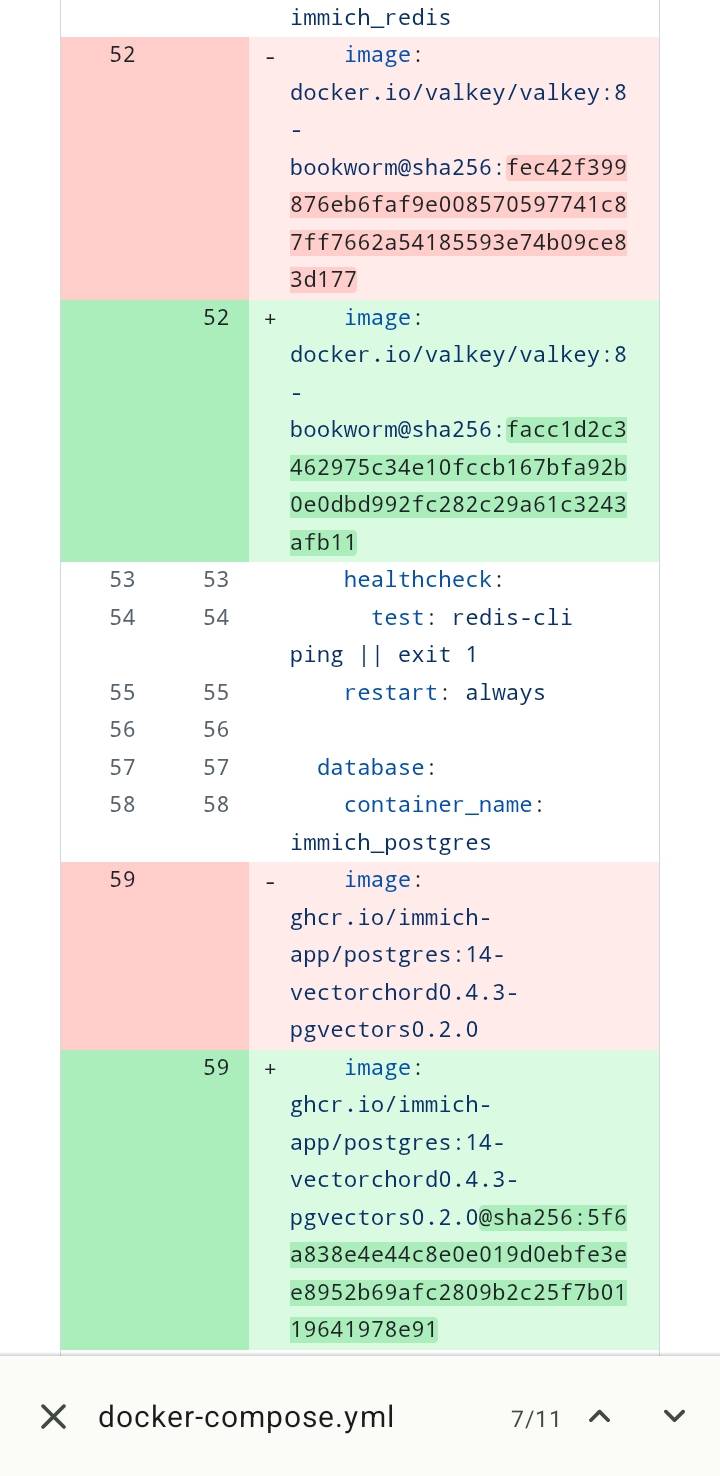
Can I just go forward and change the codelines 52 and 59 as per attached image?
Of course keeping PG16 in place as thats the one I started using im asking because I always used the "latest" as redis image and not the valkey one with sha.
Also never used sha on the DB image
Thanks a lot!
I have my immich docker compose for redis looking like this:
immich-redis:
image: redis
container_name: Immich-REDIS
hostname: immich-redis
security_opt:
- no-new-privileges:true
healthcheck:
test: ["CMD-SHELL", "redis-cli ping || exit 1"]
user: 1026:100
environment:
- TZ=Europe/Amsterdam
volumes:
- /volume1/docker/immich/redis:/data:rw
restart: on-failure:5
And my DB looking like this:
image: ghcr.io/immich-app/postgres:16-vectorchord0.4.3-pgvectors0.2.0 #16-vectorchord0.3.0-pgvectors0.2.0
container_name: Immich-DB
hostname: immich-db
security_opt:
- no-new-privileges:true
volumes:
- /volume1/docker/immich/db:/var/lib/postgresql/data:rw
environment:
- TZ=Europe/Amsterdam
- POSTGRES_DB=
- POSTGRES_USER=
- POSTGRES_PASSWORD=
- DB_STORAGE_TYPE=HDD
restart: on-failure:5
Can I just go forward and change the codelines 52 and 59 as per attached image?
Of course keeping PG16 in place as thats the one I started using im asking because I always used the "latest" as redis image and not the valkey one with sha.
Also never used sha on the DB image
Thanks a lot!