C
C#5mo ago
oke

✅ ComboBox selected item can only be updated from binding property, not the control itself

I'm attempting to use a combo box with a collection of records the user can select from. I can get the items to render in the control, and can set a default value, but the combo box will not update when you select one of the values from the dropdown. I set breakpoints on anything I could think of from the bound property, various XxxChanged events, etc. All I could find online were specific errors, which were solved by reordering the properties, which didn't apply to me because my formatter had done that already. This is the relevant code:
public sealed record JavaVersionInformation
{
public Version Version { get; init; }
public string RawVersion { get; init; }
public JavaType JavaType { get; set; } // This enum was left out
}

...

public sealed class TheViewModel : ObservableObject // From CommunityToolkit.Mvvm
{
[ObservableProperty]
public partial ObservableCollection<JavaVersionInformation> FoundJavaVersions { get; set; } = []; // Populated in the ctor

[ObservableProperty]
public partial JavaVersionInformation SelectedJavaVersion { get; set; } // Set after populating FoundJavaVersions. Shows on the ComboBox
}
public sealed record JavaVersionInformation
{
public Version Version { get; init; }
public string RawVersion { get; init; }
public JavaType JavaType { get; set; } // This enum was left out
}

...

public sealed class TheViewModel : ObservableObject // From CommunityToolkit.Mvvm
{
[ObservableProperty]
public partial ObservableCollection<JavaVersionInformation> FoundJavaVersions { get; set; } = []; // Populated in the ctor

[ObservableProperty]
public partial JavaVersionInformation SelectedJavaVersion { get; set; } // Set after populating FoundJavaVersions. Shows on the ComboBox
}
ui being WpfUi: https://wpfui.lepo.co/
<ComboBox
Grid.Column="1"
ItemsSource="{Binding ViewModel.FoundJavaVersions, Mode=OneTime}"
SelectedItem="{Binding ViewModel.SelectedJavaVersion, Mode=TwoWay}">
<ComboBox.ItemTemplate>
<DataTemplate DataType="j:JavaVersionInformation">
<ui:TextBlock>
<Run Text="{Binding JavaType, Mode=OneTime}" />
<Run Text="{Binding FixedRawVersion, Mode=OneTime}" />
<Run Text="(" /><Run Text="{Binding RawVersion, Mode=OneTime}" /><Run Text=")" />
</ui:TextBlock>
</DataTemplate>
</ComboBox.ItemTemplate>
</ComboBox>
<ComboBox
Grid.Column="1"
ItemsSource="{Binding ViewModel.FoundJavaVersions, Mode=OneTime}"
SelectedItem="{Binding ViewModel.SelectedJavaVersion, Mode=TwoWay}">
<ComboBox.ItemTemplate>
<DataTemplate DataType="j:JavaVersionInformation">
<ui:TextBlock>
<Run Text="{Binding JavaType, Mode=OneTime}" />
<Run Text="{Binding FixedRawVersion, Mode=OneTime}" />
<Run Text="(" /><Run Text="{Binding RawVersion, Mode=OneTime}" /><Run Text=")" />
</ui:TextBlock>
</DataTemplate>
</ComboBox.ItemTemplate>
</ComboBox>
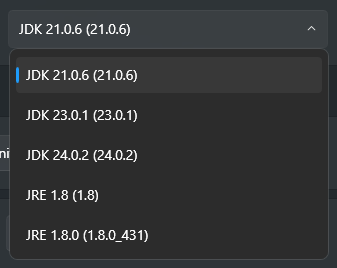
The attached image shows what the combo box looks like. The selection doesn't update after clicking an item.
wpfui.lepo.co

No description
27 Replies
ACiDCA7
ACiDCA75mo ago
does the output show you anything meaningful during runtime? eg property not found or something
oke
okeOP5mo ago
nope, i get zero errors everything seems to be bound correctly, it seems like the combo box just isnt setting the value sorry for responding to you directly, but i just found that it only works when you use your mouse wheel on the control to cycle through the items so you cannot manually pick which item you want, but scrolling will update it id still like to figure out how to use the combo box properly for user experience, though lol
leowest
leowest5mo ago
do u have a minimal repro on github? Also why are u using both
SelectedItem="{Binding ViewModel.SelectedJavaVersion, Mode=TwoWay, UpdateSourceTrigger=PropertyChanged}"
SelectionChanged="ComboBox_SelectionChanged"
SelectedItem="{Binding ViewModel.SelectedJavaVersion, Mode=TwoWay, UpdateSourceTrigger=PropertyChanged}"
SelectionChanged="ComboBox_SelectionChanged"
its highly like they are affecting eachother depending what ur doing
oke
okeOP5mo ago
i added the event to test it with breakpoints, the event handler is empty and has been removed since the post was made i updated the post to remove the unused event handler
leowest
leowest5mo ago
u can breakpoint on the source generator for the SelectedJavaVersion anyway if u post a minimal repro on github I will clone and check out
oke
okeOP5mo ago
i copied my code over into a new project, but the combo box is working (shocker) im trying to find differences because combo boxes work the same way in all pages, so i assumed its something in the window i just cannot find anything that replicated my issue in the new project
leowest
leowest5mo ago
try adding more of what is around it then
oke
okeOP5mo ago
i added a mousedown event handler in my original app, and its gets triggered by the combo box its just the item is not updated
leowest
leowest5mo ago
sorry that didnt make much sense
oke
okeOP5mo ago
it works when i put it into my window xaml, but not when i put it in a page sorry, im writing as i find things
Mrloic
Mrloic5mo ago
UI/client events are raised but they are either: not propagated/read by the parent combobox or the combobox doesn't update the value for an unknown reason
leowest
leowest5mo ago
u shouldnt need UpdateSourceTrigger=PropertyChanged either
oke
okeOP5mo ago
i just did it to be sure it fixed some other issues i had in the past this is what it currently looks like:
<ComboBox
Grid.Column="1"
ItemsSource="{Binding ViewModel.FoundJavaVersions, Mode=OneTime}"
SelectedItem="{Binding ViewModel.SelectedJavaVersion, Mode=TwoWay}">
<ComboBox.ItemTemplate>
<DataTemplate DataType="j:JavaVersionInformation">
<ui:TextBlock>
<Run Text="{Binding JavaType, Mode=OneTime}" />
<Run Text="{Binding FixedRawVersion, Mode=OneTime}" />
<Run Text="(" /><Run Text="{Binding RawVersion, Mode=OneTime}" /><Run Text=")" />
</ui:TextBlock>
</DataTemplate>
</ComboBox.ItemTemplate>
</ComboBox>
<ComboBox
Grid.Column="1"
ItemsSource="{Binding ViewModel.FoundJavaVersions, Mode=OneTime}"
SelectedItem="{Binding ViewModel.SelectedJavaVersion, Mode=TwoWay}">
<ComboBox.ItemTemplate>
<DataTemplate DataType="j:JavaVersionInformation">
<ui:TextBlock>
<Run Text="{Binding JavaType, Mode=OneTime}" />
<Run Text="{Binding FixedRawVersion, Mode=OneTime}" />
<Run Text="(" /><Run Text="{Binding RawVersion, Mode=OneTime}" /><Run Text=")" />
</ui:TextBlock>
</DataTemplate>
</ComboBox.ItemTemplate>
</ComboBox>
leowest
leowest5mo ago
can you try with the default textblock instead could be something to do with hitbox if u reach a point u can repro the issue that would be best as I would be able to actually see what is going on and perhaps explain and provide a way to do it
Mrloic
Mrloic5mo ago
the events shouldn't be raised then no?
oke
okeOP5mo ago
i did, unfortunately didnt fix the issue
leowest
leowest5mo ago
as for the breakpoint you will usually see something like this with source generator
leowest
leowest5mo ago
No description
oke
okeOP5mo ago
it only happens when placed in one of my pages, even if its the first element, and it doesnt matter which page correct
leowest
leowest5mo ago
so if u need to breakpoint u can go in there and bp
oke
okeOP5mo ago
i usually just make a partial method for onchanged so i can still see the viewmodel :p
leowest
leowest5mo ago
yeah partial props are new thingy is the project open?
oke
okeOP5mo ago
both are, yes
leowest
leowest5mo ago
is there a github link of the specific commit your working on
oke
okeOP5mo ago
no, i havent pushed changes in a super long time
leowest
leowest5mo ago
:catsweat:
oke
okeOP5mo ago
hey, i fixed it it was an event handler for mouse clicks on the window i was using to help with unfocusing textboxes/buttons when clicking off of them i swear i tested it, but i think my "test" was to use hot reload, which likely did nothing... !solved what was the command .solved -# got it

Did you find this page helpful?