Z
Zerops4mo ago
Louay

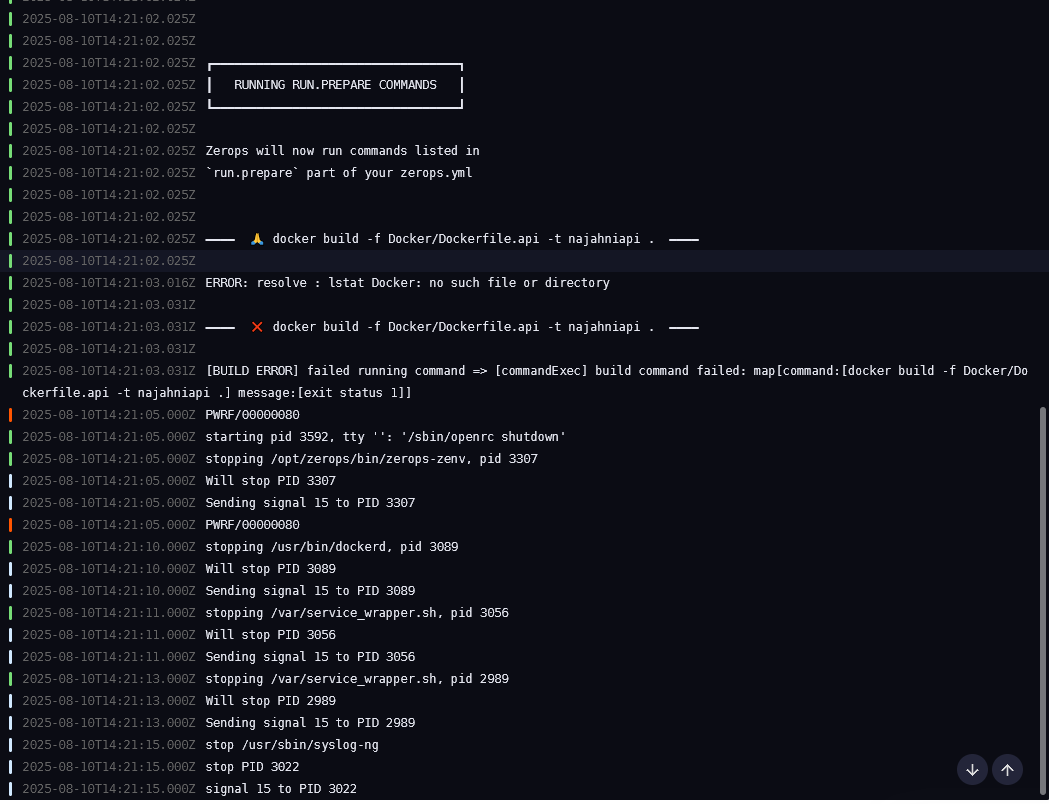
Docker error with repo

Hello im having diffuculity of deploying my app from building the dockerfile
No description
201 Replies
Louay
LouayOP4mo ago
zerops: - setup: najahniapi run: base: docker@26.1 prepareCommands: - docker build -f Docker/Dockerfile.api -t najahniapi . start: | # Run the container (adjust port if your app listens elsewhere) docker run --network=host najahniapi ports: - port: 3000 httpSupport: true and this is the zerops file
Louay
LouayOP4mo ago
No description
Louay
LouayOP4mo ago
@admin Can you help me?
Aleš
Aleš4mo ago
runtime prepare container is different from both build container and the final container the app runs on, if you need to pass it files like Docker/Dockerfile.api, you need to add it to build.addToRunPrepare
zerops:
- setup: najahniapi
build:
addToRunPrepare:
- Docker/Dockerfile.api
run:
base: docker@26.1
prepareCommands:
- docker build -f Docker/Dockerfile.api -t najahniapi .
start: |
# Run the container (adjust port if your app listens elsewhere)
docker run --network=host najahniapi
ports:
- port: 3000
httpSupport: true
zerops:
- setup: najahniapi
build:
addToRunPrepare:
- Docker/Dockerfile.api
run:
base: docker@26.1
prepareCommands:
- docker build -f Docker/Dockerfile.api -t najahniapi .
start: |
# Run the container (adjust port if your app listens elsewhere)
docker run --network=host najahniapi
ports:
- port: 3000
httpSupport: true
No description
Louay
LouayOP4mo ago
and the repo files will be auto imported?? as they are needed during the dockerfile build
Aleš
Aleš4mo ago
you should pass it everything needed for the build (@Michal Saloň)
Louay
LouayOP4mo ago
can i add . then ?
Aleš
Aleš4mo ago
you can do just
build:
addToRunPrepare:
- ./
build:
addToRunPrepare:
- ./
Louay
LouayOP4mo ago
4Z━━━━ ❌ exec # Run the container (adjust port if your app listens elsewhere) 2025-08-10T14:37:01.464Z docker run --network=host najahniapi 2025-08-10T14:37:01.464Z => 1 (exited with 1) ━━━━
Aleš
Aleš4mo ago
run.start cannot be multiline, it has to be just a single command try just
start: docker run --network=host najahniapi
btw none of our examples here https://docs.zerops.io/docker/overview show a docker build example @Michal Saloň .. cc @Petra
Louay
LouayOP4mo ago
yea thats why i came here no documentation about it i think it doesnt work no no it worked
Louay
LouayOP4mo ago
No description
Louay
LouayOP4mo ago
now i add envs from the ui?
Aleš
Aleš4mo ago
https://docs.zerops.io/docker/overview#environment-variables you need to pass down the keys you want exposed to docker
docker run -e DB_HOST -e DB_PORT
Louay
LouayOP4mo ago
what i want is i will to do pnpm db:migrate before building which require the envs of db
Aleš
Aleš4mo ago
btw is there any reason not to use zerops native nodejs service? using docker usually means you are making your life harder
Louay
LouayOP4mo ago
my monorepo is apps/web and apps/api where web is nextjs 15 and api is nestjs but i want to deploy the api for now
Aleš
Aleš4mo ago
that's essentilly the same as this https://github.com/zeropsio/recipe-nestjs you can just have a frontend (say app) and backend (say api) service, two Zerops Node.js services zerops.yml supports monorepos
Louay
LouayOP4mo ago
but i need to speciify the exact folders right?
Aleš
Aleš4mo ago
project:
name: recipe-nestjs

services:
- hostname: api
type: nodejs@20
buildFromGit: https://github.com/zeropsio/recipe-nestjs
enableSubdomainAccess: true
priority: 5
verticalAutoscaling:
minRam: 0.25
minFreeRamGB: 0.125

- hostname: app
type: nodejs
buildFromGit: https://github.com/zeropsio/recipe-backend-ui
enableSubdomainAccess: true

- hostname: db
type: postgresql@16
mode: NON_HA
priority: 10
project:
name: recipe-nestjs

services:
- hostname: api
type: nodejs@20
buildFromGit: https://github.com/zeropsio/recipe-nestjs
enableSubdomainAccess: true
priority: 5
verticalAutoscaling:
minRam: 0.25
minFreeRamGB: 0.125

- hostname: app
type: nodejs
buildFromGit: https://github.com/zeropsio/recipe-backend-ui
enableSubdomainAccess: true

- hostname: db
type: postgresql@16
mode: NON_HA
priority: 10
Louay
LouayOP4mo ago
as the api is in apps/api
Aleš
Aleš4mo ago
doesn't matter, check this for example https://github.com/fxck/zerops-rag-starter/blob/main/zerops.yml you are probably using nx, no?
Louay
LouayOP4mo ago
no turbo but i just want to cd or use apps/api and do everything there no need to use turborepo
Aleš
Aleš4mo ago
yea you can do that, just do
build:
buildCommands:
- |
cd apps/api
pnpm install
pnpm build
deployFiles:
- dist/api/
build:
buildCommands:
- |
cd apps/api
pnpm install
pnpm build
deployFiles:
- dist/api/
or something like this
Louay
LouayOP4mo ago
zerops: - setup: api build: base: nodejs@20 addToRunPrepare: - ./apps/api buildCommands: - npm i - npm run build deployFiles: - ./dist - node_modules - package.json run: base: nodejs@20 ports: - port: 3000 httpSupport: true envVariables: DATABASE_HOST: db DATABASE_NAME: db DATABASE_PASSWORD: ${db_password} DATABASE_PORT: '5432' DATABASE_USERNAME: db STORAGE_ACCESS_KEY_ID: ${storage_accessKeyId} STORAGE_ENDPOINT: ${storage_apiUrl} STORAGE_REGION: us-east-1 STORAGE_S3_BUCKET_NAME: ${storage_bucketName} STORAGE_SECRET_ACCESS_KEY: ${storage_secretAccessKey} initCommands: - zsc execOnce $ZEROPS_appVersionId npm run db:migrate start: npm run start is this correct?
Aleš
Aleš4mo ago
no need for addToRunPrepare in this case, you build everything inside the build container.. with the way you have buildCommands set up it would run npm i on the root folder, you need to do something like this https://discord.com/channels/735781031147208777/1404107753235943524/1404115789900152833 same for deployFiles, workDir is root of your monorepo, so make sure the paths are correctly pointing to the actual dist output
Louay
LouayOP4mo ago
ahaa alrightt sorry for the inconvience thnx
Aleš
Aleš4mo ago
you can always set pipeline debug to stop before any commands are ran, then ssh into the container, try the commands yourself and only then put them in the final zerops.yml, makes for easier debugging
No description
Louay
LouayOP4mo ago
zerops: - setup: api build: base: nodejs@20 buildCommands: - cd apps/api - pnpm install --frozen-lockfile - pnpm db:migrate - pnpm turbo run build --filter=api deployFiles: - apps/api/dist/ - apps/api/package.json - apps/api/node_modules/ envVariables: DB_HOST: ${db_hostname} DB_PORT: '5432' DB_USERNAME: ${db_user} DB_PASSWORD: ${db_password} DB_NAME: db STORAGE_ACCESS_KEY_ID: ${storage_accessKeyId} STORAGE_ENDPOINT: ${storage_apiUrl} STORAGE_REGION: us-east-1 STORAGE_S3_BUCKET_NAME: ${storage_bucketName} STORAGE_SECRET_ACCESS_KEY: ${storage_secretAccessKey} run: base: nodejs@20 ports: - port: 3000 httpSupport: true envVariables: DB_HOST: ${db_hostname} DB_PORT: '5432' DB_USERNAME: ${db_user} DB_PASSWORD: ${db_password} DB_NAME: db STORAGE_ACCESS_KEY_ID: ${storage_accessKeyId} STORAGE_ENDPOINT: ${storage_apiUrl} STORAGE_REGION: us-east-1 STORAGE_S3_BUCKET_NAME: ${storage_bucketName} STORAGE_SECRET_ACCESS_KEY: ${storage_secretAccessKey} start: pnpm run start idk why this setup keep failing on pnpm db:migrate
Aleš
Aleš4mo ago
what's the error
Louay
LouayOP4mo ago
Zundefined 2025-08-10T15:12:52.308Z  ERR_PNPM_RECURSIVE_EXEC_FIRST_FAIL  Command "db:migrate" not found 2025-08-10T15:12:52.338Z 2025-08-10T15:12:52.338Z ━━━━ ❌ pnpm db:migrate ━━━━ 2025-08-10T15:12:52.338Z 2025-08-10T15:12:52.338Z [BUILD ERROR] running build commands failed
Aleš
Aleš4mo ago
and you can't do it like this, each line is a new shell instance, do when you cd in one, it won't be applied to the next.. if you want a single shell instance, you need to do it like this https://discord.com/channels/735781031147208777/1404107753235943524/1404115789900152833
No description
Louay
LouayOP4mo ago
- cd apps/api && pnpm install --frozen-lockfile && pnpm turbo run db:migrate --filter=api && pnpm turbo run build --filter=api like this?
Aleš
Aleš4mo ago
no, literally like what is shown in the message
build:
buildCommands:
- |
cd apps/api
pnpm install --frozen-lockfile
pnpm turbo run db:migrate --filter=api
pnpm turbo run build --filter=api
build:
buildCommands:
- |
cd apps/api
pnpm install --frozen-lockfile
pnpm turbo run db:migrate --filter=api
pnpm turbo run build --filter=api
btw with turbo, aren't you actually suppose to run those commands from root? how would you do this whole process if you were to do it from your local terminal? in Zerops it wil be 1:1 with that
Louay
LouayOP4mo ago
so i dont have to cd into apps/api??
Aleš
Aleš4mo ago
how would you build you production locally? would you first cd to api?
Louay
LouayOP4mo ago
no hahaha i do pnpm build which build both front and back
Aleš
Aleš4mo ago
do exactly the same in Zerops, there is no difference between your machine and zerops container it's just linux with current folder set to the source of your apps, so run the same commands you would locally, and then deploy the files needed to run it in production (with deployFiles)
Louay
LouayOP4mo ago
zerops: - setup: api build: base: nodejs@20 buildCommands: - pnpm install --frozen-lockfile - pnpm turbo run db:migrate --filter=api - pnpm turbo run build --filter=api deployFiles: - apps/api/dist/** - apps/api/package.json - apps/api/node_modules/** envVariables: DB_HOST: ${db_hostname} DB_PORT: '5432' DB_USERNAME: ${db_user} DB_PASSWORD: ${db_password} DB_NAME: db STORAGE_ACCESS_KEY_ID: ${storage_accessKeyId} STORAGE_ENDPOINT: ${storage_apiUrl} STORAGE_REGION: us-east-1 STORAGE_S3_BUCKET_NAME: ${storage_bucketName} STORAGE_SECRET_ACCESS_KEY: ${storage_secretAccessKey} run: base: nodejs@20 ports: - port: 3000 httpSupport: true envVariables: DB_HOST: ${db_hostname} DB_PORT: '5432' DB_USERNAME: ${db_user} DB_PASSWORD: ${db_password} DB_NAME: db STORAGE_ACCESS_KEY_ID: ${storage_accessKeyId} STORAGE_ENDPOINT: ${storage_apiUrl} STORAGE_REGION: us-east-1 STORAGE_S3_BUCKET_NAME: ${storage_bucketName} STORAGE_SECRET_ACCESS_KEY: ${storage_secretAccessKey} start: pnpm --filter=api run start:prod ━━━━ 🙏 exec pnpm run start ━━━━ 2025-08-10T15:19:58.426Z  ERR_PNPM_NO_IMPORTER_MANIFEST_FOUND  No package.json (or package.yaml, or package.json5) was found in "/var/www". 2025-08-10T15:19:58.445Z ━━━━ ❌ exec pnpm run start => 1 (exited with 1) ━━━━ in deployFiles im already taking the package.json
Louay
LouayOP4mo ago
No description
Louay
LouayOP4mo ago
but the path is apps/api how can i put them in root when specifying the deployFiles
Aleš
Aleš4mo ago
again, would you need to manually copy some package.json files if you did this locally?
apps/api/dist/**
apps/api/dist/**
this syntax is wrong you either put the whole path there and it will deploy as is, or mark the path with wildcard ~ from where it should deploy
No description
Louay
LouayOP4mo ago
zerops:
- setup: api
build:
base: nodejs@20
buildCommands:
- pnpm install --frozen-lockfile
- pnpm turbo run db:migrate --filter=api
- pnpm turbo run build --filter=api
- pnpm deploy --filter=api --prod deploy
deployFiles:
- ~deploy/apps/api/dist
- ~deploy/apps/api/package.json
- ~deploy/apps/api/node_modules
envVariables:
DB_HOST: ${db_hostname}
DB_PORT: '5432'
DB_USERNAME: ${db_user}
DB_PASSWORD: ${db_password}
DB_NAME: db
STORAGE_ACCESS_KEY_ID: ${storage_accessKeyId}
STORAGE_ENDPOINT: ${storage_apiUrl}
STORAGE_REGION: us-east-1
STORAGE_S3_BUCKET_NAME: ${storage_bucketName}
STORAGE_SECRET_ACCESS_KEY: ${storage_secretAccessKey}
run:
base: nodejs@20
ports:
- port: 3000
httpSupport: true
envVariables:
DB_HOST: ${db_hostname}
DB_PORT: '5432'
DB_USERNAME: ${db_user}
DB_PASSWORD: ${db_password}
DB_NAME: db
STORAGE_ACCESS_KEY_ID: ${storage_accessKeyId}
STORAGE_ENDPOINT: ${storage_apiUrl}
STORAGE_REGION: us-east-1
STORAGE_S3_BUCKET_NAME: ${storage_bucketName}
STORAGE_SECRET_ACCESS_KEY: ${storage_secretAccessKey}
start: pnpm start
zerops:
- setup: api
build:
base: nodejs@20
buildCommands:
- pnpm install --frozen-lockfile
- pnpm turbo run db:migrate --filter=api
- pnpm turbo run build --filter=api
- pnpm deploy --filter=api --prod deploy
deployFiles:
- ~deploy/apps/api/dist
- ~deploy/apps/api/package.json
- ~deploy/apps/api/node_modules
envVariables:
DB_HOST: ${db_hostname}
DB_PORT: '5432'
DB_USERNAME: ${db_user}
DB_PASSWORD: ${db_password}
DB_NAME: db
STORAGE_ACCESS_KEY_ID: ${storage_accessKeyId}
STORAGE_ENDPOINT: ${storage_apiUrl}
STORAGE_REGION: us-east-1
STORAGE_S3_BUCKET_NAME: ${storage_bucketName}
STORAGE_SECRET_ACCESS_KEY: ${storage_secretAccessKey}
run:
base: nodejs@20
ports:
- port: 3000
httpSupport: true
envVariables:
DB_HOST: ${db_hostname}
DB_PORT: '5432'
DB_USERNAME: ${db_user}
DB_PASSWORD: ${db_password}
DB_NAME: db
STORAGE_ACCESS_KEY_ID: ${storage_accessKeyId}
STORAGE_ENDPOINT: ${storage_apiUrl}
STORAGE_REGION: us-east-1
STORAGE_S3_BUCKET_NAME: ${storage_bucketName}
STORAGE_SECRET_ACCESS_KEY: ${storage_secretAccessKey}
start: pnpm start
2025-08-10T15:44:23.411Z api:db:migrate: errno: -111,

2025-08-10T15:44:23.411Z api:db:migrate: code: 'ECONNREFUSED',

2025-08-10T15:44:23.411Z api:db:migrate: syscall: 'connect',

2025-08-10T15:44:23.411Z api:db:migrate: address: '127.0.0.1',

2025-08-10T15:44:23.411Z api:db:migrate: port: 5432

2025-08-10T15:44:23.411Z api:db:migrate: }

2025-08-10T15:44:23.411Z api:db:migrate: }

2025-08-10T15:44:23.445Z api:db:migrate: [⣷] applying migrations... ELIFECYCLE  Command failed with exit code 1.
2025-08-10T15:44:23.411Z api:db:migrate: errno: -111,

2025-08-10T15:44:23.411Z api:db:migrate: code: 'ECONNREFUSED',

2025-08-10T15:44:23.411Z api:db:migrate: syscall: 'connect',

2025-08-10T15:44:23.411Z api:db:migrate: address: '127.0.0.1',

2025-08-10T15:44:23.411Z api:db:migrate: port: 5432

2025-08-10T15:44:23.411Z api:db:migrate: }

2025-08-10T15:44:23.411Z api:db:migrate: }

2025-08-10T15:44:23.445Z api:db:migrate: [⣷] applying migrations... ELIFECYCLE  Command failed with exit code 1.
i get this error even tho db is deployed and using correct env during build
Aleš
Aleš4mo ago
it's trying to connect to db at 127.0.0.1 which is the local host of the build container, pnpm as far as I know ignores envs that do not have a certain prefix... give me a sec or maybe turbo does see https://turborepo.com/docs/crafting-your-repository/using-environment-variables#strict-mode you need to run it in loose --env-mode=loose so it can see all system envs
Louay
LouayOP4mo ago
my bad for failing builds xD i have to get used to it so i can write zerops.yml better
zerops:
- setup: api
build:
base: nodejs@20
buildCommands:
- pnpm install --frozen-lockfile
- pnpm turbo run db:migrate --filter=api --env-mode=loose
- pnpm turbo run build --filter=api
deployFiles:
- ~apps/api/dist
- ~apps/api/package.json
- ~apps/api/node_modules
envVariables:
DB_HOST: ${db_hostname}
DB_PORT: '5432'
DB_USERNAME: ${db_user}
DB_PASSWORD: ${db_password}
DB_NAME: db
STORAGE_ACCESS_KEY_ID: ${storage_accessKeyId}
STORAGE_ENDPOINT: ${storage_apiUrl}
STORAGE_REGION: us-east-1
STORAGE_S3_BUCKET_NAME: ${storage_bucketName}
STORAGE_SECRET_ACCESS_KEY: ${storage_secretAccessKey}
run:
base: nodejs@20
ports:
- port: 3000
httpSupport: true
envVariables:
DB_HOST: ${db_hostname}
DB_PORT: '5432'
DB_USERNAME: ${db_user}
DB_PASSWORD: ${db_password}
DB_NAME: db
STORAGE_ACCESS_KEY_ID: ${storage_accessKeyId}
STORAGE_ENDPOINT: ${storage_apiUrl}
STORAGE_REGION: us-east-1
STORAGE_S3_BUCKET_NAME: ${storage_bucketName}
STORAGE_SECRET_ACCESS_KEY: ${storage_secretAccessKey}
start: pnpm start
zerops:
- setup: api
build:
base: nodejs@20
buildCommands:
- pnpm install --frozen-lockfile
- pnpm turbo run db:migrate --filter=api --env-mode=loose
- pnpm turbo run build --filter=api
deployFiles:
- ~apps/api/dist
- ~apps/api/package.json
- ~apps/api/node_modules
envVariables:
DB_HOST: ${db_hostname}
DB_PORT: '5432'
DB_USERNAME: ${db_user}
DB_PASSWORD: ${db_password}
DB_NAME: db
STORAGE_ACCESS_KEY_ID: ${storage_accessKeyId}
STORAGE_ENDPOINT: ${storage_apiUrl}
STORAGE_REGION: us-east-1
STORAGE_S3_BUCKET_NAME: ${storage_bucketName}
STORAGE_SECRET_ACCESS_KEY: ${storage_secretAccessKey}
run:
base: nodejs@20
ports:
- port: 3000
httpSupport: true
envVariables:
DB_HOST: ${db_hostname}
DB_PORT: '5432'
DB_USERNAME: ${db_user}
DB_PASSWORD: ${db_password}
DB_NAME: db
STORAGE_ACCESS_KEY_ID: ${storage_accessKeyId}
STORAGE_ENDPOINT: ${storage_apiUrl}
STORAGE_REGION: us-east-1
STORAGE_S3_BUCKET_NAME: ${storage_bucketName}
STORAGE_SECRET_ACCESS_KEY: ${storage_secretAccessKey}
start: pnpm start
i did this but still not deploying in root they still deployed under apps/api folder
Aleš
Aleš4mo ago
if you want to deploy only the inside of apps/api, this is wrong
- ~apps/api/dist
- ~apps/api/package.json
- ~apps/api/node_modules
- ~apps/api/dist
- ~apps/api/package.json
- ~apps/api/node_modules
you put the wildcard the the mark from there you want to short-cut it, so
- apps/api/~dist
- apps/api/~package.json
- apps/api/~node_modules
- apps/api/~dist
- apps/api/~package.json
- apps/api/~node_modules
..and this assumes that inside package.json there is a start script that can work with this structure - again, do the same you would do locally, you'd start you production from inside apps/api once its done building?
No description
Louay
LouayOP4mo ago
my problem now is
Louay
LouayOP4mo ago
No description
Louay
LouayOP4mo ago
i have everything required but still get modules error
2025-08-10T16:37:10.379Z > api@0.0.0 start:prod /var/www

2025-08-10T16:37:10.379Z > node dist/src/main

2025-08-10T16:37:10.380Z

2025-08-10T16:37:10.451Z node:internal/modules/cjs/loader:1228

2025-08-10T16:37:10.451Z throw err;

2025-08-10T16:37:10.451Z ^

2025-08-10T16:37:10.451Z

2025-08-10T16:37:10.451Z Error: Cannot find module '@nestjs/core'

2025-08-10T16:37:10.451Z Require stack:

2025-08-10T16:37:10.451Z - /var/www/dist/src/main.js

2025-08-10T16:37:10.451Z at Module._resolveFilename (node:internal/modules/cjs/loader:1225:15)

2025-08-10T16:37:10.451Z at Module._load (node:internal/modules/cjs/loader:1051:27)

2025-08-10T16:37:10.451Z at Module.require (node:internal/modules/cjs/loader:1311:19)

2025-08-10T16:37:10.451Z at require (node:internal/modules/helpers:179:18)

2025-08-10T16:37:10.451Z at Object.<anonymous> (/var/www/dist/src/main.js:3:16)

2025-08-10T16:37:10.451Z at Module._compile (node:internal/modules/cjs/loader:1469:14)

2025-08-10T16:37:10.451Z at Module._extensions..js (node:internal/modules/cjs/loader:1548:10)

2025-08-10T16:37:10.451Z at Module.load (node:internal/modules/cjs/loader:1288:32)

2025-08-10T16:37:10.451Z at Module._load (node:internal/modules/cjs/loader:1104:12)

2025-08-10T16:37:10.451Z at Function.executeUserEntryPoint [as runMain] (node:internal/modules/run_main:173:12) {

2025-08-10T16:37:10.451Z code: 'MODULE_NOT_FOUND',

2025-08-10T16:37:10.451Z requireStack: [ '/var/www/dist/src/main.js' ]

2025-08-10T16:37:10.452Z }

2025-08-10T16:37:10.452Z
2025-08-10T16:37:10.379Z > api@0.0.0 start:prod /var/www

2025-08-10T16:37:10.379Z > node dist/src/main

2025-08-10T16:37:10.380Z

2025-08-10T16:37:10.451Z node:internal/modules/cjs/loader:1228

2025-08-10T16:37:10.451Z throw err;

2025-08-10T16:37:10.451Z ^

2025-08-10T16:37:10.451Z

2025-08-10T16:37:10.451Z Error: Cannot find module '@nestjs/core'

2025-08-10T16:37:10.451Z Require stack:

2025-08-10T16:37:10.451Z - /var/www/dist/src/main.js

2025-08-10T16:37:10.451Z at Module._resolveFilename (node:internal/modules/cjs/loader:1225:15)

2025-08-10T16:37:10.451Z at Module._load (node:internal/modules/cjs/loader:1051:27)

2025-08-10T16:37:10.451Z at Module.require (node:internal/modules/cjs/loader:1311:19)

2025-08-10T16:37:10.451Z at require (node:internal/modules/helpers:179:18)

2025-08-10T16:37:10.451Z at Object.<anonymous> (/var/www/dist/src/main.js:3:16)

2025-08-10T16:37:10.451Z at Module._compile (node:internal/modules/cjs/loader:1469:14)

2025-08-10T16:37:10.451Z at Module._extensions..js (node:internal/modules/cjs/loader:1548:10)

2025-08-10T16:37:10.451Z at Module.load (node:internal/modules/cjs/loader:1288:32)

2025-08-10T16:37:10.451Z at Module._load (node:internal/modules/cjs/loader:1104:12)

2025-08-10T16:37:10.451Z at Function.executeUserEntryPoint [as runMain] (node:internal/modules/run_main:173:12) {

2025-08-10T16:37:10.451Z code: 'MODULE_NOT_FOUND',

2025-08-10T16:37:10.451Z requireStack: [ '/var/www/dist/src/main.js' ]

2025-08-10T16:37:10.452Z }

2025-08-10T16:37:10.452Z
zerops:
- setup: api
build:
base: nodejs@20
buildCommands:
- pnpm install --frozen-lockfile
- pnpm turbo run db:migrate --filter=api --env-mode=loose
- pnpm turbo run build --filter=api
deployFiles:
- apps/api/~dist
- apps/api/~package.json
- apps/api/~node_modules
envVariables:
DB_HOST: ${db_hostname}
DB_PORT: '5432'
DB_USERNAME: ${db_user}
DB_PASSWORD: ${db_password}
DB_NAME: db
STORAGE_ACCESS_KEY_ID: ${storage_accessKeyId}
STORAGE_ENDPOINT: ${storage_apiUrl}
STORAGE_REGION: us-east-1
STORAGE_S3_BUCKET_NAME: ${storage_bucketName}
STORAGE_SECRET_ACCESS_KEY: ${storage_secretAccessKey}
run:
base: nodejs@20
ports:
- port: 3000
httpSupport: true
envVariables:
DB_HOST: ${db_hostname}
DB_PORT: '5432'
DB_USERNAME: ${db_user}
DB_PASSWORD: ${db_password}
DB_NAME: db
STORAGE_ACCESS_KEY_ID: ${storage_accessKeyId}
STORAGE_ENDPOINT: ${storage_apiUrl}
STORAGE_REGION: us-east-1
STORAGE_S3_BUCKET_NAME: ${storage_bucketName}
STORAGE_SECRET_ACCESS_KEY: ${storage_secretAccessKey}
start: pnpm run start:prod
zerops:
- setup: api
build:
base: nodejs@20
buildCommands:
- pnpm install --frozen-lockfile
- pnpm turbo run db:migrate --filter=api --env-mode=loose
- pnpm turbo run build --filter=api
deployFiles:
- apps/api/~dist
- apps/api/~package.json
- apps/api/~node_modules
envVariables:
DB_HOST: ${db_hostname}
DB_PORT: '5432'
DB_USERNAME: ${db_user}
DB_PASSWORD: ${db_password}
DB_NAME: db
STORAGE_ACCESS_KEY_ID: ${storage_accessKeyId}
STORAGE_ENDPOINT: ${storage_apiUrl}
STORAGE_REGION: us-east-1
STORAGE_S3_BUCKET_NAME: ${storage_bucketName}
STORAGE_SECRET_ACCESS_KEY: ${storage_secretAccessKey}
run:
base: nodejs@20
ports:
- port: 3000
httpSupport: true
envVariables:
DB_HOST: ${db_hostname}
DB_PORT: '5432'
DB_USERNAME: ${db_user}
DB_PASSWORD: ${db_password}
DB_NAME: db
STORAGE_ACCESS_KEY_ID: ${storage_accessKeyId}
STORAGE_ENDPOINT: ${storage_apiUrl}
STORAGE_REGION: us-east-1
STORAGE_S3_BUCKET_NAME: ${storage_bucketName}
STORAGE_SECRET_ACCESS_KEY: ${storage_secretAccessKey}
start: pnpm run start:prod
Aleš
Aleš4mo ago
as far as I know pnpm doesn't really put all dependecies in the dist folder, instead just adds symlinks to node_modules in root see - https://gist.github.com/fxck/2141a4c19160db2ca875ff417a9ab90c
Louay
LouayOP4mo ago
zerops:
- setup: api
build:
base: nodejs@20
buildCommands:
- pnpm install --frozen-lockfile
- pnpm turbo run db:migrate --filter=api --env-mode=loose
- pnpm turbo run build --filter=api
- pnpm --filter=api deploy out/api
deployFiles:
- out/api/~dist
- out/api/~package.json
- out/api/~node_modules
envVariables:
DB_HOST: ${db_hostname}
DB_PORT: '5432'
DB_USERNAME: ${db_user}
DB_PASSWORD: ${db_password}
DB_NAME: db
STORAGE_ACCESS_KEY_ID: ${storage_accessKeyId}
STORAGE_ENDPOINT: ${storage_apiUrl}
STORAGE_REGION: us-east-1
STORAGE_S3_BUCKET_NAME: ${storage_bucketName}
STORAGE_SECRET_ACCESS_KEY: ${storage_secretAccessKey}
run:
base: nodejs@20
ports:
- port: 3000
httpSupport: true
envVariables:
DB_HOST: ${db_hostname}
DB_PORT: '5432'
DB_USERNAME: ${db_user}
DB_PASSWORD: ${db_password}
DB_NAME: db
STORAGE_ACCESS_KEY_ID: ${storage_accessKeyId}
STORAGE_ENDPOINT: ${storage_apiUrl}
STORAGE_REGION: us-east-1
STORAGE_S3_BUCKET_NAME: ${storage_bucketName}
STORAGE_SECRET_ACCESS_KEY: ${storage_secretAccessKey}
start: pnpm run start:prod
zerops:
- setup: api
build:
base: nodejs@20
buildCommands:
- pnpm install --frozen-lockfile
- pnpm turbo run db:migrate --filter=api --env-mode=loose
- pnpm turbo run build --filter=api
- pnpm --filter=api deploy out/api
deployFiles:
- out/api/~dist
- out/api/~package.json
- out/api/~node_modules
envVariables:
DB_HOST: ${db_hostname}
DB_PORT: '5432'
DB_USERNAME: ${db_user}
DB_PASSWORD: ${db_password}
DB_NAME: db
STORAGE_ACCESS_KEY_ID: ${storage_accessKeyId}
STORAGE_ENDPOINT: ${storage_apiUrl}
STORAGE_REGION: us-east-1
STORAGE_S3_BUCKET_NAME: ${storage_bucketName}
STORAGE_SECRET_ACCESS_KEY: ${storage_secretAccessKey}
run:
base: nodejs@20
ports:
- port: 3000
httpSupport: true
envVariables:
DB_HOST: ${db_hostname}
DB_PORT: '5432'
DB_USERNAME: ${db_user}
DB_PASSWORD: ${db_password}
DB_NAME: db
STORAGE_ACCESS_KEY_ID: ${storage_accessKeyId}
STORAGE_ENDPOINT: ${storage_apiUrl}
STORAGE_REGION: us-east-1
STORAGE_S3_BUCKET_NAME: ${storage_bucketName}
STORAGE_SECRET_ACCESS_KEY: ${storage_secretAccessKey}
start: pnpm run start:prod
i changed it like this hopefully it work
Aleš
Aleš4mo ago
I don't think so, as long as you are using pnpm, is doesn't install dependencies properly, as described in that gist you need to do extra stuff to get it to produce independent production bundle it's a nice tool for local develpment where you can share deps between different projects, but it straight up sucks for any production deployment
Louay
LouayOP4mo ago
so i use npm?
Aleš
Aleš4mo ago
same for turbo, both are complicated tools none really understand
Louay
LouayOP4mo ago
npm?? and nx is better??
Aleš
Aleš4mo ago
you can use pnpm, you just need to use the proper commands like that deploy https://pnpm.io/cli/deploy I personally like nx better over turbo.. but in the end it's always about your understanding of the tools you use, how to get them to do what you want to do locally, then it's to build and deploy remotely
Louay
LouayOP4mo ago
Can i use npm for the production?
Aleš
Aleš4mo ago
yes
Louay
LouayOP4mo ago
I'll try to change the commands to npm but i have to change in package.json? as alot of things are not supported with npm
Aleš
Aleš4mo ago
keep using pnpm then, just figure out how to do production builds it should be just this https://pnpm.io/cli/deploy or the other options here https://gist.github.com/fxck/2141a4c19160db2ca875ff417a9ab90c literally just run the commands locally, then copy and paste the folders and files you think you for production and try starting he production server from the new folder, then repeat the same inside build.buildCommands and build.deployFiles once you get it working locally it will be easy
Louay
LouayOP4mo ago
i did get it working in local with pnpm but when i deployed it it says modules not found
Aleš
Aleš4mo ago
yes, but locally your node_module in dist just uses symlinks, doesn't it? or did you get it working fully standalone from the source code
Louay
LouayOP4mo ago
yes node modules in dist uses symlinks which i find symlinks are broken in file explorer in zerops
Aleš
Aleš4mo ago
yes, because you are not deploying the target files of those symlinks, because they are saved in some global .pnpm folder, you need to get it to produce the final node_modules with all deps inside the dist, which is what this is for https://discord.com/channels/735781031147208777/1404107753235943524/1404396376577806447
Deploy a package from a workspace. During deployment, the files of the deployed package are copied to the target directory. All dependencies of the deployed package, including dependencies from the workspace, are installed inside an isolated node_modules directory at the target directory. The target directory will contain a portable package that can be copied to a server and executed without additional steps.
Louay
LouayOP4mo ago
2025-08-11T09:47:00.808Z ━━━━ :pray: pnpm --filter=api deploy output ━━━━

2025-08-11T09:47:00.808Z

2025-08-11T09:47:02.229Z Packages are copied from the content-addressable store to the virtual store.

2025-08-11T09:47:02.229Z Content-addressable store is at: /home/zerops/.local/share/pnpm/store/v3

2025-08-11T09:47:02.229Z Virtual store is at: output/node_modules/.pnpm

2025-08-11T09:47:02.285Z Progress: resolved 1, reused 0, downloaded 0, added 0

2025-08-11T09:47:03.300Z Progress: resolved 67, reused 66, downloaded 0, added 0

2025-08-11T09:47:04.300Z Progress: resolved 326, reused 293, downloaded 0, added 0

2025-08-11T09:47:05.632Z  WARN  4 deprecated subdependencies found: @esbuild-kit/core-utils@3.3.2, @esbuild-kit/esm-loader@2.6.5, glob@7.2.3, inflight@1.0.6

2025-08-11T09:47:05.756Z Progress: resolved 792, reused 740, downloaded 0, added 0

2025-08-11T09:47:05.780Z . | +743 ++++++++++++++++++++++++++++++++

2025-08-11T09:47:06.756Z Progress: resolved 792, reused 740, downloaded 0, added 221

2025-08-11T09:47:07.756Z Progress: resolved 792, reused 740, downloaded 0, added 565

2025-08-11T09:47:08.757Z Progress: resolved 792, reused 740, downloaded 0, added 677

2025-08-11T09:47:09.528Z Progress: resolved 792, reused 740, downloaded 0, added 743, done

2025-08-11T09:47:09.759Z  EACCES  Error while trying to symlink "../../build/source/output/node_modules/.pnpm/eslint-scope@5.1.1/node_modules/eslint-scope" to "/output/node_modules/eslint-scope". The error happened while trying to create the parent directory for the symlink target. Details: Error: EACCES: permission denied, mkdir '/output'
2025-08-11T09:47:00.808Z ━━━━ :pray: pnpm --filter=api deploy output ━━━━

2025-08-11T09:47:00.808Z

2025-08-11T09:47:02.229Z Packages are copied from the content-addressable store to the virtual store.

2025-08-11T09:47:02.229Z Content-addressable store is at: /home/zerops/.local/share/pnpm/store/v3

2025-08-11T09:47:02.229Z Virtual store is at: output/node_modules/.pnpm

2025-08-11T09:47:02.285Z Progress: resolved 1, reused 0, downloaded 0, added 0

2025-08-11T09:47:03.300Z Progress: resolved 67, reused 66, downloaded 0, added 0

2025-08-11T09:47:04.300Z Progress: resolved 326, reused 293, downloaded 0, added 0

2025-08-11T09:47:05.632Z  WARN  4 deprecated subdependencies found: @esbuild-kit/core-utils@3.3.2, @esbuild-kit/esm-loader@2.6.5, glob@7.2.3, inflight@1.0.6

2025-08-11T09:47:05.756Z Progress: resolved 792, reused 740, downloaded 0, added 0

2025-08-11T09:47:05.780Z . | +743 ++++++++++++++++++++++++++++++++

2025-08-11T09:47:06.756Z Progress: resolved 792, reused 740, downloaded 0, added 221

2025-08-11T09:47:07.756Z Progress: resolved 792, reused 740, downloaded 0, added 565

2025-08-11T09:47:08.757Z Progress: resolved 792, reused 740, downloaded 0, added 677

2025-08-11T09:47:09.528Z Progress: resolved 792, reused 740, downloaded 0, added 743, done

2025-08-11T09:47:09.759Z  EACCES  Error while trying to symlink "../../build/source/output/node_modules/.pnpm/eslint-scope@5.1.1/node_modules/eslint-scope" to "/output/node_modules/eslint-scope". The error happened while trying to create the parent directory for the symlink target. Details: Error: EACCES: permission denied, mkdir '/output'
im getting this permission error
EACCES  Error while trying to symlink "../../../build/source/dist/api/node_modules/.pnpm/eslint-scope@5.1.1/node_modules/eslint-scope" to "/dist/api/node_modules/eslint-scope". The error happened while trying to create the parent directory for the symlink target. Details: Error: EACCES: permission denied, mkdir '/dist'
zerops:
- setup: api
build:
base: nodejs@20
buildCommands:
- pnpm install --frozen-lockfile
- pnpm turbo run db:migrate --filter=api --env-mode=loose
- pnpm turbo run build --filter=api
- pnpm --filter=api deploy dist/api
deployFiles:
- ~dist/api/apps/api/dist
- ~dist/api/apps/api/package.json
- ~dist/api/apps/api/node_modules
envVariables:
DB_HOST: ${db_hostname}
DB_PORT: '5432'
DB_USERNAME: ${db_user}
DB_PASSWORD: ${db_password}
DB_NAME: db
STORAGE_ACCESS_KEY_ID: ${storage_accessKeyId}
STORAGE_ENDPOINT: ${storage_apiUrl}
STORAGE_REGION: us-east-1
STORAGE_S3_BUCKET_NAME: ${storage_bucketName}
STORAGE_SECRET_ACCESS_KEY: ${storage_secretAccessKey}
run:
base: nodejs@20
ports:
- port: 3000
httpSupport: true
envVariables:
DB_HOST: ${db_hostname}
DB_PORT: '5432'
DB_USERNAME: ${db_user}
DB_PASSWORD: ${db_password}
DB_NAME: db
STORAGE_ACCESS_KEY_ID: ${storage_accessKeyId}
STORAGE_ENDPOINT: ${storage_apiUrl}
STORAGE_REGION: us-east-1
STORAGE_S3_BUCKET_NAME: ${storage_bucketName}
STORAGE_SECRET_ACCESS_KEY: ${storage_secretAccessKey}
start: pnpm run start:prod
zerops:
- setup: api
build:
base: nodejs@20
buildCommands:
- pnpm install --frozen-lockfile
- pnpm turbo run db:migrate --filter=api --env-mode=loose
- pnpm turbo run build --filter=api
- pnpm --filter=api deploy dist/api
deployFiles:
- ~dist/api/apps/api/dist
- ~dist/api/apps/api/package.json
- ~dist/api/apps/api/node_modules
envVariables:
DB_HOST: ${db_hostname}
DB_PORT: '5432'
DB_USERNAME: ${db_user}
DB_PASSWORD: ${db_password}
DB_NAME: db
STORAGE_ACCESS_KEY_ID: ${storage_accessKeyId}
STORAGE_ENDPOINT: ${storage_apiUrl}
STORAGE_REGION: us-east-1
STORAGE_S3_BUCKET_NAME: ${storage_bucketName}
STORAGE_SECRET_ACCESS_KEY: ${storage_secretAccessKey}
run:
base: nodejs@20
ports:
- port: 3000
httpSupport: true
envVariables:
DB_HOST: ${db_hostname}
DB_PORT: '5432'
DB_USERNAME: ${db_user}
DB_PASSWORD: ${db_password}
DB_NAME: db
STORAGE_ACCESS_KEY_ID: ${storage_accessKeyId}
STORAGE_ENDPOINT: ${storage_apiUrl}
STORAGE_REGION: us-east-1
STORAGE_S3_BUCKET_NAME: ${storage_bucketName}
STORAGE_SECRET_ACCESS_KEY: ${storage_secretAccessKey}
start: pnpm run start:prod
Aleš
Aleš4mo ago
try with ./output, it seems like it's trying to create output folder at root perhaps
Louay
LouayOP4mo ago
i tried with ./ same error
Aleš
Aleš4mo ago
can you show me the error with either ./output or /build/source/output ?
Louay
LouayOP4mo ago
2025-08-11T10:05:15.457Z  EACCES  Error while trying to symlink "../../../build/source/dist/api/node_modules/.pnpm/eslint-scope@5.1.1/node_modules/eslint-scope" to "/dist/api/node_modules/eslint-scope". The error happened while trying to create the parent directory for the symlink target. Details: Error: EACCES: permission denied, mkdir '/dist'

2025-08-11T10:05:15.458Z

2025-08-11T10:05:15.458Z pnpm: Error while trying to symlink "../../../build/source/dist/api/node_modules/.pnpm/eslint-scope@5.1.1/node_modules/eslint-scope" to "/dist/api/node_modules/eslint-scope". The error happened while trying to create the parent directory for the symlink target. Details: Error: EACCES: permission denied, mkdir '/dist'

2025-08-11T10:05:15.458Z at async Object.mkdir (node:internal/fs/promises:858:10)

2025-08-11T10:05:15.458Z at async forceSymlink (/home/zerops/.cache/node/corepack/v1/pnpm/8.15.5/dist/pnpm.cjs:105822:15)

2025-08-11T10:05:15.458Z at async symlinkHoistedDependency (/home/zerops/.cache/node/corepack/v1/pnpm/8.15.5/dist/pnpm.cjs:135618:9)

2025-08-11T10:05:15.461Z at async Promise.all (index 0)

2025-08-11T10:05:15.461Z at async /home/zerops/.cache/node/corepack/v1/pnpm/8.15.5/dist/pnpm.cjs:135609:9

2025-08-11T10:05:15.461Z at async Promise.all (index 385)

2025-08-11T10:05:15.461Z at async symlinkHoistedDependencies (/home/zerops/.cache/node/corepack/v1/pnpm/8.15.5/dist/pnpm.cjs:135595:7)

2025-08-11T10:05:15.461Z at async hoist (/home/zerops/.cache/node/corepack/v1/pnpm/8.15.5/dist/pnpm.cjs:135470:7)

2025-08-11T10:05:15.461Z at async linkPackages (/home/zerops/.cache/node/corepack/v1/pnpm/8.15.5/dist/pnpm.cjs:186973:34)

2025-08-11T10:05:15.461Z at async _installInContext (/home/zerops/.cache/node/corepack/v1/pnpm/8.15.5/dist/pnpm.cjs:187918:25)

2025-08-11T10:05:15.569Z

2025-08-11T10:05:15.570Z ━━━━ :x: pnpm --filter=api deploy ./dist/api ━━━━
2025-08-11T10:05:15.457Z  EACCES  Error while trying to symlink "../../../build/source/dist/api/node_modules/.pnpm/eslint-scope@5.1.1/node_modules/eslint-scope" to "/dist/api/node_modules/eslint-scope". The error happened while trying to create the parent directory for the symlink target. Details: Error: EACCES: permission denied, mkdir '/dist'

2025-08-11T10:05:15.458Z

2025-08-11T10:05:15.458Z pnpm: Error while trying to symlink "../../../build/source/dist/api/node_modules/.pnpm/eslint-scope@5.1.1/node_modules/eslint-scope" to "/dist/api/node_modules/eslint-scope". The error happened while trying to create the parent directory for the symlink target. Details: Error: EACCES: permission denied, mkdir '/dist'

2025-08-11T10:05:15.458Z at async Object.mkdir (node:internal/fs/promises:858:10)

2025-08-11T10:05:15.458Z at async forceSymlink (/home/zerops/.cache/node/corepack/v1/pnpm/8.15.5/dist/pnpm.cjs:105822:15)

2025-08-11T10:05:15.458Z at async symlinkHoistedDependency (/home/zerops/.cache/node/corepack/v1/pnpm/8.15.5/dist/pnpm.cjs:135618:9)

2025-08-11T10:05:15.461Z at async Promise.all (index 0)

2025-08-11T10:05:15.461Z at async /home/zerops/.cache/node/corepack/v1/pnpm/8.15.5/dist/pnpm.cjs:135609:9

2025-08-11T10:05:15.461Z at async Promise.all (index 385)

2025-08-11T10:05:15.461Z at async symlinkHoistedDependencies (/home/zerops/.cache/node/corepack/v1/pnpm/8.15.5/dist/pnpm.cjs:135595:7)

2025-08-11T10:05:15.461Z at async hoist (/home/zerops/.cache/node/corepack/v1/pnpm/8.15.5/dist/pnpm.cjs:135470:7)

2025-08-11T10:05:15.461Z at async linkPackages (/home/zerops/.cache/node/corepack/v1/pnpm/8.15.5/dist/pnpm.cjs:186973:34)

2025-08-11T10:05:15.461Z at async _installInContext (/home/zerops/.cache/node/corepack/v1/pnpm/8.15.5/dist/pnpm.cjs:187918:25)

2025-08-11T10:05:15.569Z

2025-08-11T10:05:15.570Z ━━━━ :x: pnpm --filter=api deploy ./dist/api ━━━━
Aleš
Aleš4mo ago
and with the absolute path? /build/source/output
Louay
LouayOP4mo ago
wdym
../../../build/source/dist/api/node_modules/.pnpm/eslint-scope@5.1.1/node_modules/eslint-scope" to "/dist/api/node_modules/eslint-scope".
Aleš
Aleš4mo ago
pnpm --filter=api deploy /build/source/output https://gist.github.com/fxck/17127a5f22704ae2c8de748ef1408ca9
Louay
LouayOP4mo ago
same error
Aleš
Aleš4mo ago
show me the error, is it still trying to copy to /dist/api or not?
Louay
LouayOP4mo ago
2025-08-11T10:12:20.601Z  EACCES  Error while trying to symlink "../../build/source/output/node_modules/.pnpm/eslint-scope@5.1.1/node_modules/eslint-scope" to "/output/node_modules/eslint-scope". The error happened while trying to create the parent directory for the symlink target. Details: Error: EACCES: permission denied, mkdir '/output'
Aleš
Aleš4mo ago
that's strange, it clearly changes the path, this time to /output, while before it was /dist/api, why does it ignore the full path in case of output put takes the full dist/api in account?
Louay
LouayOP4mo ago
- pnpm install --frozen-lockfile
- pnpm turbo run db:migrate --filter=api --env-mode=loose
- pnpm turbo run build --filter=api
- sudo mkdir -p /output
- sudo chown -R $(whoami) /output
- pnpm --filter=api deploy output
- pnpm install --frozen-lockfile
- pnpm turbo run db:migrate --filter=api --env-mode=loose
- pnpm turbo run build --filter=api
- sudo mkdir -p /output
- sudo chown -R $(whoami) /output
- pnpm --filter=api deploy output
i did this it worked
Zerops will now archive the build artefacts

2025-08-11T10:15:36.364Z and prepare them for deployment on your runtime

2025-08-11T10:15:36.364Z service.

2025-08-11T10:15:36.364Z

2025-08-11T10:15:36.364Z [BUILD ERROR] target '~output/apps/api/dist' specified in deployFiles field is missing

2025-08-11T10:15:36.364Z [BUILD ERROR] target '~output/apps/api/package.json' specified in deployFiles field is missing

2025-08-11T10:15:36.364Z [BUILD ERROR] target '~output/apps/api/node_modules' specified in deployFiles field is missing

2025-08-11T10:15:36.364Z [BUILD ERROR] measuring application size failed
Zerops will now archive the build artefacts

2025-08-11T10:15:36.364Z and prepare them for deployment on your runtime

2025-08-11T10:15:36.364Z service.

2025-08-11T10:15:36.364Z

2025-08-11T10:15:36.364Z [BUILD ERROR] target '~output/apps/api/dist' specified in deployFiles field is missing

2025-08-11T10:15:36.364Z [BUILD ERROR] target '~output/apps/api/package.json' specified in deployFiles field is missing

2025-08-11T10:15:36.364Z [BUILD ERROR] target '~output/apps/api/node_modules' specified in deployFiles field is missing

2025-08-11T10:15:36.364Z [BUILD ERROR] measuring application size failed
zerops:
- setup: api
build:
base: nodejs@20
buildCommands:
- pnpm install --frozen-lockfile
- pnpm turbo run db:migrate --filter=api --env-mode=loose
- pnpm turbo run build --filter=api
- sudo mkdir -p /output
- sudo chown -R $(whoami) /output
- pnpm --filter=api deploy output
deployFiles:
- ~output/apps/api/dist
- ~output/apps/api/package.json
- ~output/apps/api/node_modules
envVariables:
DB_HOST: ${db_hostname}
DB_PORT: '5432'
DB_USERNAME: ${db_user}
DB_PASSWORD: ${db_password}
DB_NAME: db
STORAGE_ACCESS_KEY_ID: ${storage_accessKeyId}
STORAGE_ENDPOINT: ${storage_apiUrl}
STORAGE_REGION: us-east-1
STORAGE_S3_BUCKET_NAME: ${storage_bucketName}
STORAGE_SECRET_ACCESS_KEY: ${storage_secretAccessKey}
run:
base: nodejs@20
ports:
- port: 3000
httpSupport: true
envVariables:
DB_HOST: ${db_hostname}
DB_PORT: '5432'
DB_USERNAME: ${db_user}
DB_PASSWORD: ${db_password}
DB_NAME: db
STORAGE_ACCESS_KEY_ID: ${storage_accessKeyId}
STORAGE_ENDPOINT: ${storage_apiUrl}
STORAGE_REGION: us-east-1
STORAGE_S3_BUCKET_NAME: ${storage_bucketName}
STORAGE_SECRET_ACCESS_KEY: ${storage_secretAccessKey}
start: pnpm run start:prod
zerops:
- setup: api
build:
base: nodejs@20
buildCommands:
- pnpm install --frozen-lockfile
- pnpm turbo run db:migrate --filter=api --env-mode=loose
- pnpm turbo run build --filter=api
- sudo mkdir -p /output
- sudo chown -R $(whoami) /output
- pnpm --filter=api deploy output
deployFiles:
- ~output/apps/api/dist
- ~output/apps/api/package.json
- ~output/apps/api/node_modules
envVariables:
DB_HOST: ${db_hostname}
DB_PORT: '5432'
DB_USERNAME: ${db_user}
DB_PASSWORD: ${db_password}
DB_NAME: db
STORAGE_ACCESS_KEY_ID: ${storage_accessKeyId}
STORAGE_ENDPOINT: ${storage_apiUrl}
STORAGE_REGION: us-east-1
STORAGE_S3_BUCKET_NAME: ${storage_bucketName}
STORAGE_SECRET_ACCESS_KEY: ${storage_secretAccessKey}
run:
base: nodejs@20
ports:
- port: 3000
httpSupport: true
envVariables:
DB_HOST: ${db_hostname}
DB_PORT: '5432'
DB_USERNAME: ${db_user}
DB_PASSWORD: ${db_password}
DB_NAME: db
STORAGE_ACCESS_KEY_ID: ${storage_accessKeyId}
STORAGE_ENDPOINT: ${storage_apiUrl}
STORAGE_REGION: us-east-1
STORAGE_S3_BUCKET_NAME: ${storage_bucketName}
STORAGE_SECRET_ACCESS_KEY: ${storage_secretAccessKey}
start: pnpm run start:prod
Aleš
Aleš4mo ago
that's because the output is now in root, while you are setting deployFiles to /build/source/ouput if this worked try creating some ./test-output folder instead with mkdir (at relative path) and then try using ./test-ouput in the deploy command param
Louay
LouayOP4mo ago
zerops:
- setup: api
build:
base: nodejs@20
buildCommands:
- pnpm install --frozen-lockfile
- pnpm turbo run db:migrate --filter=api --env-mode=loose
- pnpm turbo run build --filter=api
- sudo mkdir -p ./test-output
- sudo chown -R $(whoami) ./test-output
- pnpm --filter=api deploy ./test-output
deployFiles:
- ~test-output/apps/api/dist
- ~test-output/apps/api/package.json
- ~test-output/apps/api/node_modules
envVariables:
DB_HOST: ${db_hostname}
DB_PORT: '5432'
DB_USERNAME: ${db_user}
DB_PASSWORD: ${db_password}
DB_NAME: db
STORAGE_ACCESS_KEY_ID: ${storage_accessKeyId}
STORAGE_ENDPOINT: ${storage_apiUrl}
STORAGE_REGION: us-east-1
STORAGE_S3_BUCKET_NAME: ${storage_bucketName}
STORAGE_SECRET_ACCESS_KEY: ${storage_secretAccessKey}
run:
base: nodejs@20
ports:
- port: 3000
httpSupport: true
envVariables:
DB_HOST: ${db_hostname}
DB_PORT: '5432'
DB_USERNAME: ${db_user}
DB_PASSWORD: ${db_password}
DB_NAME: db
STORAGE_ACCESS_KEY_ID: ${storage_accessKeyId}
STORAGE_ENDPOINT: ${storage_apiUrl}
STORAGE_REGION: us-east-1
STORAGE_S3_BUCKET_NAME: ${storage_bucketName}
STORAGE_SECRET_ACCESS_KEY: ${storage_secretAccessKey}
start: pnpm run start:prod
zerops:
- setup: api
build:
base: nodejs@20
buildCommands:
- pnpm install --frozen-lockfile
- pnpm turbo run db:migrate --filter=api --env-mode=loose
- pnpm turbo run build --filter=api
- sudo mkdir -p ./test-output
- sudo chown -R $(whoami) ./test-output
- pnpm --filter=api deploy ./test-output
deployFiles:
- ~test-output/apps/api/dist
- ~test-output/apps/api/package.json
- ~test-output/apps/api/node_modules
envVariables:
DB_HOST: ${db_hostname}
DB_PORT: '5432'
DB_USERNAME: ${db_user}
DB_PASSWORD: ${db_password}
DB_NAME: db
STORAGE_ACCESS_KEY_ID: ${storage_accessKeyId}
STORAGE_ENDPOINT: ${storage_apiUrl}
STORAGE_REGION: us-east-1
STORAGE_S3_BUCKET_NAME: ${storage_bucketName}
STORAGE_SECRET_ACCESS_KEY: ${storage_secretAccessKey}
run:
base: nodejs@20
ports:
- port: 3000
httpSupport: true
envVariables:
DB_HOST: ${db_hostname}
DB_PORT: '5432'
DB_USERNAME: ${db_user}
DB_PASSWORD: ${db_password}
DB_NAME: db
STORAGE_ACCESS_KEY_ID: ${storage_accessKeyId}
STORAGE_ENDPOINT: ${storage_apiUrl}
STORAGE_REGION: us-east-1
STORAGE_S3_BUCKET_NAME: ${storage_bucketName}
STORAGE_SECRET_ACCESS_KEY: ${storage_secretAccessKey}
start: pnpm run start:prod
pnpm: Error while trying to symlink "../../build/source/test-output/node_modules/.pnpm/eslint-scope@5.1.1/node_modules/eslint-scope" to "/test-output/node_modules/eslint-scope". The error happened while trying to create the parent directory for the symlink target. Details: Error: EACCES: permission denied, mkdir '/test-output'
Aleš
Aleš4mo ago
I have no idea why it insists to make the file in root I guess you could just run it in root and then mv it back to /build/source where deployFiles can pick it up so adding
- mv /test-output /build/source/test-output
as the last command, then
deployFiles:
- ./test-output/apps/api/~dist
- ./test-output/apps/api/~package.json
- ./test-output/apps/api/~node_modules
deployFiles:
- ./test-output/apps/api/~dist
- ./test-output/apps/api/~package.json
- ./test-output/apps/api/~node_modules
this should result in
dist
package.json
node_modules
dist
package.json
node_modules
in the final runtime container
Louay
LouayOP4mo ago
EACCES  Error while trying to symlink "../../build/source/test-output/node_modules/.pnpm/eslint-scope@5.1.1/node_modules/eslint-scope" to "/test-output/node_modules/eslint-scope". The error happened while trying to create the parent directory for the symlink target. Details: Error: EACCES: permission denied, mkdir '/test-output'

2025-08-11T11:37:21.816Z

2025-08-11T11:37:21.816Z pnpm: Error while trying to symlink "../../build/source/test-output/node_modules/.pnpm/eslint-scope@5.1.1/node_modules/eslint-scope" to "/test-output/node_modules/eslint-scope". The error happened while trying to create the parent directory for the symlink target. Details: Error: EACCES: permission denied, mkdir '/test-output'

2025-08-11T11:37:21.816Z at async Object.mkdir (node:internal/fs/promises:858:10)

2025-08-11T11:37:21.816Z at async forceSymlink (/home/zerops/.cache/node/corepack/v1/pnpm/8.15.5/dist/pnpm.cjs:105822:15)

2025-08-11T11:37:21.816Z at async symlinkHoistedDependency (/home/zerops/.cache/node/corepack/v1/pnpm/8.15.5/dist/pnpm.cjs:135618:9)

2025-08-11T11:37:21.816Z at async Promise.all (index 0)

2025-08-11T11:37:21.816Z at async /home/zerops/.cache/node/corepack/v1/pnpm/8.15.5/dist/pnpm.cjs:135609:9

2025-08-11T11:37:21.816Z at async Promise.all (index 385)

2025-08-11T11:37:21.816Z at async symlinkHoistedDependencies (/home/zerops/.cache/node/corepack/v1/pnpm/8.15.5/dist/pnpm.cjs:135595:7)

2025-08-11T11:37:21.816Z at async hoist (/home/zerops/.cache/node/corepack/v1/pnpm/8.15.5/dist/pnpm.cjs:135470:7)

2025-08-11T11:37:21.816Z at async linkPackages (/home/zerops/.cache/node/corepack/v1/pnpm/8.15.5/dist/pnpm.cjs:186973:34)

2025-08-11T11:37:21.816Z at async _installInContext (/home/zerops/.cache/node/corepack/v1/pnpm/8.15.5/dist/pnpm.cjs:187918:25)

2025-08-11T11:37:21.932Z

2025-08-11T11:37:21.932Z ━━━━ :x: pnpm --filter=api deploy ./test-output ━━━━

2025-08-11T11:37:21.933Z

2025-08-11T11:37:21.933Z [BUILD ERROR] running build commands failed
EACCES  Error while trying to symlink "../../build/source/test-output/node_modules/.pnpm/eslint-scope@5.1.1/node_modules/eslint-scope" to "/test-output/node_modules/eslint-scope". The error happened while trying to create the parent directory for the symlink target. Details: Error: EACCES: permission denied, mkdir '/test-output'

2025-08-11T11:37:21.816Z

2025-08-11T11:37:21.816Z pnpm: Error while trying to symlink "../../build/source/test-output/node_modules/.pnpm/eslint-scope@5.1.1/node_modules/eslint-scope" to "/test-output/node_modules/eslint-scope". The error happened while trying to create the parent directory for the symlink target. Details: Error: EACCES: permission denied, mkdir '/test-output'

2025-08-11T11:37:21.816Z at async Object.mkdir (node:internal/fs/promises:858:10)

2025-08-11T11:37:21.816Z at async forceSymlink (/home/zerops/.cache/node/corepack/v1/pnpm/8.15.5/dist/pnpm.cjs:105822:15)

2025-08-11T11:37:21.816Z at async symlinkHoistedDependency (/home/zerops/.cache/node/corepack/v1/pnpm/8.15.5/dist/pnpm.cjs:135618:9)

2025-08-11T11:37:21.816Z at async Promise.all (index 0)

2025-08-11T11:37:21.816Z at async /home/zerops/.cache/node/corepack/v1/pnpm/8.15.5/dist/pnpm.cjs:135609:9

2025-08-11T11:37:21.816Z at async Promise.all (index 385)

2025-08-11T11:37:21.816Z at async symlinkHoistedDependencies (/home/zerops/.cache/node/corepack/v1/pnpm/8.15.5/dist/pnpm.cjs:135595:7)

2025-08-11T11:37:21.816Z at async hoist (/home/zerops/.cache/node/corepack/v1/pnpm/8.15.5/dist/pnpm.cjs:135470:7)

2025-08-11T11:37:21.816Z at async linkPackages (/home/zerops/.cache/node/corepack/v1/pnpm/8.15.5/dist/pnpm.cjs:186973:34)

2025-08-11T11:37:21.816Z at async _installInContext (/home/zerops/.cache/node/corepack/v1/pnpm/8.15.5/dist/pnpm.cjs:187918:25)

2025-08-11T11:37:21.932Z

2025-08-11T11:37:21.932Z ━━━━ :x: pnpm --filter=api deploy ./test-output ━━━━

2025-08-11T11:37:21.933Z

2025-08-11T11:37:21.933Z [BUILD ERROR] running build commands failed
zerops:
- setup: api
build:
base: nodejs@20
buildCommands:
- pnpm install --frozen-lockfile
- pnpm turbo run db:migrate --filter=api --env-mode=loose
- pnpm turbo run build --filter=api
- sudo mkdir -p ./test-output
- sudo chown -R $(whoami) ./test-output
- pnpm --filter=api deploy ./test-output
- mv /test-output /build/source/test-output
deployFiles:
- ./test-output/apps/api/~dist
- ./test-output/apps/api/~package.json
- ./test-output/apps/api/~node_modules
envVariables:
DB_HOST: ${db_hostname}
DB_PORT: '5432'
DB_USERNAME: ${db_user}
DB_PASSWORD: ${db_password}
DB_NAME: db
STORAGE_ACCESS_KEY_ID: ${storage_accessKeyId}
STORAGE_ENDPOINT: ${storage_apiUrl}
STORAGE_REGION: us-east-1
STORAGE_S3_BUCKET_NAME: ${storage_bucketName}
STORAGE_SECRET_ACCESS_KEY: ${storage_secretAccessKey}
run:
base: nodejs@20
ports:
- port: 3000
httpSupport: true
envVariables:
DB_HOST: ${db_hostname}
DB_PORT: '5432'
DB_USERNAME: ${db_user}
DB_PASSWORD: ${db_password}
DB_NAME: db
STORAGE_ACCESS_KEY_ID: ${storage_accessKeyId}
STORAGE_ENDPOINT: ${storage_apiUrl}
STORAGE_REGION: us-east-1
STORAGE_S3_BUCKET_NAME: ${storage_bucketName}
STORAGE_SECRET_ACCESS_KEY: ${storage_secretAccessKey}
start: pnpm run start:prod
zerops:
- setup: api
build:
base: nodejs@20
buildCommands:
- pnpm install --frozen-lockfile
- pnpm turbo run db:migrate --filter=api --env-mode=loose
- pnpm turbo run build --filter=api
- sudo mkdir -p ./test-output
- sudo chown -R $(whoami) ./test-output
- pnpm --filter=api deploy ./test-output
- mv /test-output /build/source/test-output
deployFiles:
- ./test-output/apps/api/~dist
- ./test-output/apps/api/~package.json
- ./test-output/apps/api/~node_modules
envVariables:
DB_HOST: ${db_hostname}
DB_PORT: '5432'
DB_USERNAME: ${db_user}
DB_PASSWORD: ${db_password}
DB_NAME: db
STORAGE_ACCESS_KEY_ID: ${storage_accessKeyId}
STORAGE_ENDPOINT: ${storage_apiUrl}
STORAGE_REGION: us-east-1
STORAGE_S3_BUCKET_NAME: ${storage_bucketName}
STORAGE_SECRET_ACCESS_KEY: ${storage_secretAccessKey}
run:
base: nodejs@20
ports:
- port: 3000
httpSupport: true
envVariables:
DB_HOST: ${db_hostname}
DB_PORT: '5432'
DB_USERNAME: ${db_user}
DB_PASSWORD: ${db_password}
DB_NAME: db
STORAGE_ACCESS_KEY_ID: ${storage_accessKeyId}
STORAGE_ENDPOINT: ${storage_apiUrl}
STORAGE_REGION: us-east-1
STORAGE_S3_BUCKET_NAME: ${storage_bucketName}
STORAGE_SECRET_ACCESS_KEY: ${storage_secretAccessKey}
start: pnpm run start:prod
Aleš
Aleš4mo ago
you need to switch back to absolute paths
No description
Aleš
Aleš4mo ago
/ instead of ./ ... we are letting it to use root, just moving it to build folder after
Louay
LouayOP4mo ago
:pray: pnpm --filter=api deploy /test-output ━━━━

2025-08-11T11:41:16.964Z

2025-08-11T11:41:17.529Z  EACCES  EACCES: permission denied, rmdir '/test-output'

2025-08-11T11:41:17.529Z

2025-08-11T11:41:17.529Z

2025-08-11T11:41:17.529Z

2025-08-11T11:41:17.549Z

2025-08-11T11:41:17.549Z ━━━━ :x: pnpm --filter=api deploy /test-output ━━━━

2025-08-11T11:41:17.549Z
:pray: pnpm --filter=api deploy /test-output ━━━━

2025-08-11T11:41:16.964Z

2025-08-11T11:41:17.529Z  EACCES  EACCES: permission denied, rmdir '/test-output'

2025-08-11T11:41:17.529Z

2025-08-11T11:41:17.529Z

2025-08-11T11:41:17.529Z

2025-08-11T11:41:17.549Z

2025-08-11T11:41:17.549Z ━━━━ :x: pnpm --filter=api deploy /test-output ━━━━

2025-08-11T11:41:17.549Z
i didnt do any rmdir
zerops:
- setup: api
build:
base: nodejs@20
buildCommands:
- pnpm install --frozen-lockfile
- pnpm turbo run db:migrate --filter=api --env-mode=loose
- pnpm turbo run build --filter=api
- sudo mkdir -p /test-output
- sudo chown -R $(whoami) /test-output
- pnpm --filter=api deploy /test-output
- mv /test-output /build/source/test-output
deployFiles:
- /test-output/apps/api/dist
- /test-output/apps/api/package.json
- /test-output/apps/api/node_modules
envVariables:
DB_HOST: ${db_hostname}
DB_PORT: '5432'
DB_USERNAME: ${db_user}
DB_PASSWORD: ${db_password}
DB_NAME: db
STORAGE_ACCESS_KEY_ID: ${storage_accessKeyId}
STORAGE_ENDPOINT: ${storage_apiUrl}
STORAGE_REGION: us-east-1
STORAGE_S3_BUCKET_NAME: ${storage_bucketName}
STORAGE_SECRET_ACCESS_KEY: ${storage_secretAccessKey}
run:
base: nodejs@20
ports:
- port: 3000
httpSupport: true
envVariables:
DB_HOST: ${db_hostname}
DB_PORT: '5432'
DB_USERNAME: ${db_user}
DB_PASSWORD: ${db_password}
DB_NAME: db
STORAGE_ACCESS_KEY_ID: ${storage_accessKeyId}
STORAGE_ENDPOINT: ${storage_apiUrl}
STORAGE_REGION: us-east-1
STORAGE_S3_BUCKET_NAME: ${storage_bucketName}
STORAGE_SECRET_ACCESS_KEY: ${storage_secretAccessKey}
start: pnpm run start:prod
zerops:
- setup: api
build:
base: nodejs@20
buildCommands:
- pnpm install --frozen-lockfile
- pnpm turbo run db:migrate --filter=api --env-mode=loose
- pnpm turbo run build --filter=api
- sudo mkdir -p /test-output
- sudo chown -R $(whoami) /test-output
- pnpm --filter=api deploy /test-output
- mv /test-output /build/source/test-output
deployFiles:
- /test-output/apps/api/dist
- /test-output/apps/api/package.json
- /test-output/apps/api/node_modules
envVariables:
DB_HOST: ${db_hostname}
DB_PORT: '5432'
DB_USERNAME: ${db_user}
DB_PASSWORD: ${db_password}
DB_NAME: db
STORAGE_ACCESS_KEY_ID: ${storage_accessKeyId}
STORAGE_ENDPOINT: ${storage_apiUrl}
STORAGE_REGION: us-east-1
STORAGE_S3_BUCKET_NAME: ${storage_bucketName}
STORAGE_SECRET_ACCESS_KEY: ${storage_secretAccessKey}
run:
base: nodejs@20
ports:
- port: 3000
httpSupport: true
envVariables:
DB_HOST: ${db_hostname}
DB_PORT: '5432'
DB_USERNAME: ${db_user}
DB_PASSWORD: ${db_password}
DB_NAME: db
STORAGE_ACCESS_KEY_ID: ${storage_accessKeyId}
STORAGE_ENDPOINT: ${storage_apiUrl}
STORAGE_REGION: us-east-1
STORAGE_S3_BUCKET_NAME: ${storage_bucketName}
STORAGE_SECRET_ACCESS_KEY: ${storage_secretAccessKey}
start: pnpm run start:prod
Aleš
Aleš4mo ago
try sudo with that mv
Louay
LouayOP4mo ago
━━ :pray: pnpm --filter=api deploy /test-output ━━━━

2025-08-11T12:10:30.358Z

2025-08-11T12:10:31.358Z  EACCES  EACCES: permission denied, rmdir '/test-output'

2025-08-11T12:10:31.358Z

2025-08-11T12:10:31.358Z

2025-08-11T12:10:31.358Z

2025-08-11T12:10:31.404Z

2025-08-11T12:10:31.404Z ━━━━ :x: pnpm --filter=api deploy /test-output ━━━━
━━ :pray: pnpm --filter=api deploy /test-output ━━━━

2025-08-11T12:10:30.358Z

2025-08-11T12:10:31.358Z  EACCES  EACCES: permission denied, rmdir '/test-output'

2025-08-11T12:10:31.358Z

2025-08-11T12:10:31.358Z

2025-08-11T12:10:31.358Z

2025-08-11T12:10:31.404Z

2025-08-11T12:10:31.404Z ━━━━ :x: pnpm --filter=api deploy /test-output ━━━━
same error
Aleš
Aleš4mo ago
@Backend 🤷‍♂️
Michal Saloň
Michal Saloň4mo ago
Why is pnpm trying to delete the directory in the first place? Also, have you tried our built in debugging and running the commands manually inside of the build container via ssh or our web terminal? So you don't have to constantly re-trigger new deploy.
Michal Saloň
Michal Saloň4mo ago
because there is pnpm --filter=api deploy output not pnpm --filter=api deploy /output
Louay
LouayOP4mo ago
What i have to change here! .
Aleš
Aleš4mo ago
use test-output instead of /test-output
Michal Saloň
Michal Saloň4mo ago
This entire thing is weird to me:
EACCES  Error while trying to symlink "../../build/source/test-output/node_modules/.pnpm/eslint-scope@5.1.1/node_modules/eslint-scope" to "/test-output/node_modules/eslint-scope". The error happened while trying to create the parent directory for the symlink target. Details: Error: EACCES: permission denied, mkdir '/test-output'
Why is it trying to go 2 directories out of the current dir in the first place (the ../../)? If you are in /build/source/ and try to go to ../../build/source/xxx then you would actually try to go to /xxx, which is what's probably breaking your build. My recommendation would be to use the debug mode in the build phase set to before first command, and manually trying to run the commands to see what's actually happening: https://docs.zerops.io/features/debug-mode
Aleš
Aleš4mo ago
It's going from nested folder apps/api to /build/source, because it has node_modules there that it needs to get the deps from (node_modules nested in apps/api has just symlinks).. what's weird is why it's always trying to create the output folder in root, no matter what you put there
Louay
LouayOP4mo ago
Idk either I'll try to dig into debug mode when i have time And see what happens @Michal Saloň its always the permissions error
Michal Saloň
Michal Saloň4mo ago
and it always tries to create files in root directory / instead of /build/source/? :kermitThink:
Aleš
Aleš4mo ago
Can you create a minimal reproduction on some public GitHub repo?
Louay
LouayOP4mo ago
the zerops file?
Aleš
Aleš4mo ago
the whole setup, turbo+pnpm apps can be "empty"
Louay
LouayOP4mo ago
can i do this in private? as its smth for production u know?
Aleš
Aleš4mo ago
just so we can try ourselves
Louay
LouayOP4mo ago
i'll do this
Michal Saloň
Michal Saloň4mo ago
I am looking at your build and it's also failing at pnpm install --frozen-lockfile Could you try to add os: ubuntu to build and run sections of zerops.yml? Just so we can eliminate other potential issues.
2025-08-11T15:46:53.892Z .../canvas@2.11.2/node_modules/canvas install: node-pre-gyp ERR! install response status 404 Not Found on https://github.com/Automattic/node-canvas/releases/download/v2.11.2/canvas-v2.11.2-node-v115-linux-musl-x64.tar.gz
2025-08-11T15:46:53.892Z .../canvas@2.11.2/node_modules/canvas install: node-pre-gyp WARN Pre-built binaries not installable for canvas@2.11.2 and node@20.18.2 (node-v115 ABI, musl) (falling back to source compile with node-gyp)
2025-08-11T15:46:53.892Z .../canvas@2.11.2/node_modules/canvas install: node-pre-gyp WARN Hit error response status 404 Not Found on https://github.com/Automattic/node-canvas/releases/download/v2.11.2/canvas-v2.11.2-node-v115-linux-musl-x64.tar.gz
2025-08-11T15:46:53.892Z .../canvas@2.11.2/node_modules/canvas install: node-pre-gyp ERR! install response status 404 Not Found on https://github.com/Automattic/node-canvas/releases/download/v2.11.2/canvas-v2.11.2-node-v115-linux-musl-x64.tar.gz
2025-08-11T15:46:53.892Z .../canvas@2.11.2/node_modules/canvas install: node-pre-gyp WARN Pre-built binaries not installable for canvas@2.11.2 and node@20.18.2 (node-v115 ABI, musl) (falling back to source compile with node-gyp)
2025-08-11T15:46:53.892Z .../canvas@2.11.2/node_modules/canvas install: node-pre-gyp WARN Hit error response status 404 Not Found on https://github.com/Automattic/node-canvas/releases/download/v2.11.2/canvas-v2.11.2-node-v115-linux-musl-x64.tar.gz
Also it seems to require python?
2025-08-11T15:46:54.167Z .../canvas@2.11.2/node_modules/canvas install: gyp ERR! find Python You need to install the latest version of Python.
2025-08-11T15:46:54.167Z .../canvas@2.11.2/node_modules/canvas install: gyp ERR! find Python Node-gyp should be able to find and use Python. If not,
2025-08-11T15:46:54.168Z .../canvas@2.11.2/node_modules/canvas install: gyp ERR! find Python you can try one of the following options:
2025-08-11T15:46:54.168Z .../canvas@2.11.2/node_modules/canvas install: gyp ERR! find Python - Use the switch --python="/path/to/pythonexecutable"
2025-08-11T15:46:54.167Z .../canvas@2.11.2/node_modules/canvas install: gyp ERR! find Python You need to install the latest version of Python.
2025-08-11T15:46:54.167Z .../canvas@2.11.2/node_modules/canvas install: gyp ERR! find Python Node-gyp should be able to find and use Python. If not,
2025-08-11T15:46:54.168Z .../canvas@2.11.2/node_modules/canvas install: gyp ERR! find Python you can try one of the following options:
2025-08-11T15:46:54.168Z .../canvas@2.11.2/node_modules/canvas install: gyp ERR! find Python - Use the switch --python="/path/to/pythonexecutable"
Louay
LouayOP4mo ago
nah i dont have these issues lol it doesnt fail on install it only fail on last step of deploy
Michal Saloň
Michal Saloň4mo ago
If you run on Ubuntu and have python installed, you might not see any issues like this locally.
Louay
LouayOP4mo ago
im on windows
Michal Saloň
Michal Saloň4mo ago
Scroll a bit in the Build log, you can see this:
2025-08-11T15:46:54.180Z .../canvas@2.11.2/node_modules/canvas install: Failed to execute '/usr/local/bin/node /home/zerops/.cache/node/corepack/v1/pnpm/8.15.5/dist/node_modules/node-gyp/bin/node-gyp.js configure --fallback-to-build --update-binary --module=/build/source/node_modules/.pnpm/canvas@2.11.2/node_modules/canvas/build/Release/canvas.node --module_name=canvas --module_path=/build/source/node_modules/.pnpm/canvas@2.11.2/node_modules/canvas/build/Release --napi_version=9 --node_abi_napi=napi --napi_build_version=0 --node_napi_label=node-v115' (1)
2025-08-11T15:46:54.185Z .../canvas@2.11.2/node_modules/canvas install: Failed
2025-08-11T15:46:54.180Z .../canvas@2.11.2/node_modules/canvas install: Failed to execute '/usr/local/bin/node /home/zerops/.cache/node/corepack/v1/pnpm/8.15.5/dist/node_modules/node-gyp/bin/node-gyp.js configure --fallback-to-build --update-binary --module=/build/source/node_modules/.pnpm/canvas@2.11.2/node_modules/canvas/build/Release/canvas.node --module_name=canvas --module_path=/build/source/node_modules/.pnpm/canvas@2.11.2/node_modules/canvas/build/Release --napi_version=9 --node_abi_napi=napi --napi_build_version=0 --node_napi_label=node-v115' (1)
2025-08-11T15:46:54.185Z .../canvas@2.11.2/node_modules/canvas install: Failed
It might be that it considers this failure to be ok, but it's still weird to me.
im on windows
Are you using WSL, or just plain Windows?
Louay
LouayOP4mo ago
im using bash on windows no WSL i'll try to make a reproduction of my repo
Michal Saloň
Michal Saloň4mo ago
Please do, it will let us experiemnt. By reducing the example to minimum you might even find what is causing the issue.
Louay
LouayOP4mo ago
yea thats what im currently doing it looks like github is so laggy now
Louay
LouayOP4mo ago
GitHub
GitHub - LouayHouimli/ExperimentMono
Contribute to LouayHouimli/ExperimentMono development by creating an account on GitHub.
Michal Saloň
Michal Saloň4mo ago
Btw, when you are done with debugging of Build pipeline on Zerops, you need to go to the build container (can use web terminal) and finish the debugging process by calling zsc debug continue. Otherwise it will wait 1 hour until the build pipeline times out.
No description
Louay
LouayOP4mo ago
oh mb didnt know that Thats the reproduction Still nothing??
Aleš
Aleš4mo ago
we'll check tomorrow, people are offline already
Aleš
Aleš4mo ago
@Louay can you send me export of your project?
No description
Aleš
Aleš4mo ago
without any sensitive info, I just need the structure, what services, databases etc
Louay
LouayOP4mo ago
In the reproduction i gave No db or storage are used
Aleš
Aleš4mo ago
oh, ok
Louay
LouayOP4mo ago
Its just a monorepo init which i also tried with And same problem I get the same error
Aleš
Aleš4mo ago
ok, I'll check it out well I got it working pnpm is the biggest piece of crap I've ever seen when running the pnpm deploy command with sudo, it actually respects the path you choose, so it properly creates it at /build/source/api-dist when it's done I just use chown to switch the owner of the api-dist from root back to zerops
zerops:
- setup: api
build:
base: nodejs@20
buildCommands:
- pnpm install --frozen-lockfile
# - pnpm turbo run db:migrate --filter=api --env-mode=loose
- pnpm turbo run build --filter=api
- sudo pnpm --filter=api --prod deploy api-dist
- sudo chown -R zerops:zerops api-dist
deployFiles:
- api-dist/~dist
- api-dist/~node_modules
- api-dist/~package.json
run:
base: nodejs@20
ports:
- port: 3000
httpSupport: true
start: npm run start:prod
zerops:
- setup: api
build:
base: nodejs@20
buildCommands:
- pnpm install --frozen-lockfile
# - pnpm turbo run db:migrate --filter=api --env-mode=loose
- pnpm turbo run build --filter=api
- sudo pnpm --filter=api --prod deploy api-dist
- sudo chown -R zerops:zerops api-dist
deployFiles:
- api-dist/~dist
- api-dist/~node_modules
- api-dist/~package.json
run:
base: nodejs@20
ports:
- port: 3000
httpSupport: true
start: npm run start:prod
Aleš
Aleš4mo ago
also your package.json in api has this for start command"start:prod": "node dist/main", but the actual main.js is in dist/src/main
No description
Aleš
Aleš4mo ago
so you need to change that as well
"start:prod": "node dist/src/main"
Louay
LouayOP4mo ago
Finally lol I'll try it and tell ya Thanks for the help man Will i face the same problem? When trying to add nextjs ?
Aleš
Aleš4mo ago
the same process should work for nextjs
Louay
LouayOP4mo ago
Alright i'll try it i get this
Louay
LouayOP4mo ago
No description
Louay
LouayOP4mo ago
even tho no runtime logs errors
Aleš
Aleš4mo ago
is it running on the same port as defined in zerops.yml?
Louay
LouayOP4mo ago
yea the nest start run on 3000 and in zerops its configured for 3000
zerops:
- setup: api
build:
base: nodejs@20
buildCommands:
- pnpm install --frozen-lockfile
- pnpm turbo run db:migrate --filter=api --env-mode=loose
- pnpm turbo run build --filter=api
- sudo pnpm --filter=api --prod deploy api-dist
- sudo chown -R zerops:zerops api-dist
deployFiles:
- api-dist/~dist
- api-dist/~node_modules
- api-dist/~package.json
envVariables:
DB_HOST: ${db_hostname}
DB_PORT: '5432'
DB_USERNAME: ${db_user}
DB_PASSWORD: ${db_password}
DB_NAME: db
STORAGE_ACCESS_KEY_ID: ${storage_accessKeyId}
STORAGE_ENDPOINT: ${storage_apiUrl}
STORAGE_REGION: us-east-1
STORAGE_S3_BUCKET_NAME: ${storage_bucketName}
STORAGE_SECRET_ACCESS_KEY: ${storage_secretAccessKey}
run:
base: nodejs@20
ports:
- port: 3000
httpSupport: true
envVariables:
DB_HOST: ${db_hostname}
DB_PORT: '5432'
DB_USERNAME: ${db_user}
DB_PASSWORD: ${db_password}
DB_NAME: db
STORAGE_ACCESS_KEY_ID: ${storage_accessKeyId}
STORAGE_ENDPOINT: ${storage_apiUrl}
STORAGE_REGION: us-east-1
STORAGE_S3_BUCKET_NAME: ${storage_bucketName}
STORAGE_SECRET_ACCESS_KEY: ${storage_secretAccessKey}
start: npm run start:prod
zerops:
- setup: api
build:
base: nodejs@20
buildCommands:
- pnpm install --frozen-lockfile
- pnpm turbo run db:migrate --filter=api --env-mode=loose
- pnpm turbo run build --filter=api
- sudo pnpm --filter=api --prod deploy api-dist
- sudo chown -R zerops:zerops api-dist
deployFiles:
- api-dist/~dist
- api-dist/~node_modules
- api-dist/~package.json
envVariables:
DB_HOST: ${db_hostname}
DB_PORT: '5432'
DB_USERNAME: ${db_user}
DB_PASSWORD: ${db_password}
DB_NAME: db
STORAGE_ACCESS_KEY_ID: ${storage_accessKeyId}
STORAGE_ENDPOINT: ${storage_apiUrl}
STORAGE_REGION: us-east-1
STORAGE_S3_BUCKET_NAME: ${storage_bucketName}
STORAGE_SECRET_ACCESS_KEY: ${storage_secretAccessKey}
run:
base: nodejs@20
ports:
- port: 3000
httpSupport: true
envVariables:
DB_HOST: ${db_hostname}
DB_PORT: '5432'
DB_USERNAME: ${db_user}
DB_PASSWORD: ${db_password}
DB_NAME: db
STORAGE_ACCESS_KEY_ID: ${storage_accessKeyId}
STORAGE_ENDPOINT: ${storage_apiUrl}
STORAGE_REGION: us-east-1
STORAGE_S3_BUCKET_NAME: ${storage_bucketName}
STORAGE_SECRET_ACCESS_KEY: ${storage_secretAccessKey}
start: npm run start:prod
Aleš
Aleš4mo ago
yeah and in log is says it's running on port 3000? maybe try setting host to 0.0.0.0
Louay
LouayOP4mo ago
i wasted so many build time on errors lol
Aleš
Aleš4mo ago
should've used the debug mode you usually do it in express configuration at the same place you define port
Aleš
Aleš4mo ago
No description
Aleš
Aleš4mo ago
GeeksforGeeks
Express app.listen() Function - GeeksforGeeks
Your All-in-One Learning Portal: GeeksforGeeks is a comprehensive educational platform that empowers learners across domains-spanning computer science and programming, school education, upskilling, commerce, software tools, competitive exams, and more.
Aleš
Aleš4mo ago
await app.listen(3000, '0.0.0.0')
Louay
LouayOP4mo ago
lol i got the error it was the start indention should been below the run
- setup: web
build:
base: nodejs@20
buildCommands:
- pnpm install --frozen-lockfile
- pnpm turbo run build --filter=web
- sudo pnpm --filter=web --prod deploy web-dist
- sudo chown -R zerops:zerops web-dist
deployFiles:
- web-dist/~.next
- web-dist/~node_modules
- web-dist/~package.json
run:
base: nodejs@20
ports:
- port: 3001
httpSupport: true
envVariables:
NEXT_PUBLIC_API_URL: ${api_zeropsSubdomain}
NEXT_PUBLIC_WEB_URL: ${zeropsSubdomain}
start: pnpm run start
- setup: web
build:
base: nodejs@20
buildCommands:
- pnpm install --frozen-lockfile
- pnpm turbo run build --filter=web
- sudo pnpm --filter=web --prod deploy web-dist
- sudo chown -R zerops:zerops web-dist
deployFiles:
- web-dist/~.next
- web-dist/~node_modules
- web-dist/~package.json
run:
base: nodejs@20
ports:
- port: 3001
httpSupport: true
envVariables:
NEXT_PUBLIC_API_URL: ${api_zeropsSubdomain}
NEXT_PUBLIC_WEB_URL: ${zeropsSubdomain}
start: pnpm run start
is this correct??
[BUILD ERROR] target 'web-dist/~.next' specified in deployFiles field is missing
[BUILD ERROR] measuring application size failed
[BUILD ERROR] target 'web-dist/~.next' specified in deployFiles field is missing
[BUILD ERROR] measuring application size failed
Aleš
Aleš4mo ago
use the debug mode, set it to "after last command", then use the web terminal to ssh into the build container
No description
No description
Louay
LouayOP4mo ago
i set it into command fail and i will check
Aleš
Aleš4mo ago
then do
cd /build/source
ls -la # see what's in the build folder root
cd web-dist # if it exists
ls -la # see what's inside web-dist
cd /build/source
ls -la # see what's in the build folder root
cd web-dist # if it exists
ls -la # see what's inside web-dist
you need "after last command", because your commands succeded and it went to the next step (packing files), which is outside of the debugability
Louay
LouayOP4mo ago
buildwebv1755011913-runtime-1-46:/build/source$ cd web-dist/
buildwebv1755011913-runtime-1-46:/build/source/web-dist$ ls -la # see what's in the build folder root
total 126
drwxr-xr-x 6 zerops zerops 12 Aug 12 15:20 .
drwxr-xr-x 10 zerops zerops 21 Aug 12 15:20 ..
drwxr-xr-x 2 zerops zerops 3 Aug 12 15:20 .turbo
-rw-r--r-- 1 zerops zerops 221 Aug 12 15:20 README.md
-rw-r--r-- 1 zerops zerops 452 Aug 12 15:20 components.json
-rw-r--r-- 1 zerops zerops 663 Aug 12 15:20 next.config.ts
drwxr-xr-x 9 zerops zerops 25 Aug 12 15:20 node_modules
-rw-r--r-- 1 zerops zerops 1816 Aug 12 15:20 package.json
-rw-r--r-- 1 zerops zerops 86 Aug 12 15:20 postcss.config.mjs
drwxr-xr-x 3 zerops zerops 12 Aug 12 15:20 public
drwxr-xr-x 6 zerops zerops 7 Aug 12 15:20 src
-rw-r--r-- 1 zerops zerops 629 Aug 12 15:20 tsconfig.json
buildwebv1755011913-runtime-1-46:/build/source/web-dist$
buildwebv1755011913-runtime-1-46:/build/source$ cd web-dist/
buildwebv1755011913-runtime-1-46:/build/source/web-dist$ ls -la # see what's in the build folder root
total 126
drwxr-xr-x 6 zerops zerops 12 Aug 12 15:20 .
drwxr-xr-x 10 zerops zerops 21 Aug 12 15:20 ..
drwxr-xr-x 2 zerops zerops 3 Aug 12 15:20 .turbo
-rw-r--r-- 1 zerops zerops 221 Aug 12 15:20 README.md
-rw-r--r-- 1 zerops zerops 452 Aug 12 15:20 components.json
-rw-r--r-- 1 zerops zerops 663 Aug 12 15:20 next.config.ts
drwxr-xr-x 9 zerops zerops 25 Aug 12 15:20 node_modules
-rw-r--r-- 1 zerops zerops 1816 Aug 12 15:20 package.json
-rw-r--r-- 1 zerops zerops 86 Aug 12 15:20 postcss.config.mjs
drwxr-xr-x 3 zerops zerops 12 Aug 12 15:20 public
drwxr-xr-x 6 zerops zerops 7 Aug 12 15:20 src
-rw-r--r-- 1 zerops zerops 629 Aug 12 15:20 tsconfig.json
buildwebv1755011913-runtime-1-46:/build/source/web-dist$
no .next
Aleš
Aleš4mo ago
looks like it, is there something in src?
Louay
LouayOP4mo ago
buildwebv1755011913-runtime-1-46:/build/source/web-dist$ cd src
buildwebv1755011913-runtime-1-46:/build/source/web-dist/src$ ls -la # see what's in the build folder root
total 92
drwxr-xr-x 6 zerops zerops 7 Aug 12 15:20 .
drwxr-xr-x 6 zerops zerops 12 Aug 12 15:20 ..
drwxr-xr-x 4 zerops zerops 7 Aug 12 15:20 app
drwxr-xr-x 10 zerops zerops 14 Aug 12 15:20 components
drwxr-xr-x 2 zerops zerops 3 Aug 12 15:20 hooks
drwxr-xr-x 5 zerops zerops 8 Aug 12 15:20 lib
-rw-r--r-- 1 zerops zerops 1230 Aug 12 15:20 middleware.ts
buildwebv1755011913-runtime-1-46:/build/source/web-dist/src$
buildwebv1755011913-runtime-1-46:/build/source/web-dist$ cd src
buildwebv1755011913-runtime-1-46:/build/source/web-dist/src$ ls -la # see what's in the build folder root
total 92
drwxr-xr-x 6 zerops zerops 7 Aug 12 15:20 .
drwxr-xr-x 6 zerops zerops 12 Aug 12 15:20 ..
drwxr-xr-x 4 zerops zerops 7 Aug 12 15:20 app
drwxr-xr-x 10 zerops zerops 14 Aug 12 15:20 components
drwxr-xr-x 2 zerops zerops 3 Aug 12 15:20 hooks
drwxr-xr-x 5 zerops zerops 8 Aug 12 15:20 lib
-rw-r--r-- 1 zerops zerops 1230 Aug 12 15:20 middleware.ts
buildwebv1755011913-runtime-1-46:/build/source/web-dist/src$
maybe because of permissions? cus building with sudo
Aleš
Aleš4mo ago
nope it's likely another stupid pnpm / turbo quirk
Louay
LouayOP4mo ago
lol
buildwebv1755011913-runtime-1-46:/build/source$ cd apps/web/.next
buildwebv1755011913-runtime-1-46:/build/source/apps/web/.next$ ls
BUILD_ID images-manifest.json routes-manifest.json
app-build-manifest.json next-minimal-server.js.nft.json server
app-path-routes-manifest.json next-server.js.nft.json static
build-manifest.json package.json trace
cache prerender-manifest.json types
diagnostics react-loadable-manifest.json
export-marker.json required-server-files.json
buildwebv1755011913-runtime-1-46:/build/source/apps/web/.next$
buildwebv1755011913-runtime-1-46:/build/source$ cd apps/web/.next
buildwebv1755011913-runtime-1-46:/build/source/apps/web/.next$ ls
BUILD_ID images-manifest.json routes-manifest.json
app-build-manifest.json next-minimal-server.js.nft.json server
app-path-routes-manifest.json next-server.js.nft.json static
build-manifest.json package.json trace
cache prerender-manifest.json types
diagnostics react-loadable-manifest.json
export-marker.json required-server-files.json
buildwebv1755011913-runtime-1-46:/build/source/apps/web/.next$
ig as i told you cus i can cd into it
Aleš
Aleš4mo ago
yea but that's no the thing pnpm deploy produces, so it's probably going to have deps problems
Louay
LouayOP4mo ago
buildwebv1755011913-runtime-1-46:/build/source/apps/web/.next$ ls
BUILD_ID images-manifest.json required-server-files.json
app-build-manifest.json next-minimal-server.js.nft.json routes-manifest.json
app-path-routes-manifest.json next-server.js.nft.json server
build-manifest.json package.json static
diagnostics prerender-manifest.json trace
export-marker.json react-loadable-manifest.json types
buildwebv1755011913-runtime-1-46:/build/source/apps/web/.next$ pnpm start
 ERR_PNPM_NO_SCRIPT_OR_SERVER  Missing script start or file server.js
buildwebv1755011913-runtime-1-46:/build/source/apps/web/.next$ cd ..
buildwebv1755011913-runtime-1-46:/build/source/apps/web$ ls
README.md next-env.d.ts node_modules postcss.config.mjs src
components.json next.config.ts package.json public tsconfig.json
buildwebv1755011913-runtime-1-46:/build/source/apps/web$ pnpm start

> web@0.1.0 start /build/source/apps/web
> next start --port 3001

▲ Next.js 15.4.2
- Local: http://localhost:3001
- Network: http://10.1.28.12:3001

✓ Starting...
✓ Ready in 1032ms
buildwebv1755011913-runtime-1-46:/build/source/apps/web/.next$ ls
BUILD_ID images-manifest.json required-server-files.json
app-build-manifest.json next-minimal-server.js.nft.json routes-manifest.json
app-path-routes-manifest.json next-server.js.nft.json server
build-manifest.json package.json static
diagnostics prerender-manifest.json trace
export-marker.json react-loadable-manifest.json types
buildwebv1755011913-runtime-1-46:/build/source/apps/web/.next$ pnpm start
 ERR_PNPM_NO_SCRIPT_OR_SERVER  Missing script start or file server.js
buildwebv1755011913-runtime-1-46:/build/source/apps/web/.next$ cd ..
buildwebv1755011913-runtime-1-46:/build/source/apps/web$ ls
README.md next-env.d.ts node_modules postcss.config.mjs src
components.json next.config.ts package.json public tsconfig.json
buildwebv1755011913-runtime-1-46:/build/source/apps/web$ pnpm start

> web@0.1.0 start /build/source/apps/web
> next start --port 3001

▲ Next.js 15.4.2
- Local: http://localhost:3001
- Network: http://10.1.28.12:3001

✓ Starting...
✓ Ready in 1032ms
Aleš
Aleš4mo ago
you could maybe use
// next.config.ts
module.exports = {
output: 'standalone',
}
// next.config.ts
module.exports = {
output: 'standalone',
}
Louay
LouayOP4mo ago
nah it started
Aleš
Aleš4mo ago
ok, then just remove this
- sudo pnpm --filter=web --prod deploy web-dist
- sudo chown -R zerops:zerops web-dist
- sudo pnpm --filter=web --prod deploy web-dist
- sudo chown -R zerops:zerops web-dist
and deploy just
deployFiles:
- apps/web/~.next
deployFiles:
- apps/web/~.next
https://gist.github.com/fxck/6d4b008139419dbb6ba452439ca591b9 pnpm is such a piece of crap
Louay
LouayOP4mo ago
while i always find it good for local dev thats the first time i have to put alot of effort to make it deployed idk why it needs this with nest and doesnt need that with next
Aleš
Aleš4mo ago
next doesn't require node_modules at all, its build can create a standalone bundle so you don't have to deal with the symlink crap pnpm does
Louay
LouayOP4mo ago
yea yea thats why maybe i'll migrate it to npm i dont want to deal with that in production
Aleš
Aleš4mo ago
yea, if turbo works fine with npm, I'd suggest doing so
Louay
LouayOP4mo ago
- setup: web
build:
base: nodejs@20
buildCommands:
- pnpm install --frozen-lockfile
- pnpm turbo run build --filter=web
- sudo pnpm --filter=web --prod deploy web-dist
- sudo chown -R zerops:zerops web-dist
deployFiles:
- web-dist/~.next
- web-dist/~node_modules
- web-dist/~package.json
run:
base: nodejs@20
ports:
- port: 3001
httpSupport: true
envVariables:
NEXT_PUBLIC_API_URL: ${api_zeropsSubdomain}
NEXT_PUBLIC_WEB_URL: ${zeropsSubdomain}
start: pnpm run start
- setup: web
build:
base: nodejs@20
buildCommands:
- pnpm install --frozen-lockfile
- pnpm turbo run build --filter=web
- sudo pnpm --filter=web --prod deploy web-dist
- sudo chown -R zerops:zerops web-dist
deployFiles:
- web-dist/~.next
- web-dist/~node_modules
- web-dist/~package.json
run:
base: nodejs@20
ports:
- port: 3001
httpSupport: true
envVariables:
NEXT_PUBLIC_API_URL: ${api_zeropsSubdomain}
NEXT_PUBLIC_WEB_URL: ${zeropsSubdomain}
start: pnpm run start
why its keeping using the old zerops.yml
Louay
LouayOP4mo ago
No description
Aleš
Aleš4mo ago
you sure you are looking at the right pipeline?
Louay
LouayOP4mo ago
yea
No description
Aleš
Aleš4mo ago
what are you using to trigger the pipeline, CLI or github?
Louay
LouayOP4mo ago
i even deleted the service zcli push
Aleš
Aleš4mo ago
didn't you forget to save the changes in zerops.yml? otherwise it's impossible for it to use old zerops.yml, zcli push always archives the current code
Louay
LouayOP4mo ago
ig my pc just lagged and didnt manage to save i restarted vscode and it looks like using the correct one
2025-08-12T15:49:40.376Z > web@0.1.0 start /var/www

2025-08-12T15:49:40.376Z > next start --port 3001

2025-08-12T15:49:40.376Z

2025-08-12T15:49:40.416Z node:internal/modules/cjs/loader:1228

2025-08-12T15:49:40.416Z throw err;

2025-08-12T15:49:40.416Z ^

2025-08-12T15:49:40.416Z

2025-08-12T15:49:40.416Z Error: Cannot find module '/var/www/node_modules/next/dist/bin/next'

2025-08-12T15:49:40.416Z at Module._resolveFilename (node:internal/modules/cjs/loader:1225:15)

2025-08-12T15:49:40.416Z at Module._load (node:internal/modules/cjs/loader:1051:27)

2025-08-12T15:49:40.416Z at Function.executeUserEntryPoint [as runMain] (node:internal/modules/run_main:173:12)

2025-08-12T15:49:40.416Z at node:internal/main/run_main_module:28:49 {

2025-08-12T15:49:40.416Z code: 'MODULE_NOT_FOUND',

2025-08-12T15:49:40.416Z requireStack: []

2025-08-12T15:49:40.416Z }

2025-08-12T15:49:40.416Z

2025-08-12T15:49:40.416Z Node.js v20.18.2

2025-08-12T15:49:40.438Z  ELIFECYCLE  Command failed with exit code 1.

2025-08-12T15:49:40.454Z ━━━━ :x: exec pnpm run start => 1 (exited with 1) ━━━━

2025-08-12T15:49:40.000Z /opt/zerops/bin/zerops-zenv, pid 1589, exited with return code 1
2025-08-12T15:49:40.376Z > web@0.1.0 start /var/www

2025-08-12T15:49:40.376Z > next start --port 3001

2025-08-12T15:49:40.376Z

2025-08-12T15:49:40.416Z node:internal/modules/cjs/loader:1228

2025-08-12T15:49:40.416Z throw err;

2025-08-12T15:49:40.416Z ^

2025-08-12T15:49:40.416Z

2025-08-12T15:49:40.416Z Error: Cannot find module '/var/www/node_modules/next/dist/bin/next'

2025-08-12T15:49:40.416Z at Module._resolveFilename (node:internal/modules/cjs/loader:1225:15)

2025-08-12T15:49:40.416Z at Module._load (node:internal/modules/cjs/loader:1051:27)

2025-08-12T15:49:40.416Z at Function.executeUserEntryPoint [as runMain] (node:internal/modules/run_main:173:12)

2025-08-12T15:49:40.416Z at node:internal/main/run_main_module:28:49 {

2025-08-12T15:49:40.416Z code: 'MODULE_NOT_FOUND',

2025-08-12T15:49:40.416Z requireStack: []

2025-08-12T15:49:40.416Z }

2025-08-12T15:49:40.416Z

2025-08-12T15:49:40.416Z Node.js v20.18.2

2025-08-12T15:49:40.438Z  ELIFECYCLE  Command failed with exit code 1.

2025-08-12T15:49:40.454Z ━━━━ :x: exec pnpm run start => 1 (exited with 1) ━━━━

2025-08-12T15:49:40.000Z /opt/zerops/bin/zerops-zenv, pid 1589, exited with return code 1
holy moly
Aleš
Aleš4mo ago
do you have this in your next config?
Louay
LouayOP4mo ago
no
Aleš
Aleš4mo ago
the reason it started in the build container was because the build container had node_modules available (it had the whole source + whatever pnpm install installed) you need to use the output: 'standalone' to make next produce the version that has everything included
Louay
LouayOP4mo ago
its the same error even with this output : standalone
"start:prod": "node .next/standalone/apps/web/server.js",
i did this its running btw i can run two services with same port?
zerops:
- setup: api
build:
base: nodejs@20
buildCommands:
- pnpm install --frozen-lockfile
- pnpm turbo run db:migrate --filter=api --env-mode=loose
- pnpm turbo run build --filter=api
- sudo pnpm --filter=api --prod deploy api-dist
- sudo chown -R zerops:zerops api-dist
deployFiles:
- api-dist/~dist
- api-dist/~node_modules
- api-dist/~package.json
envVariables:
DB_HOST: ${db_hostname}
DB_PORT: '5432'
DB_USERNAME: ${db_user}
DB_PASSWORD: ${db_password}
DB_NAME: db
STORAGE_ACCESS_KEY_ID: ${storage_accessKeyId}
STORAGE_ENDPOINT: ${storage_apiUrl}
STORAGE_REGION: us-east-1
STORAGE_S3_BUCKET_NAME: ${storage_bucketName}
STORAGE_SECRET_ACCESS_KEY: ${storage_secretAccessKey}
run:
base: nodejs@20
ports:
- port: 3000
httpSupport: true
envVariables:
DB_HOST: ${db_hostname}
DB_PORT: '5432'
DB_USERNAME: ${db_user}
DB_PASSWORD: ${db_password}
DB_NAME: db
STORAGE_ACCESS_KEY_ID: ${storage_accessKeyId}
STORAGE_ENDPOINT: ${storage_apiUrl}
STORAGE_REGION: us-east-1
STORAGE_S3_BUCKET_NAME: ${storage_bucketName}
STORAGE_SECRET_ACCESS_KEY: ${storage_secretAccessKey}
CORS_ORIGIN: ${api_zeropsSubdomain}
start: pnpm run start:prod

- setup: web
build:
base: nodejs@20
buildCommands:
- pnpm install --frozen-lockfile
- pnpm turbo run build --filter=web
deployFiles:
- apps/web/~.next
- apps/web/~node_modules
- apps/web/~package.json
run:
base: nodejs@20
ports:
- port: 3000
httpSupport: true
envVariables:
NEXT_PUBLIC_API_URL: ${api_zeropsSubdomain}
NEXT_PUBLIC_WEB_URL: ${zeropsSubdomain}
start: pnpm run start:prod
zerops:
- setup: api
build:
base: nodejs@20
buildCommands:
- pnpm install --frozen-lockfile
- pnpm turbo run db:migrate --filter=api --env-mode=loose
- pnpm turbo run build --filter=api
- sudo pnpm --filter=api --prod deploy api-dist
- sudo chown -R zerops:zerops api-dist
deployFiles:
- api-dist/~dist
- api-dist/~node_modules
- api-dist/~package.json
envVariables:
DB_HOST: ${db_hostname}
DB_PORT: '5432'
DB_USERNAME: ${db_user}
DB_PASSWORD: ${db_password}
DB_NAME: db
STORAGE_ACCESS_KEY_ID: ${storage_accessKeyId}
STORAGE_ENDPOINT: ${storage_apiUrl}
STORAGE_REGION: us-east-1
STORAGE_S3_BUCKET_NAME: ${storage_bucketName}
STORAGE_SECRET_ACCESS_KEY: ${storage_secretAccessKey}
run:
base: nodejs@20
ports:
- port: 3000
httpSupport: true
envVariables:
DB_HOST: ${db_hostname}
DB_PORT: '5432'
DB_USERNAME: ${db_user}
DB_PASSWORD: ${db_password}
DB_NAME: db
STORAGE_ACCESS_KEY_ID: ${storage_accessKeyId}
STORAGE_ENDPOINT: ${storage_apiUrl}
STORAGE_REGION: us-east-1
STORAGE_S3_BUCKET_NAME: ${storage_bucketName}
STORAGE_SECRET_ACCESS_KEY: ${storage_secretAccessKey}
CORS_ORIGIN: ${api_zeropsSubdomain}
start: pnpm run start:prod

- setup: web
build:
base: nodejs@20
buildCommands:
- pnpm install --frozen-lockfile
- pnpm turbo run build --filter=web
deployFiles:
- apps/web/~.next
- apps/web/~node_modules
- apps/web/~package.json
run:
base: nodejs@20
ports:
- port: 3000
httpSupport: true
envVariables:
NEXT_PUBLIC_API_URL: ${api_zeropsSubdomain}
NEXT_PUBLIC_WEB_URL: ${zeropsSubdomain}
start: pnpm run start:prod
like this
Michal Saloň
Michal Saloň4mo ago
Not on the same container, but if they are different services in zerops, then yes.
Louay
LouayOP4mo ago
- setup: web
build:
base: nodejs@20
buildCommands:
- pnpm install --frozen-lockfile
- pnpm turbo run build --filter=web
- cp -r apps/web/public apps/web/.next/standalone/
- cp -r apps/web/.next/static apps/web/.next/standalone/.next/
deployFiles:
- apps/web/~.next/standalone
- apps/web/~package.json
run:
base: nodejs@20
ports:
- port: 3000
httpSupport: true
envVariables:
NEXT_PUBLIC_API_URL: ${api_zeropsSubdomain}
NEXT_PUBLIC_WEB_URL: ${zeropsSubdomain}
start: node .next/standalone/apps/web/server.js
- setup: web
build:
base: nodejs@20
buildCommands:
- pnpm install --frozen-lockfile
- pnpm turbo run build --filter=web
- cp -r apps/web/public apps/web/.next/standalone/
- cp -r apps/web/.next/static apps/web/.next/standalone/.next/
deployFiles:
- apps/web/~.next/standalone
- apps/web/~package.json
run:
base: nodejs@20
ports:
- port: 3000
httpSupport: true
envVariables:
NEXT_PUBLIC_API_URL: ${api_zeropsSubdomain}
NEXT_PUBLIC_WEB_URL: ${zeropsSubdomain}
start: node .next/standalone/apps/web/server.js
im having statics not found
Louay
LouayOP4mo ago
No description
Michal Saloň
Michal Saloň4mo ago
shouldn't the start be just start: node .next/standalone/server.js?
Louay
LouayOP4mo ago
nah bcs im in monorepo and there are apps/web folder
Michal Saloň
Michal Saloň4mo ago
Sadly I don't work with modern front-end frameworks at all, so I can't help you much if it's some framework quirk :catSad:
Louay
LouayOP4mo ago
No description
Louay
LouayOP4mo ago
is this correct? the usage of env
Michal Saloň
Michal Saloň4mo ago
If you are inside of api service, then no, you should just use ${zeropsSubdomain}. If you were inside of web service and wanted url from api service, then you would use ${api_zeropsSubdomain}
Louay
LouayOP4mo ago
yea im inside web service
Michal Saloň
Michal Saloň4mo ago
Ok, then it's correct
Louay
LouayOP4mo ago
@Aleš
Louay
LouayOP4mo ago
No description
Louay
LouayOP4mo ago
idk why its not reading this env even tho its defined in the gui of zerops and i can see it with echo $NEXT_PUBLIC_API_URL in web terminal but in the web it
Louay
LouayOP4mo ago
No description
Louay
LouayOP4mo ago
it getting the web url not the api url
Aleš
Aleš4mo ago
doesn't it need it to be in both build and runtime?
Louay
LouayOP4mo ago
isnt only needed on runtime?
Aleš
Aleš4mo ago
I don't know how next works, if it prerenders some pages it might need it in build as well
Louay
LouayOP4mo ago
i add them as plain text? in zerops or what ?
Aleš
Aleš4mo ago
the problem might be elsewhere also, given it should fallback to localhost if the env wasn't defined.. you screen shows undefined
Louay
LouayOP4mo ago
yea thats why even tho in terminal with echo its there i'll try to add it in build
Aleš
Aleš4mo ago
then the problem might be somewhere else if it's in web terminal, the env is definitely there
Louay
LouayOP4mo ago
yea but maybe its not seen when building? because they are defined in ui in secrets
Aleš
Aleš4mo ago
you need to manually add it to build.envVariables, it doesn't read them without it but even in build it should fallback to localhost, not undefined
Louay
LouayOP4mo ago
No description
Louay
LouayOP4mo ago
in the browser its not reading it also thats mean its reading the env but with value undefined
Aleš
Aleš4mo ago
yes, but undefined || 'localhost' would resolve into 'localhost' what are you logging there? that baseUrl?
Louay
LouayOP4mo ago
I used t3 env library to read envs Ans its working fine now Btw you can customise the url of object storage?
Aleš
Aleš4mo ago
Louay
LouayOP4mo ago
With this i can? Aha i got it
Aleš
Aleš4mo ago
if you enable it on your object storage service, you can use https://storage.cdn.zerops.app/your-bucket/path/to/file and it will work automatically
Louay
LouayOP4mo ago
But i meant like fully s3.domain.com
Aleš
Aleš4mo ago
nope, not possible at the moment
Louay
LouayOP4mo ago
Btw i can delete the ExperimentalMono repo?
Aleš
Aleš4mo ago
yes

Did you find this page helpful?