Stuff that does not survive akshara update

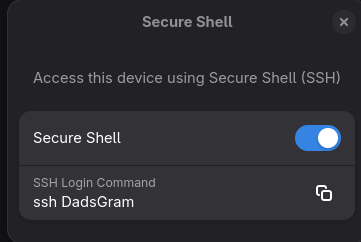
I've found a few things that do not seem to survive akshara update (and there may be others): 1. user defined systemd services: I got a tiny service that I uploaded to the usual spot (/etc/systemd/system) that always gets deleted(!) following akshara update 2. the ssh setting (see screenshot below) always gets set to off following akshara update Are these bugs, or is this expected behavior? How can I work around these please? See also this: https://www.reddit.com/r/BlendOS/comments/1n8ioa8/stuff_that_does_not_survive_akshara_update/
Reddit
From the BlendOS community on Reddit
Explore this post and more from the BlendOS community
No description
Solution:
Thanks all for the input! Adding gnome-remote-desktop to the services section of system.yaml fixes this.
Jump to solution
12 Replies
Asterisk
Asterisk4mo ago
for SSH you need to use the services block to enable the sshd system service
Christian
ChristianOP4mo ago
Thanks. How about #1 though? Is that a bug? Any plans on fixing that?
Valkyrja
Valkyrja4mo ago
ム丂イ乇尺ノ丂ズ received a thank you Jao!
Christian
ChristianOP3mo ago
Here's another couple of settings that doesn't survive akshara update: "Desktop Sharing" and "Remote Login." What do I do about these? What services should I add to the service block?
Christian
ChristianOP3mo ago
No description
No description
Asterisk
Asterisk3mo ago
You should be able to look these up Remote login should be SSH
Asterisk
Asterisk3mo ago
yeah oh I see desktop sharing and remote login are the same service I think look through systemctl list-units for anything RDP-related
#1 mixed number hater
yeah, that's a bug one of the biggest right now i think the issue is we 1) rebuild the system in a vacuum, but 2) have to allow for akshara updating stuff in /etc, and 3) allow you to modify /etc outside of akshara i think the solution is to mount /etc inside the chroot/just copy everything over, would have to test though currently it's using a really horrible hack instead
Solution
Christian
Christian3mo ago
Thanks all for the input! Adding gnome-remote-desktop to the services section of system.yaml fixes this.
Christian
ChristianOP3mo ago
I managed to work around this bug by adding some commands in system.yaml, so all's well. Thanks for the assistance.
Valkyrja
Valkyrja3mo ago
.triller_ received a thank you Jao!

Did you find this page helpful?