Persistent Schema Cache Error: "Could not find a relationship" despite correct Foreign Key
Hi everyone! Our team is working on a simple Next.js blog app for a practice exercise. The goal is for an admin to log in and create posts that everyone can see. We've hit a wall with a persistent schema cache error and would really appreciate some help.
When our homepage tries to fetch all posts, the API fails with: Could not find a relationship between 'posts' and 'users' in the schema cache.
Environment:
- Framework: Next.js v15.5.4
- Platform: Web
- Libraries: @supabase/supabase-js@2.58.0, @supabase/auth-helpers-nextjs@0.10.0
Failing API Code (/api/posts/index.js):
import { supabase } from "../../../lib/supabaseClient";
export default async function getAllPost(req, res) {
try {
const { data, error } = await supabase.from('posts').select('*, users(email)');
if (error) { throw error; }
res.status(200).json(data);
} catch (error) {
res.status(500).json({ error: error.message });
}
}
What We've Tried:
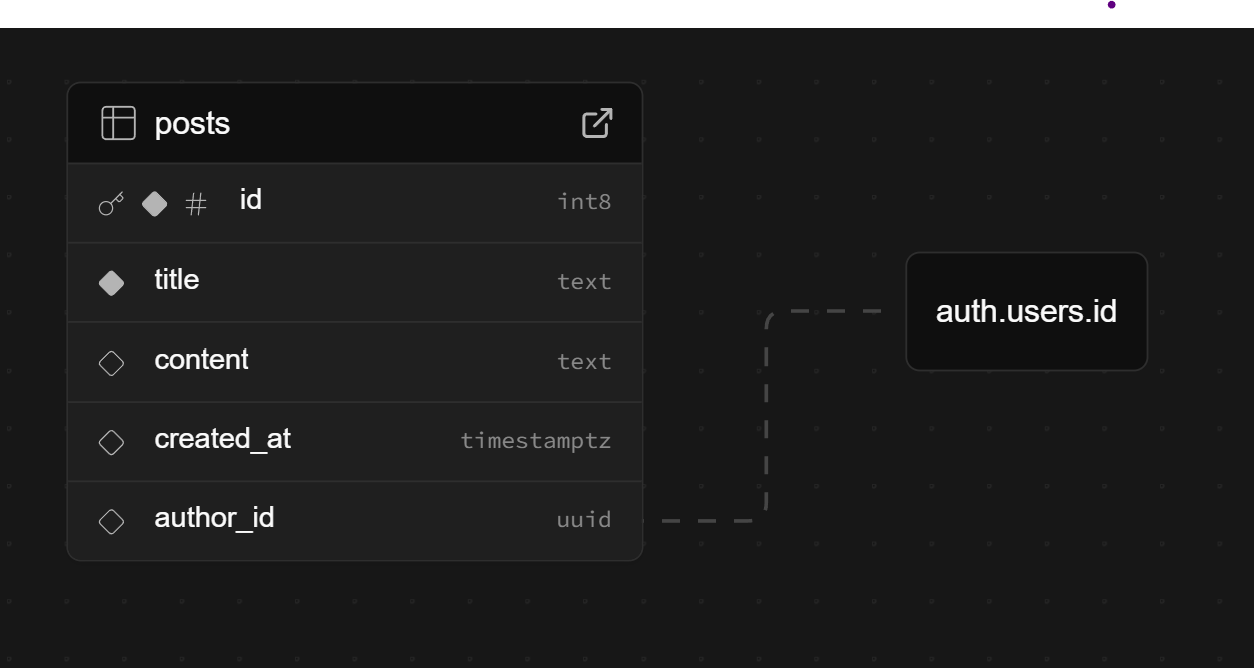
We've confirmed our schema is correct: posts.author_id is a uuid with a Foreign Key pointing directly to auth.users.id. We've already tried all the standard fixes we could find:
- Running NOTIFY pgrst, 'reload schema';
- A full project pause and restart.
- Manually recreating the foreign key with ALTER TABLE.
The error still persists, which makes us think the schema cache is stuck. Since this is just for a team practice project, we're really hoping to get past this blocker. Any advice on how to force a hard reset would be amazing. Thank you!
When our homepage tries to fetch all posts, the API fails with: Could not find a relationship between 'posts' and 'users' in the schema cache.
Environment:
- Framework: Next.js v15.5.4
- Platform: Web
- Libraries: @supabase/supabase-js@2.58.0, @supabase/auth-helpers-nextjs@0.10.0
Failing API Code (/api/posts/index.js):
import { supabase } from "../../../lib/supabaseClient";
export default async function getAllPost(req, res) {
try {
const { data, error } = await supabase.from('posts').select('*, users(email)');
if (error) { throw error; }
res.status(200).json(data);
} catch (error) {
res.status(500).json({ error: error.message });
}
}
What We've Tried:
We've confirmed our schema is correct: posts.author_id is a uuid with a Foreign Key pointing directly to auth.users.id. We've already tried all the standard fixes we could find:
- Running NOTIFY pgrst, 'reload schema';
- A full project pause and restart.
- Manually recreating the foreign key with ALTER TABLE.
The error still persists, which makes us think the schema cache is stuck. Since this is just for a team practice project, we're really hoping to get past this blocker. Any advice on how to force a hard reset would be amazing. Thank you!