set JTextPane to max possible size

I'm writing an application using swing and I want to stretch out the JTextPane to take whole possible space. For now, there is nothing in there except the JTextPane, but it takes only the space it needs, when due to aesthetics I want it to take whole possible space. Preferably I would like to do it with layouts, instead of using fixed size. Currently I use BorderLayout.
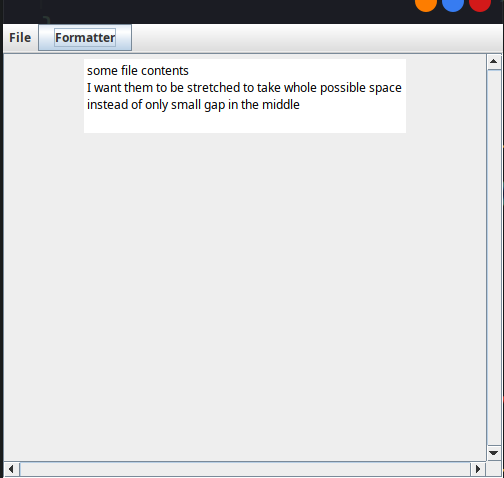
public class FileView extends JPanel {
private ModelInterface model;
private JTextPane textPane = new JTextPane();
// creating TextPane
public FileView(ModelInterface model) {
this.model = model;

add(textPane);

refreshFile();

}
...

// thats how I append new lines to the TextPane. TextPane can also be modified from client view
private void appendToPane(JTextPane textPane, String msg, Color c)
{
StyleContext sc = StyleContext.getDefaultStyleContext();
AttributeSet aset = sc.addAttribute(SimpleAttributeSet.EMPTY, StyleConstants.Foreground, c);

aset = sc.addAttribute(aset, StyleConstants.FontFamily, "Lucida Console");
aset = sc.addAttribute(aset, StyleConstants.Alignment, StyleConstants.ALIGN_JUSTIFIED);

int len = textPane.getDocument().getLength();
textPane.setCaretPosition(len);
textPane.setCharacterAttributes(aset, false);
textPane.replaceSelection(msg);
}
}
public class FileView extends JPanel {
private ModelInterface model;
private JTextPane textPane = new JTextPane();
// creating TextPane
public FileView(ModelInterface model) {
this.model = model;

add(textPane);

refreshFile();

}
...

// thats how I append new lines to the TextPane. TextPane can also be modified from client view
private void appendToPane(JTextPane textPane, String msg, Color c)
{
StyleContext sc = StyleContext.getDefaultStyleContext();
AttributeSet aset = sc.addAttribute(SimpleAttributeSet.EMPTY, StyleConstants.Foreground, c);

aset = sc.addAttribute(aset, StyleConstants.FontFamily, "Lucida Console");
aset = sc.addAttribute(aset, StyleConstants.Alignment, StyleConstants.ALIGN_JUSTIFIED);

int len = textPane.getDocument().getLength();
textPane.setCaretPosition(len);
textPane.setCharacterAttributes(aset, false);
textPane.replaceSelection(msg);
}
}
No description
18 Replies
JavaBot
JavaBot2mo ago
This post has been reserved for your question.
Hey @dezodorant! Please use /close or the Close Post button above when your problem is solved. Please remember to follow the help guidelines. This post will be automatically marked as dormant after 300 minutes of inactivity.
TIP: Narrow down your issue to simple and precise questions to maximize the chance that others will reply in here.
dezodorant
dezodorantOP2mo ago
anyone?
Madjosz
Madjosz2mo ago
I don't see you using BorderLayout here. So if you add this it should work.
dezodorant
dezodorantOP2mo ago
Thats how I use border layout:
public void createView() {
JScrollPane scrollPane = new JScrollPane(fileView);
scrollPane.setVerticalScrollBarPolicy(JScrollPane.VERTICAL_SCROLLBAR_ALWAYS);
scrollPane.setHorizontalScrollBarPolicy(JScrollPane.HORIZONTAL_SCROLLBAR_ALWAYS);
scrollPane.getVerticalScrollBar().setUnitIncrement(16);
frame.getContentPane().add(scrollPane, BorderLayout.CENTER); // adding it to border layout here

createMenu();

frame.setSize(500,500);
frame.setDefaultCloseOperation(JFrame.EXIT_ON_CLOSE);
frame.setVisible(true);
}
public void createView() {
JScrollPane scrollPane = new JScrollPane(fileView);
scrollPane.setVerticalScrollBarPolicy(JScrollPane.VERTICAL_SCROLLBAR_ALWAYS);
scrollPane.setHorizontalScrollBarPolicy(JScrollPane.HORIZONTAL_SCROLLBAR_ALWAYS);
scrollPane.getVerticalScrollBar().setUnitIncrement(16);
frame.getContentPane().add(scrollPane, BorderLayout.CENTER); // adding it to border layout here

createMenu();

frame.setSize(500,500);
frame.setDefaultCloseOperation(JFrame.EXIT_ON_CLOSE);
frame.setVisible(true);
}
Sorry for so late reply, I didnt notice the message
Madjosz
Madjosz2mo ago
Ok, so here is a minimal working example for your case:
import java.awt.*;
import javax.swing.*;

public class TextFrame extends JFrame {

private FileView fileView = new FileView();

public void createView() {
JScrollPane scrollPane = new JScrollPane(fileView);
scrollPane.setVerticalScrollBarPolicy(JScrollPane.VERTICAL_SCROLLBAR_ALWAYS);
scrollPane.setHorizontalScrollBarPolicy(JScrollPane.HORIZONTAL_SCROLLBAR_ALWAYS);
getContentPane().add(scrollPane, BorderLayout.CENTER); // adding it to border layout here

setSize(500,500);
setDefaultCloseOperation(JFrame.EXIT_ON_CLOSE);
setVisible(true);
}

public static void main(String... args) {
new TextFrame().createView();
}

private class FileView extends JPanel {
private JTextPane textPane = new JTextPane();

public FileView() {
add(textPane);
appendToPane("Hello world!");
}

private void appendToPane(String msg) {
textPane.replaceSelection(msg);
}
}
}
import java.awt.*;
import javax.swing.*;

public class TextFrame extends JFrame {

private FileView fileView = new FileView();

public void createView() {
JScrollPane scrollPane = new JScrollPane(fileView);
scrollPane.setVerticalScrollBarPolicy(JScrollPane.VERTICAL_SCROLLBAR_ALWAYS);
scrollPane.setHorizontalScrollBarPolicy(JScrollPane.HORIZONTAL_SCROLLBAR_ALWAYS);
getContentPane().add(scrollPane, BorderLayout.CENTER); // adding it to border layout here

setSize(500,500);
setDefaultCloseOperation(JFrame.EXIT_ON_CLOSE);
setVisible(true);
}

public static void main(String... args) {
new TextFrame().createView();
}

private class FileView extends JPanel {
private JTextPane textPane = new JTextPane();

public FileView() {
add(textPane);
appendToPane("Hello world!");
}

private void appendToPane(String msg) {
textPane.replaceSelection(msg);
}
}
}
The problem here is that the JScrollPane is only a clipped viewer on the underlying FileView. The latter one is not attached to any parent component of which it could inherit any sizes.
dezodorant
dezodorantOP2mo ago
so I have to attach it to something for it to inherit a size?
Madjosz
Madjosz2mo ago
I am not sure, haven't worked with Swing that much lately but I think the scrolling could already be attached to some text component without wrapping it in a ScrollPane.
dezodorant
dezodorantOP2mo ago
wdym? When I unwrap the fileView from JScrollPane, then the issue is the same, it's just not scrollable
dezodorant
dezodorantOP2mo ago
No description
Madjosz
Madjosz2mo ago
Ah, you need to set the Layout of the FileView. Currently it uses FlowLayout.
public FileView() {
super(new BorderLayout());
add(textPane, BorderLayout.CENTER);
appendToPane("Hello world!");
}
public FileView() {
super(new BorderLayout());
add(textPane, BorderLayout.CENTER);
appendToPane("Hello world!");
}
Madjosz
Madjosz2mo ago
No description
dezodorant
dezodorantOP2mo ago
it works! Thanks a lot
JavaBot
JavaBot2mo ago
If you are finished with your post, please close it. If you are not, please ignore this message. Note that you will not be able to send further messages here after this post have been closed but you will be able to create new posts.
dezodorant
dezodorantOP2mo ago
For the future, how can I know that some layout allows it when other doesnt?
Madjosz
Madjosz2mo ago
Usually you need to make sure that your used LayoutManager matches the given layout contraints. Since this a kind of old API it uses Object arguments everywhere and does not enforce anything in the type system. A more modern API would probably have warned you or even failed to build because the BorderLayout.CENTER is not supported by FlowLayout.
dezodorant
dezodorantOP2mo ago
okay thanks'
JavaBot
JavaBot2mo ago
If you are finished with your post, please close it. If you are not, please ignore this message. Note that you will not be able to send further messages here after this post have been closed but you will be able to create new posts.
JavaBot
JavaBot2mo ago
Post Closed
This post has been closed by <@949384053809901579>.

Did you find this page helpful?