jupiter
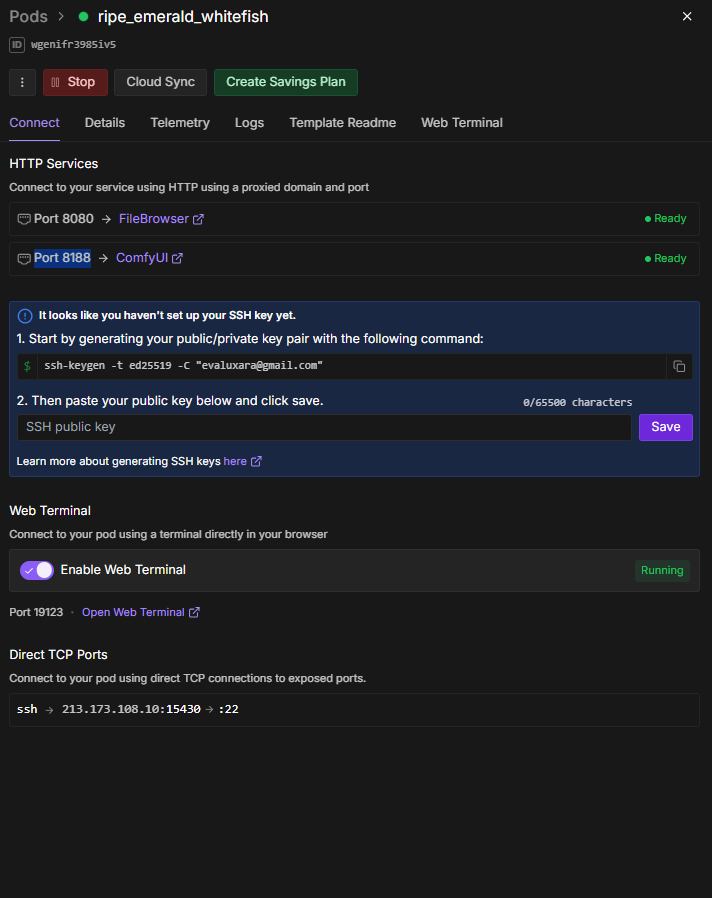
 Bug Report: JupyterLab port 8888 disappears after pod restart
Template: Official ComfyUI (latest version)
Pod ID: wgenifr3985iv5
Region: EU-RO-1
Problem:
When I create a pod, all 3 ports work fine (8080, 8188, 8888). After stopping and restarting the pod, port 8888 (JupyterLab) disappears from the HTTP Services panel.
Steps to reproduce:
1. Create pod with official ComfyUI template
2. Verify ports 8080, 8188, 8888 are visible and working
3. Stop the pod (manually or when GPU unavailable)
4. Start the pod again
5. Port 8888 is missing from UI, but ports 8080 & 8188 still work
What's happening:
- Port 8888 disappears from HTTP Services panel

- JupyterLab IS running internally (verified with
netstat -tuln | grep 8888- Can't access it even with manual URL
- Ports 8080 & 8188 continue working fine

Workaround:
Manually restart jupyter from terminal:
Impact:
This particularly affects users without persistent volumes who need JupyterLab after every restart. Bug happens consistently on every Stop/Start cycle.
Thanks for looking into this!