My mc keeps crashing very oftenly
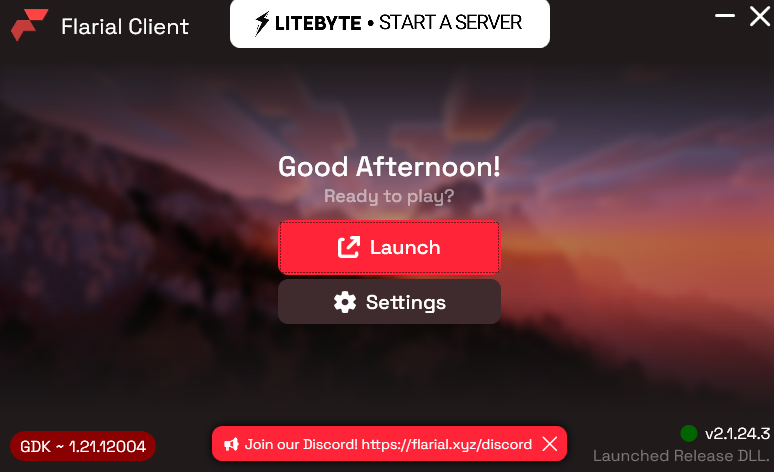
My mc keeps crashing very oftenly, and then i need to update the client everytime, otherwise i can't launch the game, the problem isn't from my pc, it really is a good pc. After crashing it turns into "GDK" and when i do the update of the client it turns back into normal
23 Replies
here u can see it's written GDK
did the update

back to UWP
did u figure out a fix @Shyamőis 🍂
no
but seems like if i launch the game right after the crash
it stays UWp
so when playing keep launcher opened and launch as fasr as u can lol
yeh keeps happening to me
Same
guys please help
@Shyamőis 🍂@Drxxgo@Abhijeet@lilly this was fixed yesterday
yes thanks !
w
no they didn't the game crashes still
then you have a different issue
make a new post and send a video of the crash
Just playing the game and it randomly crashing nothing really to show
we can't really fix it if we don't know when and why it's being caused
.logs
How to open logs
If you're on GDK/1.21.120+:
1. Press
⊞ + R on your keyboard
2. Paste this: %localappdata%\Flarial\Client\logs
3. Send latest.log
Otherwise
1. Press ⊞ + R on your keyboard
2. Paste this: %localappdata%\Packages\Microsoft.MinecraftUWP_8wekyb3d8bbwe\RoamingState\Flarial\logs
3. Send latest.logsend these
crash logs included
crashed on me just now
ye it keeps crashing, reinstalled the client and everything
basically a liabilty at this point
plus can't even press k without the game crashing too
.config
How to get config If you're on GDK/1.21.120+:
1. Press
⊞ + R on your keyboard
2. Paste this: %localappdata%\Flarial\Client\Config
3. Select all files (Ctrl + A)
4. Right click and Click "Send to -> Compressed (zipped) folder"
Otherwise:
1. Press ⊞ + R on your keyboard
2. Paste this: %localappdata\Packages\Microsoft.MinecraftUWP_8wekyb3d8bbwe\RoamingState\Flarial\Config
3. Select all files (Ctrl + A)
4. Right click and Click "Send to -> Compressed (zipped) folder"@Abhijeet
crashed again