R
roblox-ts•4w ago
Zolo

JSX not working in react project.

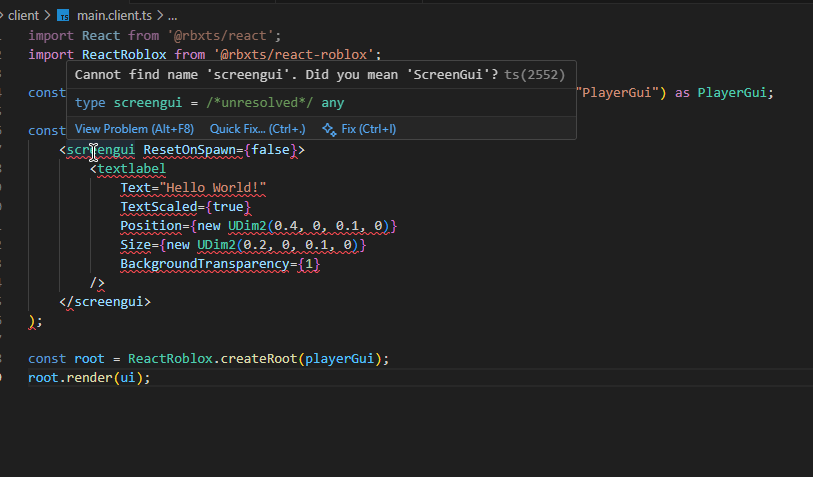
I can't seem to figure out why the JSX isn't working In my react project. I have the JSX compiler option set but I'm still getting errors when trying to compile the Typescript.
"jsx": "react",
"jsxFactory": "React.createElement",
"jsxFragmentFactory": "React.Fragment",
"jsx": "react",
"jsxFactory": "React.createElement",
"jsxFragmentFactory": "React.Fragment",
Solution:
you need .tsx for react
Jump to solution
9 Replies
Zolo
ZoloOP•4w ago
tsconfig:
{
"compilerOptions": {
// required
"allowSyntheticDefaultImports": true,
"downlevelIteration": true,
"jsx": "react",
"jsxFactory": "React.createElement",
"jsxFragmentFactory": "React.Fragment",
"module": "commonjs",
"moduleResolution": "Node",
"noLib": true,
"resolveJsonModule": true,
"experimentalDecorators": true,
"forceConsistentCasingInFileNames": true,
"moduleDetection": "force",
"strict": true,
"target": "ESNext",
"typeRoots": ["node_modules/@rbxts"],

// configurable
"rootDir": "src",
"outDir": "out",
"baseUrl": "src",
"incremental": true,
"tsBuildInfoFile": "out/tsconfig.tsbuildinfo"
}
}
{
"compilerOptions": {
// required
"allowSyntheticDefaultImports": true,
"downlevelIteration": true,
"jsx": "react",
"jsxFactory": "React.createElement",
"jsxFragmentFactory": "React.Fragment",
"module": "commonjs",
"moduleResolution": "Node",
"noLib": true,
"resolveJsonModule": true,
"experimentalDecorators": true,
"forceConsistentCasingInFileNames": true,
"moduleDetection": "force",
"strict": true,
"target": "ESNext",
"typeRoots": ["node_modules/@rbxts"],

// configurable
"rootDir": "src",
"outDir": "out",
"baseUrl": "src",
"incremental": true,
"tsBuildInfoFile": "out/tsconfig.tsbuildinfo"
}
}
code:
import React from '@rbxts/react';
import ReactRoblox from '@rbxts/react-roblox';

const playerGui = game.GetService("Players").LocalPlayer!.WaitForChild("PlayerGui") as PlayerGui;

const ui = (
<screengui ResetOnSpawn={false}>
<textlabel
Text="Hello World!"
TextScaled={true}
Position={new UDim2(0.4, 0, 0.1, 0)}
Size={new UDim2(0.2, 0, 0.1, 0)}
BackgroundTransparency={1}
/>
</screengui>
);

const root = ReactRoblox.createRoot(playerGui);
root.render(ui);
import React from '@rbxts/react';
import ReactRoblox from '@rbxts/react-roblox';

const playerGui = game.GetService("Players").LocalPlayer!.WaitForChild("PlayerGui") as PlayerGui;

const ui = (
<screengui ResetOnSpawn={false}>
<textlabel
Text="Hello World!"
TextScaled={true}
Position={new UDim2(0.4, 0, 0.1, 0)}
Size={new UDim2(0.2, 0, 0.1, 0)}
BackgroundTransparency={1}
/>
</screengui>
);

const root = ReactRoblox.createRoot(playerGui);
root.render(ui);
Zolo
ZoloOP•4w ago
No description
iSentinel
iSentinel•4w ago
is this a .ts file?
Solution
iSentinel
iSentinel•4w ago
you need .tsx for react
Zolo
ZoloOP•4w ago
Lord have mercy
iSentinel
iSentinel•4w ago
look its better when its the simple things
Zolo
ZoloOP•4w ago
How could I be so stupiud.
iSentinel
iSentinel•4w ago
😆 the alternative is a lot of pai n
Zolo
ZoloOP•4w ago
Ive worked with react for years as a FiveM dev This is embarrassing

Did you find this page helpful?