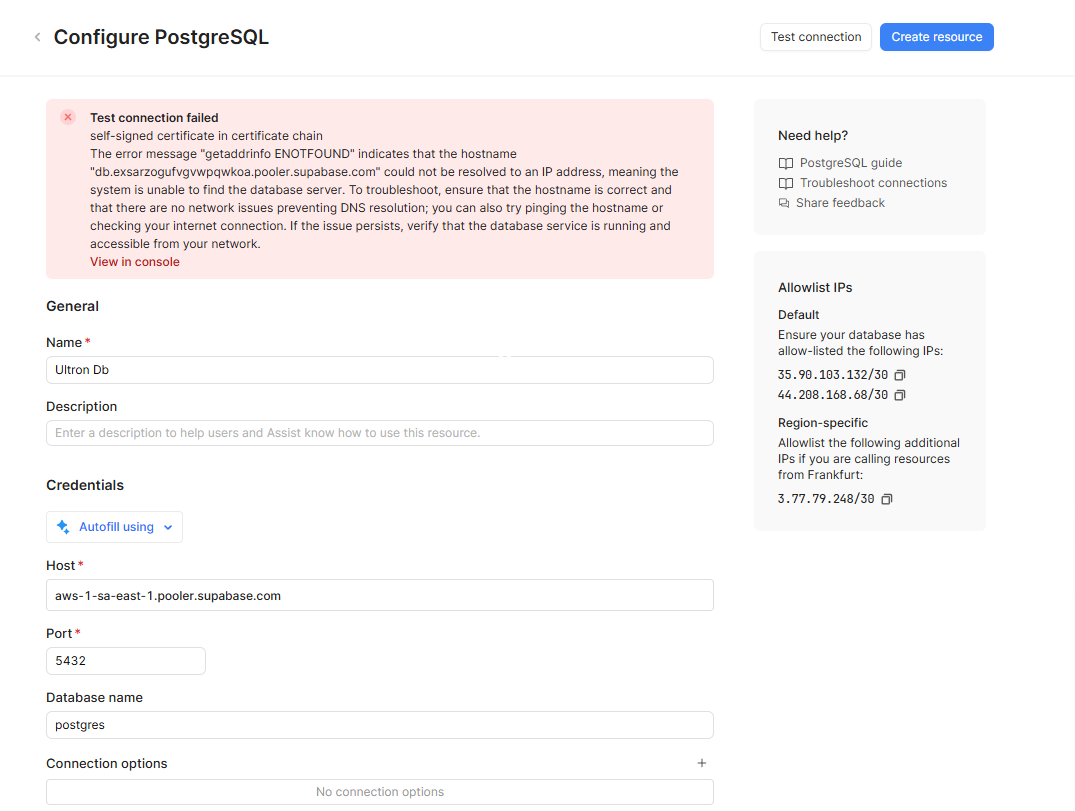
i need help ASAP pls
🔢DB Connections🤷other
errors
The issue is that Supabase does not show the “Allowed IPs” section anywhere in Database → Settings, and I don’t see any place to enable IP allowlisting.
Here is what Supabase gives me:
Direct connection string:
postgresql://postgres:[PASSWORD]@db.exsarzogufvgvwpqwkoa.supabase.co:5432/postgres
Pooler connection string:
postgresql://postgres.exsarzogufvgvwpqwkoa:[PASSWORD]@aws-1-sa-east-1.pooler.supabase.com:5432/postgres
Retool tries to connect to:
db.exsarzogufvgvwpqwkoa.pooler.supabase.com
…but that host does not exist (DNS ENOTFOUND).
Also, my project is on the Free/Nano tier in sa-east-1, and I’m not sure if IP allowlisting is available for this plan or region.
My questions:
Is it possible to connect Retool to a Supabase Free/Nano project in sa-east-1?
Should the pooler hostname look different?
Is IP allowlisting disabled on this plan/region?
Thanks!
Test connection failed: getaddrinfo ENOTFOUND db.exsarzogufvgvwpqwkoa.pooler.supabase.com
self-signed certificate in certificate chain
The issue is that Supabase does not show the “Allowed IPs” section anywhere in Database → Settings, and I don’t see any place to enable IP allowlisting.
Here is what Supabase gives me:
Direct connection string:
postgresql://postgres:[PASSWORD]@db.exsarzogufvgvwpqwkoa.supabase.co:5432/postgres
Pooler connection string:
postgresql://postgres.exsarzogufvgvwpqwkoa:[PASSWORD]@aws-1-sa-east-1.pooler.supabase.com:5432/postgres
Retool tries to connect to:
db.exsarzogufvgvwpqwkoa.pooler.supabase.com
…but that host does not exist (DNS ENOTFOUND).
Also, my project is on the Free/Nano tier in sa-east-1, and I’m not sure if IP allowlisting is available for this plan or region.
My questions:
Is it possible to connect Retool to a Supabase Free/Nano project in sa-east-1?
Should the pooler hostname look different?
Is IP allowlisting disabled on this plan/region?
Thanks!