created a swap file using util-linux and now it persists after uninstalling the app. is this possibl
 Android OS
 Linux (PRoot/chroot)🔺Unresolved
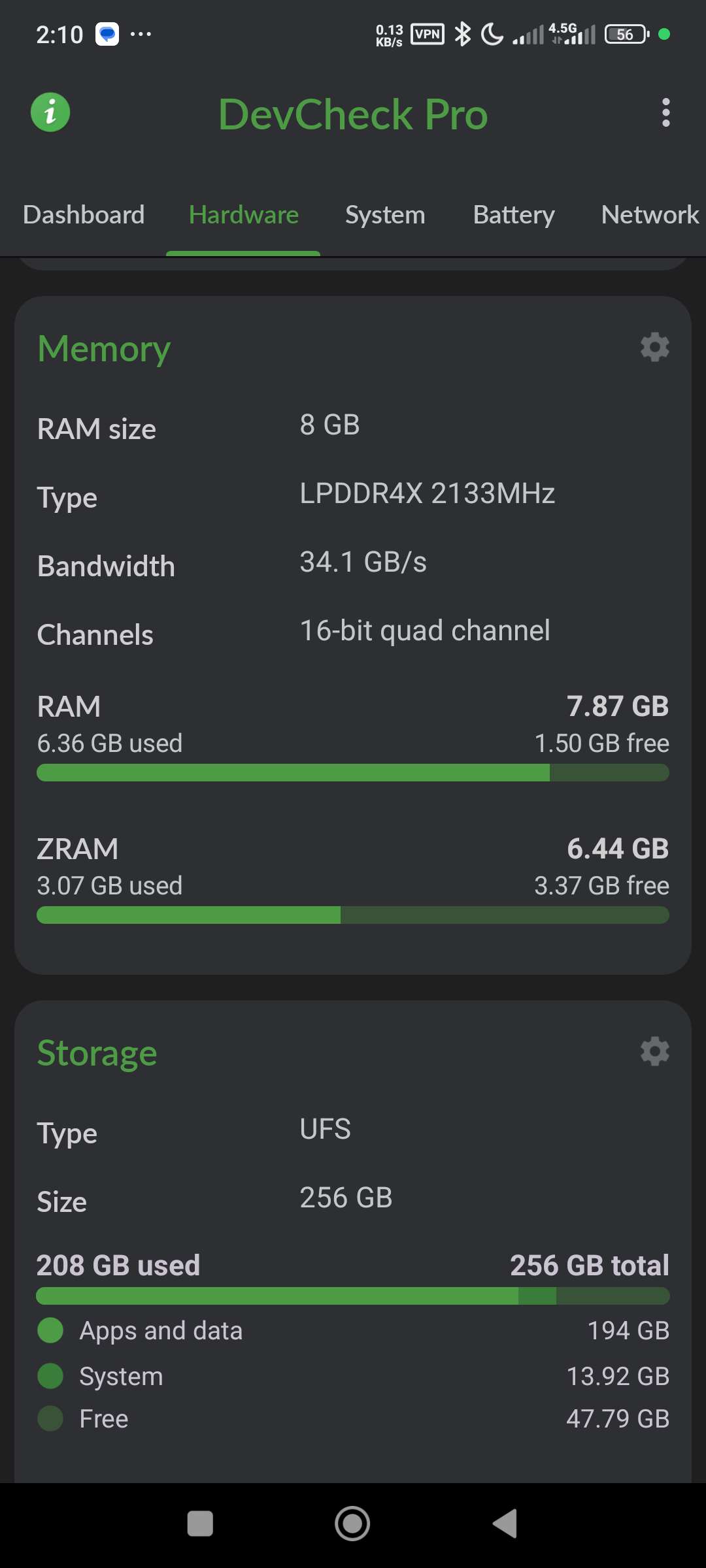
I have a major issue on my Xiaomi 11T (Dimensity 1200, HyperOS/MIUI). I seem to have created a persistent Swap/ZRAM allocation that survives reboots and app uninstalls, and I cannot get rid of it.
The Context (How I Messed Up):
A few months ago, I was trying to run the NVIDIA NeMo toolkit locally. To prevent OOM kills, I followed a guide to create a massive swap file inside Termux using util-linux.
I ran these exact commands (Non-Root):
pkg install util-linux
dd if=/dev/zero of=~/swapfile bs=1M count=8192 (Created 8GB file)
mkswap ~/swapfile
swapon ~/swapfile
The Problem:
I now have 6GB of Swap/ZRAM permanently active on my device, and I cannot remove it.
I have uninstalled Termux completely. (It even weirdly auto-reinstalled once, but I removed it again. It's gone).
Xiaomi Settings "Memory Extension" is toggled OFF.
ADB commands failed: tried settings put global zram_enabled 0 (and secure/system tables) via PC.
dumpsys meminfo still reports: ZRAM: 6,291,452K total swap.
The Question:
How is this possible without root? Did the swapon command trigger a persistent Xiaomi kernel flag (persist.miui...) that overrides the UI settings?
Does anyone know how to force flush the memory configuration or access the hidden props that control this 6GB block on a Xiaomi 11T without unlocking the bootloader? I am trying to avoid a factory reset if possible, but this "Ghost RAM" is eating my resources.
Specs:
Device: Xiaomi 11T
OS: HyperOS / MIUI
Root Status: Locked / Non-Root
Any help is appreciated. I'm stuck.
The Context (How I Messed Up):
A few months ago, I was trying to run the NVIDIA NeMo toolkit locally. To prevent OOM kills, I followed a guide to create a massive swap file inside Termux using util-linux.
I ran these exact commands (Non-Root):
pkg install util-linux
dd if=/dev/zero of=~/swapfile bs=1M count=8192 (Created 8GB file)
mkswap ~/swapfile
swapon ~/swapfile
The Problem:
I now have 6GB of Swap/ZRAM permanently active on my device, and I cannot remove it.
I have uninstalled Termux completely. (It even weirdly auto-reinstalled once, but I removed it again. It's gone).
Xiaomi Settings "Memory Extension" is toggled OFF.
ADB commands failed: tried settings put global zram_enabled 0 (and secure/system tables) via PC.
dumpsys meminfo still reports: ZRAM: 6,291,452K total swap.
The Question:
How is this possible without root? Did the swapon command trigger a persistent Xiaomi kernel flag (persist.miui...) that overrides the UI settings?
Does anyone know how to force flush the memory configuration or access the hidden props that control this 6GB block on a Xiaomi 11T without unlocking the bootloader? I am trying to avoid a factory reset if possible, but this "Ghost RAM" is eating my resources.
Specs:
Device: Xiaomi 11T
OS: HyperOS / MIUI
Root Status: Locked / Non-Root
Any help is appreciated. I'm stuck.