Modify mod icon/move them?

This mod is cool, but the icon location is frustrating. Is there a way to put it on the bottom of the list, or modify the icon?
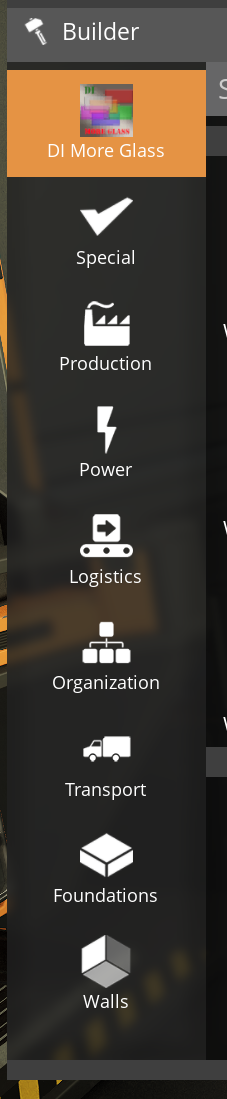
No description
Solution:
you can use ContentLib to do one of 2 things to help with this: 1. change the priority of the category asset so it shows up lower 2. change the categories of all the mod's items to something else, so the category does not appear...
Jump to solution
17 Replies
Solution
Robb
Robb4d ago
you can use ContentLib to do one of 2 things to help with this: 1. change the priority of the category asset so it shows up lower 2. change the categories of all the mod's items to something else, so the category does not appear

Robb
Robb4d ago
I think you can also use Build Menu Organizer to achieve #2 easier >mod build menu organizer
FICSIT-Fred
FICSIT-Fred4d ago
Fred Mod Search™
Build Menu Organiser
Hide / Show or change the categories of your items in your Build Menu and in the Machines Menu. EA: :white_check_mark: EXP: :white_check_mark: Last Updated <t:1748784064:R> Created by Andre Aquila
If this isn't the mod you were looking for, try a different spelling.
Robb
Robb4d ago
>mod contentlib
FICSIT-Fred
FICSIT-Fred4d ago
Fred Mod Search™
ContentLib
Easily create or modify Items, Recipes, and more via JSON for any machine and any mod! EA: :white_check_mark: EXP: :white_check_mark: Last Updated <t:1754879077:R> Created by Robb, Jarno458, and Nogg-aholic
If this isn't the mod you were looking for, try a different spelling.
Robb
Robb4d ago
oh it looks like build menu organizer lets you change category priorities too
No description
Avaviel
AvavielOP4d ago
awesome! I'll look at these.
Avaviel
AvavielOP4d ago
Shoot. It requires a linux server and I'm on proxmox ubuntu... which is linux. weird
Robb
Robb4d ago
neither of those mods require a linux server, where are you seeing that?
Robb
Robb4d ago
Build Menu Organizer actually doesn't work on dedicated servers
No description
Robb
Robb3d ago
checking in again if you got this working
Avaviel
AvavielOP3d ago
Oh I see! I’m running both a server and a PC install. I switched between them and it still didn’t like it. I’ll try again later when I’m there. But I run the game on a proxmox server so I keep the mods updated. Thank you for your help
Robb
Robb3d ago
if you are managing both the client and the server with SMM, and have them on the same Profile, it will try to keep them both in sync. so it should prevent you from installing Build Menu Organizer because it is not compatible with your proxmox server install on the same profile
Avaviel
AvavielOP3d ago
that is how I'm managing! Its a clientside only mod right? wonder if i can manually install I'll look that up
Robb
Robb3d ago
it is not client side only, it is not usable on servers. it uses a chat command which always runs server side
Avaviel
AvavielOP3d ago
oh shoot Then I'll find something else ha
Robb
Robb3d ago
there is not currently anything on SMM/ficsit.app that clearly shows if something is client side only or not, a display for that will be added in a future update contentlib works on servers so you could use that. or @AndreAquila may be able to update BMO to work on servers; it uses contentlib behind the scenes so it should be possible

Did you find this page helpful?