Game Launching

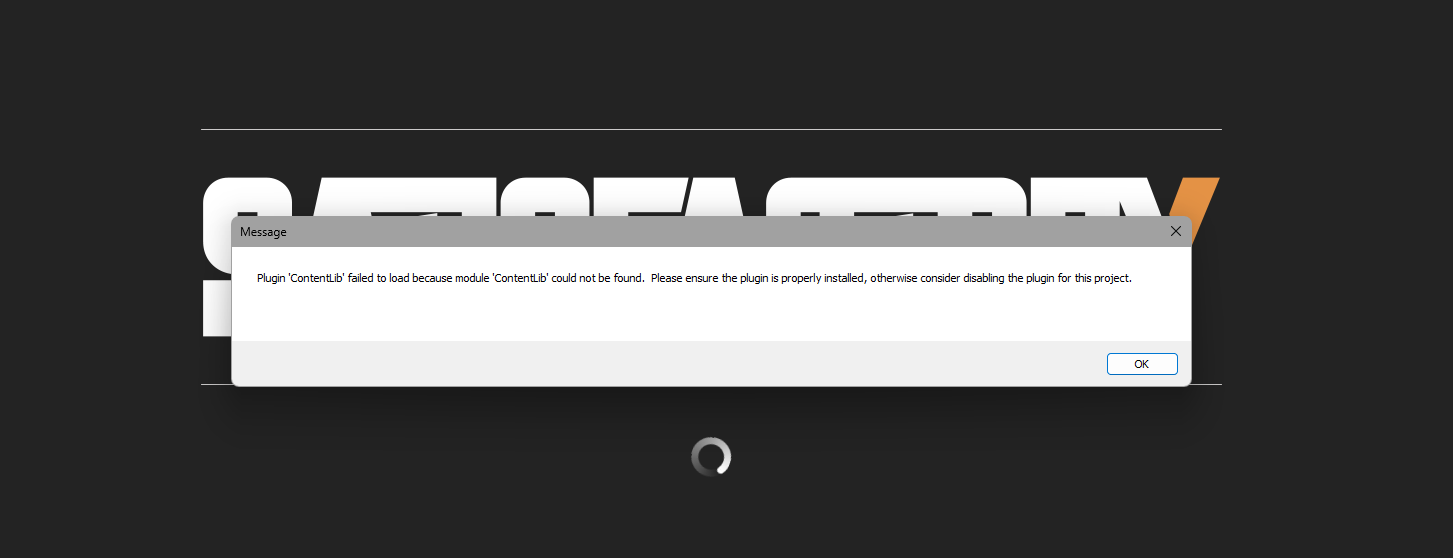
Always geting this error.
Solution:
You have three options: * Uninstall the steam copy * Update the steam copy * Create a new profile for the steam copy...
Jump to solution
4 Replies
FICSIT-Fred
FICSIT-Fred5d ago
Automated responses for TheNexus (222348308537016322)
Outdated mods found!
Structural Solutions can be updated to 1.1.44 Infinite Nudge can be updated to 2.5.0 Satisfactory Mod Loader can be updated to 3.11.3 Multidimensional Factory can be updated to 1.0.18 Magic Splitter can be updated to 2.0.33 Organized Crates can be updated to 2.0.10 Instant Craft Bench can be updated to 1.0.7 All Minable can be updated to 1.0.18 Mod Update Notifier can be updated to 2.4.1 No Research Time can be updated to 1.0.7 ContentLib can be updated to 1.8.0 Infinite Zoop can be updated to 1.9.5 Refined Power can be updated to 4.0.44 Storage Teleporter can be updated to 1.2.1 RefinedRDLib can be updated to 1.1.38 Modular UI can be updated to 2.1.35 Factory Props can be updated to 2.5.5 Daisy Chain Smart Input Factory can be updated to 2.0.18 Modular Load Balancers can be updated to 1.15.12 Update these mods, there may be fixes for your issue in doing so.
downgrade_duplicate
The Mod Manager is reporting an error because it's trying to modify an outdated copy of the game. This could be caused by one of two things: 1. One of the installs connected to the Profile you have selected is still running a previous version. To fix this, either uninstall it, update it, or switch to a different Mod Manager profile so that it isn't considered in the update process. 2. You have leftover files in your install directory from downgrading to play a previous version. To fix this, uninstall the game (verify files won't fix this!), delete the game install directory if it still exists (this is NOT the AppData folder, but the location where you installed the game), then reinstall the game, and reopen SMM.
Key Details for SMMDebug-2025-12-01-15-21-40.zip
SMM Version: 3.0.3
SML Version: 3.7.0
Installed Mods: 19
Game: WindowsClient CL 273254 from steam
Path: `d:\SteamLibrary\steamapps\common\Satisfactory`
Command Line: cmd /C start steam://rungameid/526870-NO_EOS_OVERLAY
SMM Version: 3.0.3
SML Version: 3.7.0
Installed Mods: 19
Game: WindowsClient CL 273254 from steam
Path: `d:\SteamLibrary\steamapps\common\Satisfactory`
Command Line: cmd /C start steam://rungameid/526870-NO_EOS_OVERLAY
sjhoward
sjhoward5d ago
You have an up to date epic install and an out of date steam one They're both trying to use the same profile at the moment which is forcing it to use old versions of mods which don't work on the latest version
Solution
sjhoward
sjhoward5d ago
You have three options: * Uninstall the steam copy * Update the steam copy * Create a new profile for the steam copy
TheNexus
TheNexusOP5d ago
ok that worked great tks for th help finaly i can enjoy mods

Did you find this page helpful?