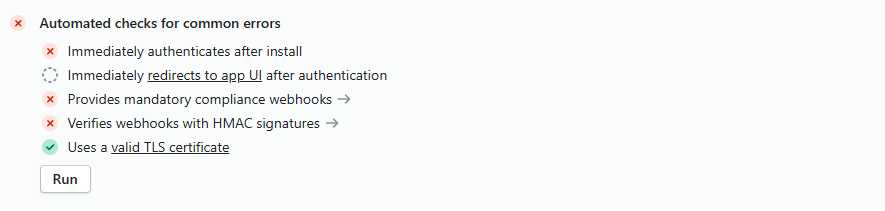
Automated Shopify checks failing
Hi, I am trying to send an app for review however the automated checks for it are failing.

37 Replies
Hello,
Could you please share the URL of your Gadget app?
There are a few things that you might want to check:
- Has the toml been deployed? This would push the GDPR webhook configs
You can also look to see if there's anything missing by looking at the dev dashboard
- When you install, do you see any errors (in production)
- Take a look at yojur backend logs running through the install and test webhooks to see that everything works as expected
The toml has been deployed
When I install I see no errors, webhooks dont throw any errors
Only 2 checks are failing now

When I tested your installation, I saw this:

This makes me think that you either may need to ask for additional permissions from Shopify or somethings missing from your app
Oh ok, that is interesting - When I install it on the dev store I do not see this
Let me try to request these permissions in the partners dashboard
Maybe I've missed something in the setup of the partner app
When you selected the app distribution, did you select this?

And this?

I do not think so - It did not ask for that
We just selected public distribution as we need this app to work as a sales channel
Yeah, I think that might be what needs to be done
Okay ty I will quickly look into it now and lyk
@[Gadget] Antoine I dont see those options - Also the app does have access to the scopes it says that are missing, please see:

subscriptions api as well as payment mandates
Mind sharing a full video of installation and what you see?
Yes sure, I will just make a video right now
@[Gadget] Antoine Just a question - How did you test installation to go get here?
I made an environment on your app and installed it on my development store
Okay cool I will just show my screen installing on a dev store after uninstalling
@[Gadget] Antoine Heres a screen recording
Do you have contacts at Shopify? You might have better luck getting some information about this from them. Everything looks fine to me
Let me ask Robert he may be able to assist with that
Also just a question, the only reason we are going via sales channel route is because we want products to be private and prevent users being able to go through the usual checkout apis etc to buy products
This is for a raffles app, do you have any suggestions on how we could maybe do this without a public distribution app?
We just want private checkouts
I believe that you can have the same api access with the custom distribution.
The public distribution only needs to be used if you're going to install on multiple stores (that aren't yours)
Only problem is that when we select custom distribution, you cannot convert your app into a sales channel. That is the blocker we have
Unfortunately sales channel apps are required to be public distribution (which is kind of strange)
Is that confirmed by Shopify?
Yeah its on their docs as well
Interesting. Ok, if you don't mind getting some information from Shopify support about why the first test is failing; it shouldn't based off of what we're seeing.
They might be able to tell you what step is failing
Okay thanks, I will ask Robert if we can speak to anyone at shopify who can give us the reason for the failure
Hi
I just did some digging with a team member
when we install
we tried on a private browser and this request fails
the app installs fine but this fails and does not return any cookie (im assuming this is the reason the checks fail)
From that doc, I would keep in mind that if you don't want to use Shopify managed installs, you shouldn't include the scopes in the toml (nor the root route of your app).
Here are some docs on Shopify managed installs if you don't care how it gets installed 😛
https://docs.gadget.dev/guides/plugins/shopify/advanced-topics/oauth#setting-up-shopify-managed-installations
Shopify App OAuth - Developer Docs - Gadget
Gadget Docs
I can also keep trying to figure this out. I'm talking with the team to see where I should continue digging.
@Chocci_Milk Thanks for that, is there any downside to using Shopify managed installs?
I will update the toml file to see if it helps solve that error
No, in fact it will make the installation process faster.
Alternatively, the team just told me that you may want to test installation on a fresh dev store. Apparently, the automated tests go based off of cached results
If you go with Shopify managed installs, you'll need to deploy the scopes and other toml configurations any time you want to update what you have access to
That is not an issue for us to be honest, we need to install it for a single merchant anyway so it should be good
I will test it right now and update you, ty!
@Chocci_Milk @Udi It worked! Thanks guys ❤️
No problem!