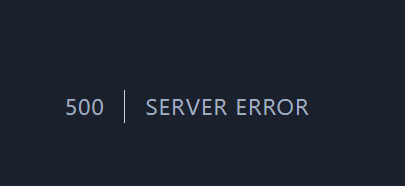
/admin/extensions 500 | Server Error
I feel like i did something real dumb and this is an obvious fix.
I tried to reinstall several times, updated pterodactyl panel and made sure i had the updated blueprint as well, several attempts later... here i am.
Im decently new with blueprint, discovered it today, got nebula installed and working.
Tho when i go to the admin panel and click on the extentions button. I get a "500 | Server Error"
/admin/extensions/nebula however, does work correctly and lets me access the theme designer.
Any logs i can provide to help figure this out? You'll have to point me in the direction of them if so.

Solution:
Jump to solution
https://github.com/BlueprintFramework/framework/commit/4cd437e6307ed1a410ba185b9fb7b5aafd2934c9
@Woz Should be fixed in the latest commit. Could you try upgrading to it with
blueprint -upgrade remote?...
30 Replies
You can also reset most things by following:
1. Remove certain files and directories with
rm -r resources public node_modules.
2. Go through the Pterodactyl update documentation.
3. Install dependencies by running the yarn command.
4. Repair Blueprint with blueprint -upgrade.
5. Get some Blueprint extensions (if you haven't already) and install them onto your panel.Sent by loki_101 ⢠byte snippet-upgrade
And if you see any errors throughout the process, stop and post them here; don't continue.
https://ptero.co/uwojenofew
I'll go through the reset and lyk
What's the output of
ahhh it got cutt off, one sec
https://pastebin.com/sXyEP568

I got what I need from the cut off one. You got a 403
Something's blocking that machine from reaching that site
Where is this VPS hosted? And @Emma what's hosting blueprint.zip/api again?
OVH- Oregon - North America (US ā West ā Hillsboro)
OVH proxied behind Cloudflare
@Woz See if your VPS can reach another site behind Cloudflare.
root@ns1010256:/var/www/pterodactyl# curl -v https://bluesky.crazycoder.dev
* Host bluesky.crazycoder.dev:443 was resolved.
* IPv6: 2606:4700:3036::6815:1318, 2606:4700:3037::ac43:b8e5
* IPv4: 172.67.184.229, 104.21.19.24
* Trying [2606:4700:3036::6815:1318]:443...
* Connected to bluesky.crazycoder.dev (2606:4700:3036::6815:1318) port 443
* ALPN: curl offers h2,http/1.1
* TLSv1.3 (OUT), TLS handshake, Client hello (1):
* CAfile: /etc/ssl/certs/ca-certificates.crt
* CApath: /etc/ssl/certs
* TLSv1.3 (IN), TLS handshake, Server hello (2):
* TLSv1.3 (IN), TLS handshake, Encrypted Extensions (8):
* TLSv1.3 (IN), TLS handshake, Certificate (11):
* TLSv1.3 (IN), TLS handshake, CERT verify (15):
* TLSv1.3 (IN), TLS handshake, Finished (20):
* TLSv1.3 (OUT), TLS change cipher, Change cipher spec (1):
* TLSv1.3 (OUT), TLS handshake, Finished (20):
* SSL connection using TLSv1.3 / TLS_AES_256_GCM_SHA384 / X25519 / id-ecPublicKey
* ALPN: server accepted h2
* Server certificate:
* subject: CN=crazycoder.dev
* start date: Oct 8 05:06:14 2025 GMT
* expire date: Jan 6 06:03:29 2026 GMT
* subjectAltName: host "bluesky.crazycoder.dev" matched cert's "*.crazycoder.dev"
* issuer: C=US; O=Google Trust Services; CN=WE1
* SSL certificate verify ok.
* Certificate level 0: Public key type EC/prime256v1 (256/128 Bits/secBits), signed using ecdsa-with-SHA256
* Certificate level 1: Public key type EC/prime256v1 (256/128 Bits/secBits), signed using ecdsa-with-SHA384
* Certificate level 2: Public key type EC/secp384r1 (384/192 Bits/secBits), signed using ecdsa-with-SHA384
* using HTTP/2
* [HTTP/2] [1] OPENED stream for https://bluesky.crazycoder.dev/
* [HTTP/2] [1] [:method: GET]
* [HTTP/2] [1] [:scheme: https]
* [HTTP/2] [1] [:authority: bluesky.crazycoder.dev]
* [HTTP/2] [1] [:path: /]
* [HTTP/2] [1] [user-agent: curl/8.5.0]
* [HTTP/2] [1] [accept: /]
GET / HTTP/2 Host: bluesky.crazycoder.dev User-Agent: curl/8.5.0 Accept: /* TLSv1.3 (IN), TLS handshake, Newsession Ticket (4): * TLSv1.3 (IN), TLS handshake, Newsession Ticket (4): * old SSL session ID is stale, removing < HTTP/2 200 < date: Tue, 02 Dec 2025 20:48:36 GMT < content-type: text/plain; charset=utf-8 < content-length: 626 < access-control-allow-origin: * < etag: W/"272-EylHGLPvy/AHIrTwXqLojS7qD3o" < vary: Accept-Encoding < x-powered-by: Express < cf-cache-status: DYNAMIC < nel: {"report_to":"cf-nel","success_fraction":0.0,"max_age":604800} < strict-transport-security: max-age=15552000; includeSubDomains; preload < x-content-type-options: nosniff < report-to: {"group":"cf-nel","maxage":604800,"endpoints":[{"url":"https://a.nel.cloudflare.com/report/v4?s=SeDi%2Bkm1JnV9f%2FV%2FCAGwuEhc0hvmEY%2BSA%2FLAyqLvB2sRe3n4nGSQsG7ulQncdwIlRNRcEmeUYFuCMYkYw%2BiyaTAglmmgZvo1xevQfpsTCWHCMrZBaILyBXsIlyR7IFncVgw%3D"}]} < server: cloudflare < cf-ray: 9a7dafa0798cfc83-PDX < alt-svc: h3=":443"; ma=86400 < /\ _ /\ _ __ \ \ ,\ __ _\ \ ,\ __ /''\ \ \ / /\ ''/''/ '\ \ / / '\ /\ \L._\ \ _\ \ \L\ \ \ //\ \L\ \ \ _/\ \L\ \ \ _/._\ _\ \ ,/\ _\ _/\ _\ __/ ///_/ // \ \ / // /__/ ///_/ \ _\ /_/ This is an AT Protocol Personal Data Server (aka, an atproto PDS) Most API routes are under /xrpc/ Code: https://github.com/bluesky-social/atproto Self-Host: https://github.com/bluesky-social/pds Protocol: https://atproto.com * Connection #0 to host bluesky.crazycoder.dev left intact root@ns1010256:/var/www/pterodactyl#
Huh. Doesn't seem like Cloudflare has your VPS's IP range blocked then.
Makes sense, since they published an article a while ago ranting about how blocking IPs is stupid.
Ive got a domain through cloudflare, for the panel that i havent had any issues with to my knowledge
Maybe it's getting through Cloudflare, and the webserver on the OVH machine is rejecting it. @Emma can you check the access and error logs next time you're free?
And @Woz can you DM Emma your VPS's IP address so she knows what to look for in the logs?
Sent š
Does it being a dedicated server and not a VPS change anything?
No, that doesn't change anything.
The good news is it's not being dropped silently by a firewall; 403 means it was actively refused; something should be showing up in the webserver logs, if it's configured to log things.
See my post here in support
You will get a temporary solution
Oh is it the same issue? I wasn't entirely sure when I was looking through it
I had the same problem as yours
Yes
Yes
Okay bet. Thanks much
Your welcome
I provided logs you didn't saw logs I guess
š
To be honest, I glanced at it snd didn't realize ours where the same, looking at it now. I shoulda have caught it š
No worries check it out
And if you don't get ask proboy
He solved my issue
Just got it applied, worked for me too
Thanks again for noticing!
Good day š»
Your welcome
Solution
https://github.com/BlueprintFramework/framework/commit/4cd437e6307ed1a410ba185b9fb7b5aafd2934c9
@Woz Should be fixed in the latest commit. Could you try upgrading to it with
blueprint -upgrade remote?
Seems to have worked, just getting a failed to reach release name error. But i can actually reach the extentions page without the workaround

This error indicator was added in the commit I sent in my message. This is basically to inform you that the API request has failed, what would otherwise cause a 500 server error.