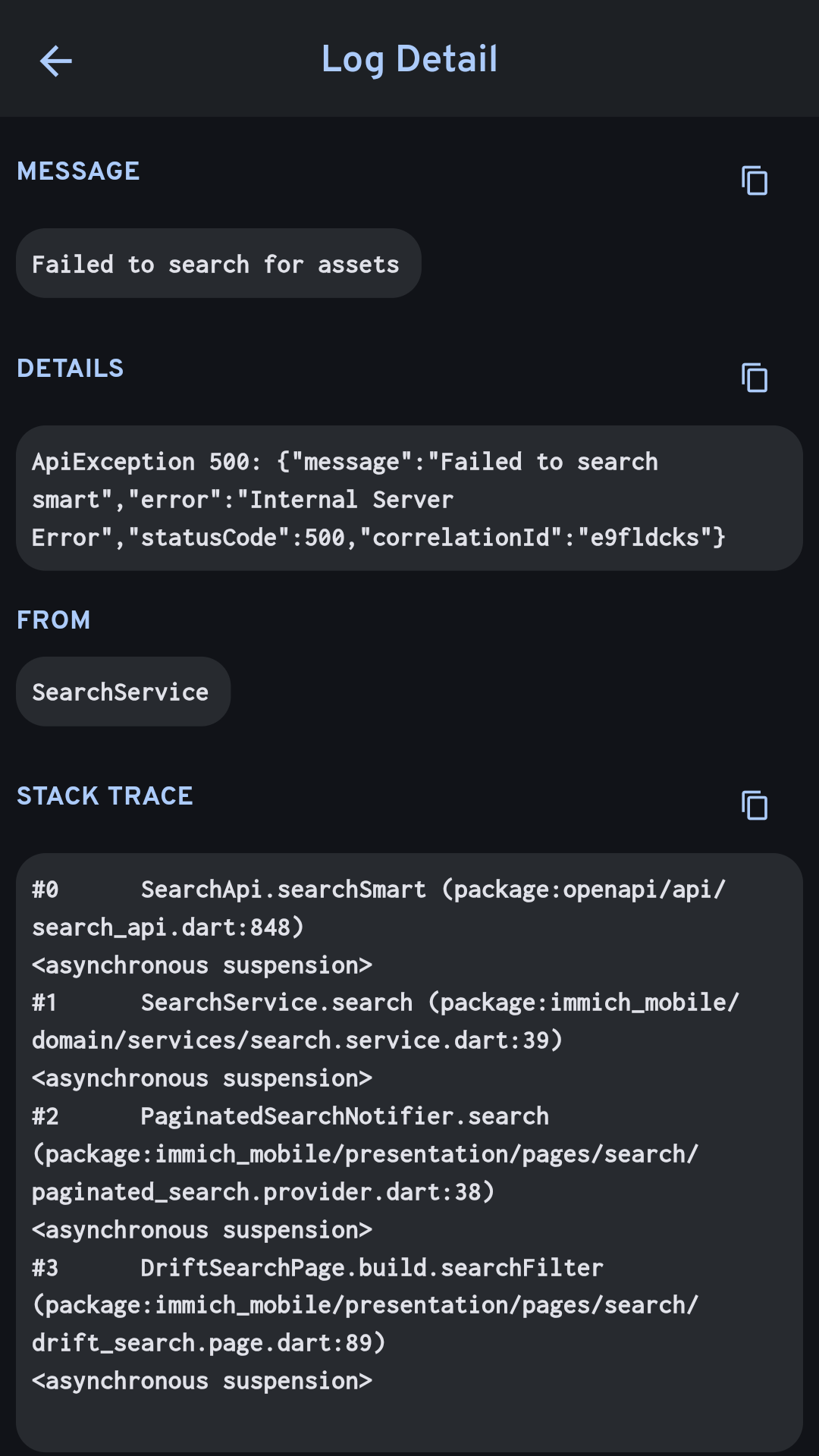
Failed to search smart ApiException: 500 Internal Server Error
🗄️Server☑️Ready
My setup: Running Immich as an LXC container on proxmox using community script. On a mini pc with an i3, integrated gpu. I was able to setup Immich Remote Machine Learning to use my home PC's NVIDIA GPU for ML. So i have gone to admin settings on immich, added 2 url's in Machine Learning tab- 1st is my pc_ip:3003, 2nd is the default immich-machine-learning:3003. The problem does NOT take place when the home PC is on and all devices work fine with smart search. But when i switch off my PC, smart search doesnt work. So the problem ONLY happens when using the server solo. Logs after search error are in the image attached
Since the setup was done via proxmox helper scripts, I dont think there's a docker compose yaml file for immich. Which makes it confusing for me since all the queries online are resolved by going to the compose file. I added /dev/dri/card0 and renderD128 via proxmox GUI- add device passthrough
Here's the LXC conf file:
arch: amd64
console: 0
cores: 4
dev0: /dev/dri/card0
dev1: /dev/dri/renderD128
features: keyctl=1,nesting=1
hostname: immich
memory: 6144
mp0: /mnt/usbdrive,mp=/mnt/usbdrive
net0: name=eth0,bridge=vmbr0,hwaddr=BC:24:11:7D:59:58,ip=dhcp,type=veth
onboot: 1
ostype: debian
protection: 0
rootfs: crucial_nvme:100/vm-100-disk-0.raw,size=300G
swap: 512
tags: community-script;photos
unprivileged: 1
lxc.cgroup2.devices.allow: c 10:200 rwm
lxc.mount.entry: /dev/net/tun dev/net/tun none bind,create=file
.env
MMICH_VERSION=release
NODE_ENV=production
DB_HOSTNAME=127.0.0.1
DB_USERNAME=immich
DB_PASSWORD=Ol4WWp7kCm2hv1IgGf
DB_DATABASE_NAME=immich
DB_VECTOR_EXTENSION=vectorchord
REDIS_HOSTNAME=127.0.0.1
IMMICH_MACHINE_LEARNING_URL=http://127.0.0.1:3003
MACHINE_LEARNING_CACHE_FOLDER=/opt/immich/cache
IMMICH_MEDIA_LOCATION=/opt/immich/upload
Since the setup was done via proxmox helper scripts, I dont think there's a docker compose yaml file for immich. Which makes it confusing for me since all the queries online are resolved by going to the compose file. I added /dev/dri/card0 and renderD128 via proxmox GUI- add device passthrough
Here's the LXC conf file:
arch: amd64
console: 0
cores: 4
dev0: /dev/dri/card0
dev1: /dev/dri/renderD128
features: keyctl=1,nesting=1
hostname: immich
memory: 6144
mp0: /mnt/usbdrive,mp=/mnt/usbdrive
net0: name=eth0,bridge=vmbr0,hwaddr=BC:24:11:7D:59:58,ip=dhcp,type=veth
onboot: 1
ostype: debian
protection: 0
rootfs: crucial_nvme:100/vm-100-disk-0.raw,size=300G
swap: 512
tags: community-script;photos
unprivileged: 1
lxc.cgroup2.devices.allow: c 10:200 rwm
lxc.mount.entry: /dev/net/tun dev/net/tun none bind,create=file
.env
MMICH_VERSION=release
NODE_ENV=production
DB_HOSTNAME=127.0.0.1
DB_USERNAME=immich
DB_PASSWORD=Ol4WWp7kCm2hv1IgGf
DB_DATABASE_NAME=immich
DB_VECTOR_EXTENSION=vectorchord
REDIS_HOSTNAME=127.0.0.1
IMMICH_MACHINE_LEARNING_URL=http://127.0.0.1:3003
MACHINE_LEARNING_CACHE_FOLDER=/opt/immich/cache
- For OpenVINO only - uncomment below to increase
- inference speed while reducing accuracy
- Default is FP32
MACHINE_LEARNING_OPENVINO_PRECISION=FP16
IMMICH_MEDIA_LOCATION=/opt/immich/upload