© 2026 Hedgehog Software, LLC

TwitterGitHubDiscord
More
CommunitiesDocsAboutTermsPrivacy
Search
Star
Setup for Free
FilamentF
Filament•3w ago•
6 replies
Wim

Grid view table

4️⃣v4
I wanted to display some photos in a grid view. I have done the following:

class FavoritesTable
{
    public static function configure(Table $table): Table
    {
        return $table
            ->contentGrid([
                'sm' => 2,
                'lg' => 3,
            ])
            ->recordClasses([
                '!p-0 !m-0 !border-0 !shadow-none !bg-transparent !ring-0 !overflow-hidden',
            ])
            ->columns([
                View::make('filament.tables.columns.favorite-card'),
            ]);
    }
}
class FavoritesTable
{
    public static function configure(Table $table): Table
    {
        return $table
            ->contentGrid([
                'sm' => 2,
                'lg' => 3,
            ])
            ->recordClasses([
                '!p-0 !m-0 !border-0 !shadow-none !bg-transparent !ring-0 !overflow-hidden',
            ])
            ->columns([
                View::make('filament.tables.columns.favorite-card'),
            ]);
    }
}

and then a custom blade like:

<div class="rounded-2xl overflow-hidden border-2 border-rose-200">
    <a href="{{ $getRecord()->animal ? route('show-animal-detail', $getRecord()->animal->id) : '#' }}" target="_blank">

        @if($getRecord()->animal?->featured_photo_url)
            <img 
                class="aspect-3/2 w-full object-cover"
                src="{{ $getRecord()->animal->featured_photo_url }}"
                alt="{{ $getRecord()->animal->name }}"
            >
        @else
            <div class="aspect-3/2 w-full bg-gray-200 flex items-center justify-center">
                <span class="text-gray-500">{{ __('animals.frontend.empty.no_image') }}</span>
            </div>
        @endif

        <div class="p-6">
            <h3 class="text-lg font-semibold leading-8 tracking-tight text-primary-600">
                {{ $getRecord()->animal?->name ?? '-' }}
            </h3>

            <p class="text-base leading-7 text-gray-600 mt-3">
                {{ $getRecord()->animal?->getLocationLabel() ?? '-' }}
            </p>
        </div>

    </a>
</div>
<div class="rounded-2xl overflow-hidden border-2 border-rose-200">
    <a href="{{ $getRecord()->animal ? route('show-animal-detail', $getRecord()->animal->id) : '#' }}" target="_blank">

        @if($getRecord()->animal?->featured_photo_url)
            <img 
                class="aspect-3/2 w-full object-cover"
                src="{{ $getRecord()->animal->featured_photo_url }}"
                alt="{{ $getRecord()->animal->name }}"
            >
        @else
            <div class="aspect-3/2 w-full bg-gray-200 flex items-center justify-center">
                <span class="text-gray-500">{{ __('animals.frontend.empty.no_image') }}</span>
            </div>
        @endif

        <div class="p-6">
            <h3 class="text-lg font-semibold leading-8 tracking-tight text-primary-600">
                {{ $getRecord()->animal?->name ?? '-' }}
            </h3>

            <p class="text-base leading-7 text-gray-600 mt-3">
                {{ $getRecord()->animal?->getLocationLabel() ?? '-' }}
            </p>
        </div>

    </a>
</div>

Attached an example of how this renders versus what I want. Strange thing is that I used the same Tailwind classes as what I use in the version I want. Only difference is that the upper one is using Filament v4
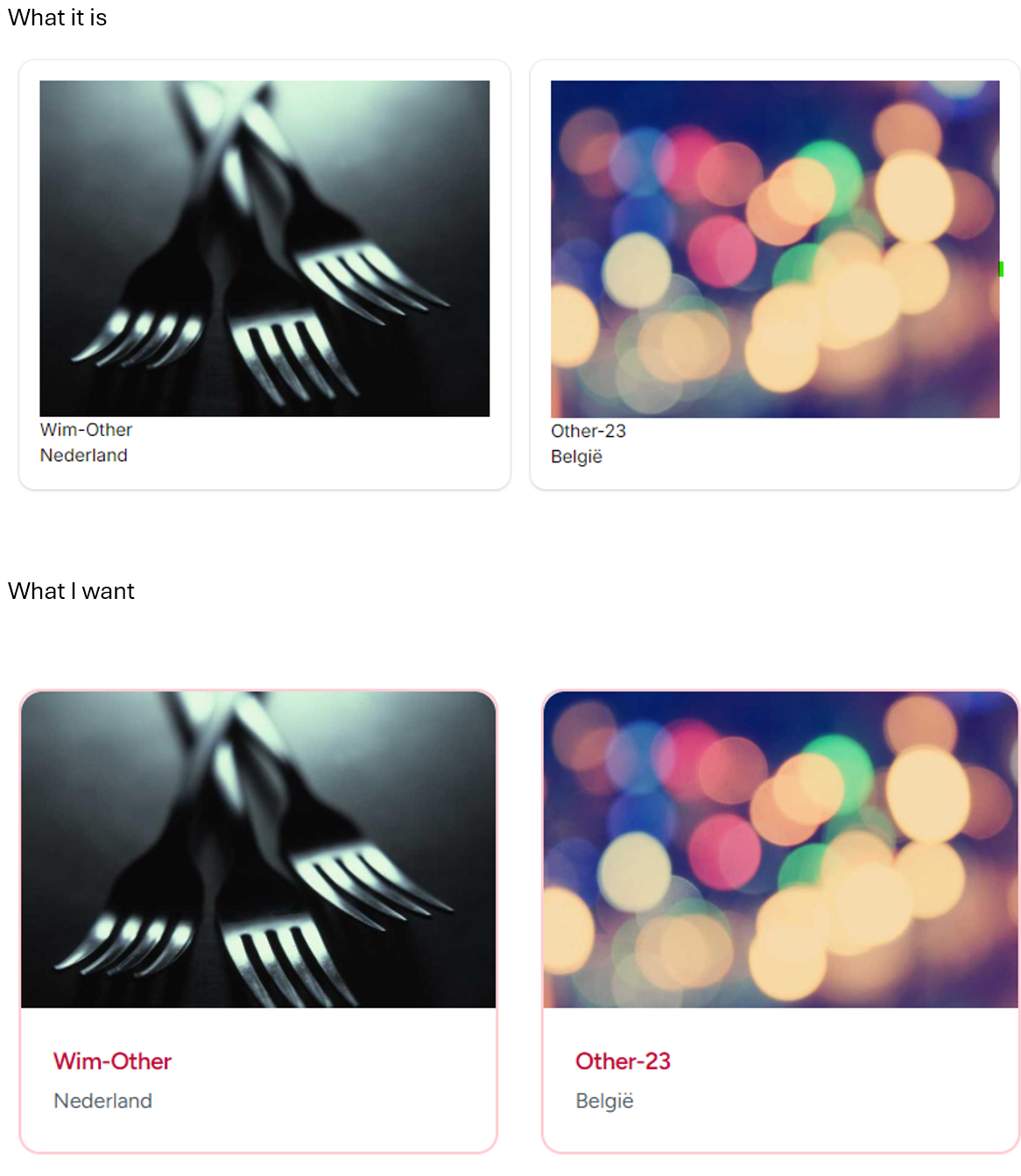
image.png
Filament banner
FilamentJoin
A powerful open source UI framework for Laravel • Build and ship admin panels & apps fast with Livewire
20,307Members
Resources
Was this page helpful?

Similar Threads

Recent Announcements

Similar Threads

toggle grid view
FilamentFFilament / ❓┊help
3y ago
Grid view loses headers
FilamentFFilament / ❓┊help
2y ago
table grid layout
FilamentFFilament / ❓┊help
3y ago
custom table view
FilamentFFilament / ❓┊help
2y ago
