
CSS solution for this
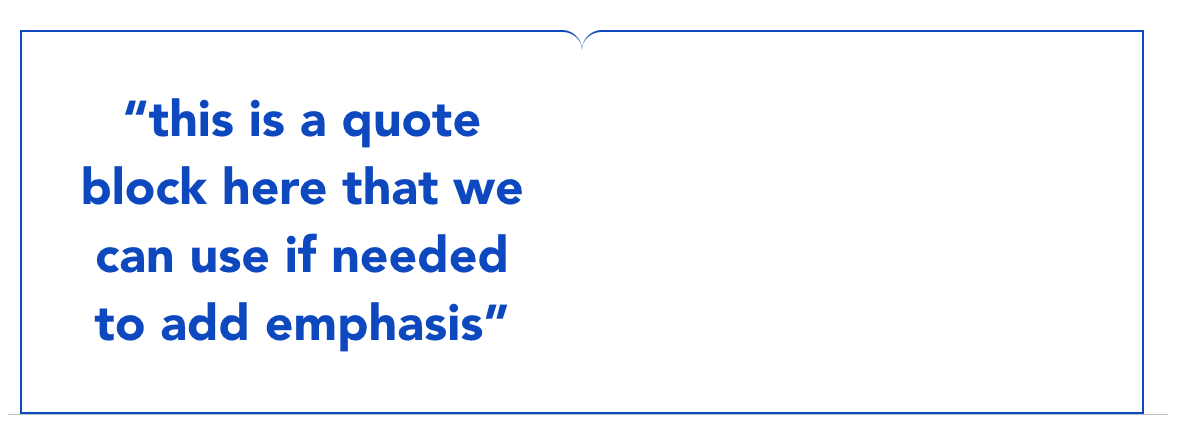
Hey guys, to get the notch in middle I've used two divs with border radius. But now because of that text inside one div wont expand. I can I use css so that the blockquote expands all the the way across ??
CSS:
.callout-box {
display: flex;
justify-content: center;
flex-wrap: wrap;
}
.box {
flex: 1;
padding: 54px;
border: 2px solid #0A5CC7;
min-width: 300px;
}
.box--left {
border-right: none;
border-top-right-radius: 20px;
}
.box--right {
border-left: none;
border-top-left-radius: 20px;
display: flex;
flex-direction: column;
justify-content: center;
}
.box__text {
margin: 0;
}
.cpa-blockquote-holder{
position: relative;
}
.cpa-blockquote{
position: absolute;
margin: 0px;
padding: 0px;
border: none;
right: 27%;
text-align: center;
color: #0A5CC7;
font-family: 'Avenir';
font-style: normal;
font-weight: 900;
font-size: 50px;
line-height: 68px;
}
HTML:
<div class="scaffold-media-box" data-context-menu="insert delete" editable="false" caninsert="false">
<div class="callout-box">
<div class="box box--left">
<blockquote class="cpa-blockquote">“this is a quote block here that we can use if needed to add emphasis”</blockquote>
</div>
<div class="box box--right">
</div>
</div>
</div>
CSS:
.callout-box {
display: flex;
justify-content: center;
flex-wrap: wrap;
}
.box {
flex: 1;
padding: 54px;
border: 2px solid #0A5CC7;
min-width: 300px;
}
.box--left {
border-right: none;
border-top-right-radius: 20px;
}
.box--right {
border-left: none;
border-top-left-radius: 20px;
display: flex;
flex-direction: column;
justify-content: center;
}
.box__text {
margin: 0;
}
.cpa-blockquote-holder{
position: relative;
}
.cpa-blockquote{
position: absolute;
margin: 0px;
padding: 0px;
border: none;
right: 27%;
text-align: center;
color: #0A5CC7;
font-family: 'Avenir';
font-style: normal;
font-weight: 900;
font-size: 50px;
line-height: 68px;
}
HTML:
<div class="scaffold-media-box" data-context-menu="insert delete" editable="false" caninsert="false">
<div class="callout-box">
<div class="box box--left">
<blockquote class="cpa-blockquote">“this is a quote block here that we can use if needed to add emphasis”</blockquote>
</div>
<div class="box box--right">
</div>
</div>
</div>

A friendly place for developers to meet other devs, ask questions, get help, and just have a good time 🙂.
36,263Members
Resources
Was this page helpful?
