TanStackT
TanStack3y ago
6 replies
sacred-rose

How to add a custom class to a specific column header <th> tag?

I'm trying to add a class prop to a specific column header.

columnHelper.accessor((row) => row.id, {
            id: 'id',
            header: () => 'Options',  //<---I was to pass the prop to the header here
            cell: (props) => h(DataTableOptions, { id: props.row.original.id }),
        }),


I'm trying to make the Options column fit the contents of column (see the images for the difference I'm looking for).

I could easily just add the class directly in the HTML but I would like to pass it in as a prop for that one column since I don't want that class in all the other columns.
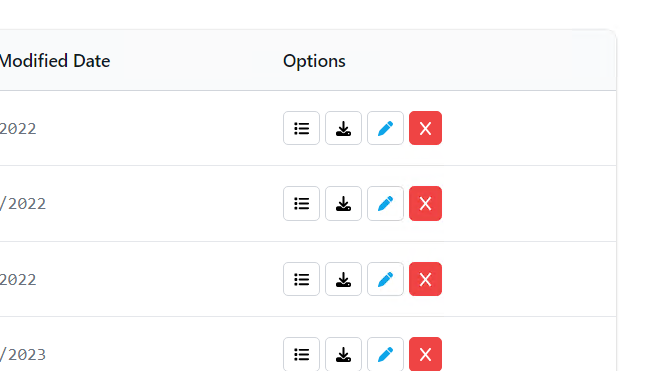
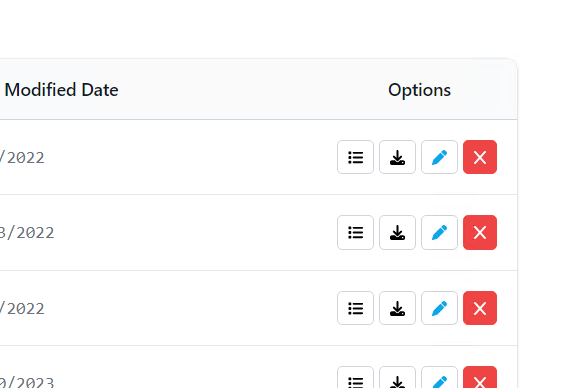
<thead class="bg-gray-50">
    <tr v-for="headerGroup in props.table.getHeaderGroups()" :key="headerGroup.id">
        <th
            v-for="header in headerGroup.headers"
            :key="header.id"
            :colspan="header.colSpan"
            @click="header.column.getToggleSortingHandler()?.($event)"
            class="px-3 py-3.5 text-left text-sm font-semibold text-gray-900 hover:cursor-pointer">
            <template v-if="!header.isPlaceholder">
                <FlexRender :render="header.column.columnDef.header" :props="header.getContext()" />
                {{ { asc: ' ↑', desc: ' ↓' }[header.column.getIsSorted() as string] }}
            </template>
        </th>
    </tr>
</thead>
image.png
image.png
Was this page helpful?
