❔ Reading a process' memory - can't fix the issue
Hi guys,
For the last ~5 hours I've been trying to make a c# application, which will read a process memory and prints that in the console. Just that. Nothing big.
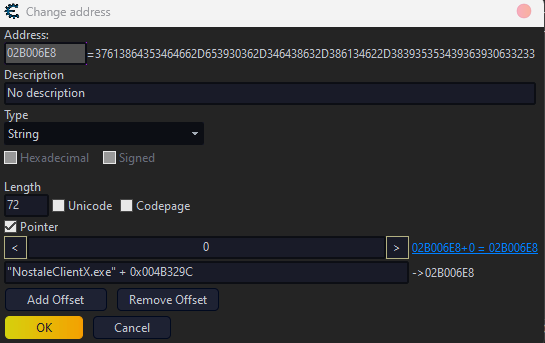
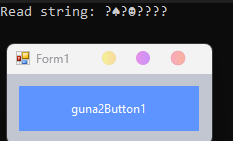
On the screenshot you can see the end-goal. I would like to see that value in the console. The problem is that the code I wrote doesn't work. Same thing with the help of chatGPT (gpt4) and many open-source copy&paste ideas I found on the internet. I simply have no idea what's wrong.
Code I am using:
I've already tried many other ways to handle that but the output is always the same.
I also have the python code...which actually works...and I have no idea why the hell the c# code doesn't work.
part of the python code:
Any ideas what's wrong?
For the last ~5 hours I've been trying to make a c# application, which will read a process memory and prints that in the console. Just that. Nothing big.
On the screenshot you can see the end-goal. I would like to see that value in the console. The problem is that the code I wrote doesn't work. Same thing with the help of chatGPT (gpt4) and many open-source copy&paste ideas I found on the internet. I simply have no idea what's wrong.
Code I am using:
        [DllImport("kernel32.dll")]
        public static extern IntPtr OpenProcess(int dwDesiredAccess, bool bInheritHandle, int dwProcessId);

        [DllImport("kernel32.dll", SetLastError = true)]
        public static extern bool ReadProcessMemory(int hProcess, int lpBaseAddress, byte[] lpBuffer, uint dwSize, out int lpNumberOfBytesRead);

        [DllImport("kernel32.dll")]
        public static extern bool CloseHandle(IntPtr hObject);

        private const int PROCESS_WM_READ = 0x0010;

        public Form1()
        {
            InitializeComponent();
        }

        private void guna2Button1_Click(object sender, EventArgs e)
        {
            try
            {
                Process process = Process.GetProcessesByName("NostaleClientX")[0];
                IntPtr processHandle = OpenProcess(PROCESS_WM_READ, false, process.Id);

                int address = process.MainModule.BaseAddress.ToInt32() + 0x004B329C + 0x0;
                byte[] buffer = new byte[72]; // Adjusted to 72 bytes

                if (ReadProcessMemory((int)processHandle, address, buffer, (uint)buffer.Length, out int bytesRead))
                {
                    string result = Encoding.UTF8.GetString(buffer);
                    Console.WriteLine($"Read string: {result}");
                }

                CloseHandle(processHandle);
            }
            catch (IndexOutOfRangeException)
            {
                Console.WriteLine("The specified process is not running.");
            }
            catch (Exception ex)
            {
                Console.WriteLine($"An error occurred: {ex.Message}");
            }
        }
[DllImport("kernel32.dll")]
public static extern IntPtr OpenProcess(int dwDesiredAccess, bool bInheritHandle, int dwProcessId);
[DllImport("kernel32.dll", SetLastError = true)]
public static extern bool ReadProcessMemory(int hProcess, int lpBaseAddress, byte[] lpBuffer, uint dwSize, out int lpNumberOfBytesRead);
[DllImport("kernel32.dll")]
public static extern bool CloseHandle(IntPtr hObject);
private const int PROCESS_WM_READ = 0x0010;
public Form1()
{
InitializeComponent();
}
private void guna2Button1_Click(object sender, EventArgs e)
{
try
{
Process process = Process.GetProcessesByName("NostaleClientX")[0];
IntPtr processHandle = OpenProcess(PROCESS_WM_READ, false, process.Id);
int address = process.MainModule.BaseAddress.ToInt32() + 0x004B329C + 0x0;
byte[] buffer = new byte[72]; // Adjusted to 72 bytes
if (ReadProcessMemory((int)processHandle, address, buffer, (uint)buffer.Length, out int bytesRead))
{
string result = Encoding.UTF8.GetString(buffer);
Console.WriteLine($"Read string: {result}");
}
CloseHandle(processHandle);
}
catch (IndexOutOfRangeException)
{
Console.WriteLine("The specified process is not running.");
}
catch (Exception ex)
{
Console.WriteLine($"An error occurred: {ex.Message}");
}
}I've already tried many other ways to handle that but the output is always the same.
I also have the python code...which actually works...and I have no idea why the hell the c# code doesn't work.
part of the python code:
def get_pids(process_name):
    pids = []
    for proc in psutil.process_iter(['pid', 'name']):
        if proc.info['name'] == process_name:
            pids.append(proc.info['pid'])
    return pids

def GetPtrAddr(base, offsets):
    addr = pm.read_uint(base)
    for i in offsets:
        if i != offsets[-1]:
            addr = pm.read_uint(addr + i)
        else:
            addr += i
    return addr
def read_value(pm, address, data_type):
    if data_type == 'byte':
        return pm.read_uchar(address)
    elif data_type == 'string':
        return pm.read_bytes(address, 72).decode('utf-8')
    else:
        return None

process_names = ['NostaleClientX.exe']

variables = [
    {"name": "StringValue", "base_address": 0x004B329C, "offsets": [0x0], "data_type": 'string'},
]
while True:
    for process_name in process_names:
        pids = get_pids(process_name)
        for pid in pids:
            try:
                PROCESS_ALL_ACCESS = (0x000F0000 | 0x00100000 | 0xFFF)
                handle = ctypes.windll.kernel32.OpenProcess(PROCESS_ALL_ACCESS, False, pid)
                pm = pymem.Pymem()
                pm.process_handle = handle
                gameModule = pymem.process.module_from_name(pm.process_handle, process_name).lpBaseOfDll
                for variable in variables:
                    try:
                        address = GetPtrAddr(gameModule + variable['base_address'], variable['offsets'])
                        hex_value = read_value(pm, address, variable['data_type'])
                        print(f"{variable['name']} value is {hex_value}")
def get_pids(process_name):
pids = []
for proc in psutil.process_iter(['pid', 'name']):
if proc.info['name'] == process_name:
pids.append(proc.info['pid'])
return pids
def GetPtrAddr(base, offsets):
addr = pm.read_uint(base)
for i in offsets:
if i != offsets[-1]:
addr = pm.read_uint(addr + i)
else:
addr += i
return addr
def read_value(pm, address, data_type):
if data_type == 'byte':
return pm.read_uchar(address)
elif data_type == 'string':
return pm.read_bytes(address, 72).decode('utf-8')
else:
return None
process_names = ['NostaleClientX.exe']
variables = [
{"name": "StringValue", "base_address": 0x004B329C, "offsets": [0x0], "data_type": 'string'},
]
while True:
for process_name in process_names:
pids = get_pids(process_name)
for pid in pids:
try:
PROCESS_ALL_ACCESS = (0x000F0000 | 0x00100000 | 0xFFF)
handle = ctypes.windll.kernel32.OpenProcess(PROCESS_ALL_ACCESS, False, pid)
pm = pymem.Pymem()
pm.process_handle = handle
gameModule = pymem.process.module_from_name(pm.process_handle, process_name).lpBaseOfDll
for variable in variables:
try:
address = GetPtrAddr(gameModule + variable['base_address'], variable['offsets'])
hex_value = read_value(pm, address, variable['data_type'])
print(f"{variable['name']} value is {hex_value}")Any ideas what's wrong?