Working on object detection code for Bee Swarm Simulator
As the title says, I am working on AHK code that can detect any object in the game, and navigate to it using advanced maneuvers (e.g. gliding, jumping) to reach it.
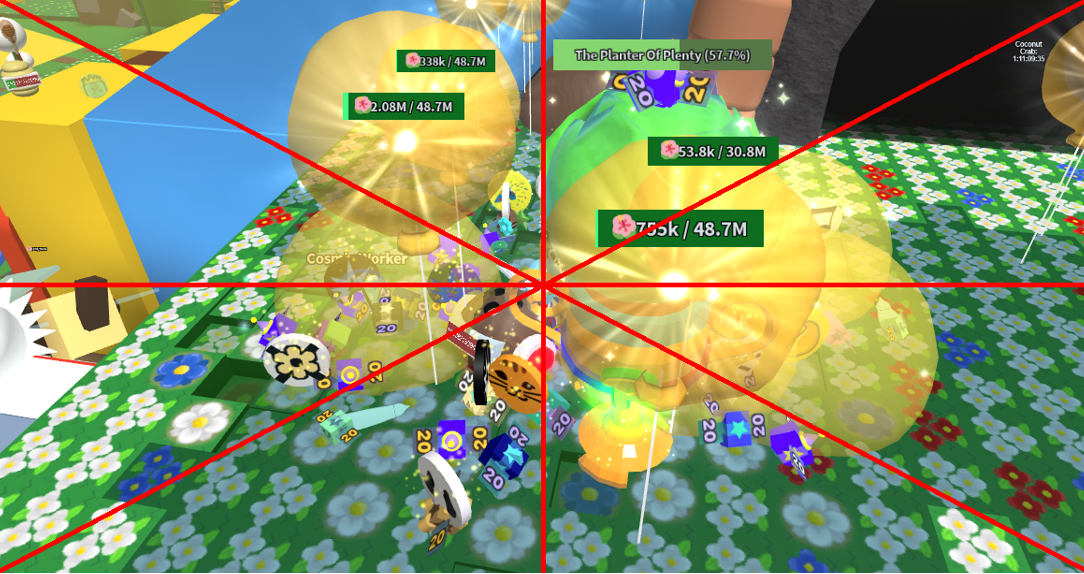
I have started working on the functions that detect where the object is located on screen. As you can see, I have used linear equations (y = mx + c) to calculate the gradients from one corner of the screen to another. I am now trying to find which region of the screen (the triangles that are formed by the lines) the image is located in), and then execute the navigation code (not started yet)
How could I possibly finish this object detection module?
object_bitmaps file:
Main script:
I have started working on the functions that detect where the object is located on screen. As you can see, I have used linear equations (y = mx + c) to calculate the gradients from one corner of the screen to another. I am now trying to find which region of the screen (the triangles that are formed by the lines) the image is located in), and then execute the navigation code (not started yet)
How could I possibly finish this object detection module?
object_bitmaps file:
object_bitmaps["move_test"] := Gdip_BitmapFromBase64("iVBORw0KGgoAAAANSUhEUgAAABUAAAAWCAIAAACg4UBvAAAAAXNSR0IArs4c6QAAAARnQU1BAACxjwv8YQUAAAAJcEhZcwAADsMAAA7DAcdvqGQAAAJcSURBVDhPXVM9bxRBDLVn9hCCSzghPpLLKX8BiQAlCEqCEH8BiYY/QAs9FS09iqgieuDHwIqeS0WUHfPe8+2S4JvzeDzPHvvNrB8dfbYI+yduFuZOZ2r6zi2hJ4kok8uhOYTWWnnoHLc3W/wjSqlLuqCxkqUMMogS6LymgT+itNL5TclahAxoQmGnZBidRsAIy0p1flGR0AWTjElPUrxopCEPEObHx18AREKdlcX9L9hNDAKwT00Y//7t63cuNr5xK3fHjuGF0JGJIsb2rQgDdWFKSzxQ1PIFaU2O1rIVCc7JgyCZXJJ4YpWktUEeOVDIpw9vBdfbSCJo5IrBmUKpaOCg1Onx968P05pgUwwmaqaExepgTCWm4W9ePsUOi9FaUbxjYDuPn33PnSwuYjG/irnyAuFjBv/47pVCWPc0sVc0yg7tR/+r73vtIS8I45NjFyoB/JMbDDpoIZDEEC7Q3nLnwf17y90liREATiJYc6uHD+8oNQ9m1YokCg6hKK1tza/s7d5G7euTk7FeSn326K7q4UXKw2b5lFGbo1WOWbHLs9mlWXfz+iJQstmf01Nl8PriycEY2dgP+gMzev61FlBVu67USvbdW/ji2vbOrRv48H+v18DX548P+FEAJzDrYAr8MgYfmL4xaFKOwXO3t+b7q9XQrJAuUY1BGkmgDSBCJOau9iDyZPcqeX+1xGWMnInezZI8w8kOAaVw0oXp82Wp1buugozESzOIPx6AaBkx5IPHhWy0Bg285NK5dSXAMF4bjGJ4IXgL4HKwOOPgq4GNLNCwz7Cl0dyGvzCUB1SCmvdjAAAAAElFTkSuQmCC")
(move_test is the name of the image, located in the nm_image_assets folder. It has been encoded into Base64 format)
object_bitmaps["move_test"] := Gdip_BitmapFromBase64("iVBORw0KGgoAAAANSUhEUgAAABUAAAAWCAIAAACg4UBvAAAAAXNSR0IArs4c6QAAAARnQU1BAACxjwv8YQUAAAAJcEhZcwAADsMAAA7DAcdvqGQAAAJcSURBVDhPXVM9bxRBDLVn9hCCSzghPpLLKX8BiQAlCEqCEH8BiYY/QAs9FS09iqgieuDHwIqeS0WUHfPe8+2S4JvzeDzPHvvNrB8dfbYI+yduFuZOZ2r6zi2hJ4kok8uhOYTWWnnoHLc3W/wjSqlLuqCxkqUMMogS6LymgT+itNL5TclahAxoQmGnZBidRsAIy0p1flGR0AWTjElPUrxopCEPEObHx18AREKdlcX9L9hNDAKwT00Y//7t63cuNr5xK3fHjuGF0JGJIsb2rQgDdWFKSzxQ1PIFaU2O1rIVCc7JgyCZXJJ4YpWktUEeOVDIpw9vBdfbSCJo5IrBmUKpaOCg1Onx968P05pgUwwmaqaExepgTCWm4W9ePsUOi9FaUbxjYDuPn33PnSwuYjG/irnyAuFjBv/47pVCWPc0sVc0yg7tR/+r73vtIS8I45NjFyoB/JMbDDpoIZDEEC7Q3nLnwf17y90liREATiJYc6uHD+8oNQ9m1YokCg6hKK1tza/s7d5G7euTk7FeSn326K7q4UXKw2b5lFGbo1WOWbHLs9mlWXfz+iJQstmf01Nl8PriycEY2dgP+gMzev61FlBVu67USvbdW/ji2vbOrRv48H+v18DX548P+FEAJzDrYAr8MgYfmL4xaFKOwXO3t+b7q9XQrJAuUY1BGkmgDSBCJOau9iDyZPcqeX+1xGWMnInezZI8w8kOAaVw0oXp82Wp1buugozESzOIPx6AaBkx5IPHhWy0Bg285NK5dSXAMF4bjGJ4IXgL4HKwOOPgq4GNLNCwz7Cl0dyGvzCUB1SCmvdjAAAAAElFTkSuQmCC")
(move_test is the name of the image, located in the nm_image_assets folder. It has been encoded into Base64 format)Main script:
#include %A_ScriptDir%\lib\Gdip_All.ahk
#Include %A_ScriptDir%\lib\Gdip_ImageSearch.ahk
#Include %A_ScriptDir%\lib\WinGetClientPos.ahk

SetWorkingDir, %A_ScriptDir%

if (!pToken := Gdip_Startup())
   MsgBox, Failed to start GDIP!

global object_bitmaps := {}

#Include %A_ScriptDir%\object_bitmaps.ahk

DisableToolUse := true

FwdKey:="sc011" ; w
LeftKey:="sc01e" ; a
BackKey:="sc01f" ; s
RightKey:="sc020" ; d

WinActivate, Roblox

winUp := windowHeight // 2.14, winDown := windowHeight // 1.88
winLeft := windowWidth // 2.14, winRight := windowWidth // 1.88

nm_moveToObject("move_test")

nm_moveToObject(img_name){
    global

    WinGetClientPos(windowX, windowY, windowWidth, windowHeight, "ahk_id " GetRobloxHWND())

    pBMScreen := Gdip_BitmapFromScreen(windowX "|" windowY "|" windowWidth "|" windowHeight)

    img := Gdip_ImageSearch(pBMScreen, object_bitmaps[img_name], pos, , , , , 5)

    x := SubStr(pos, 1, InStr(pos, ",") - 1), y := SubStr(pos, InStr(pos, ",") + 1)

    gradient1 := calcGradient("topright")
    gradient2 := calcGradient("bottomright")
    gradient3 := calcGradient("vertical")
    gradient4 := calcGradient("horizontal")

    centerVertical := windowWidth // 2
    centerHorizontal := windowHeight // 2

    intercept1 := ((centerHorizontal - centerVertical) * gradient1)
    intercept2 := ((centerHorizontal - centerVertical) * gradient2)

    yPos1 := (gradient1 * x) + intercept1
    yPos2 := (gradient2 * x) + intercept2

    MsgBox, %yPos1%, %yPos2%

    Gdip_DisposeImage(pBMScreen)
}

calcGradient(dir){
    global
    WinGetClientPos(windowX, windowY, windowWidth, windowHeight, "ahk_id " GetRobloxHWND())

    if (dir == "topright"){
        y2 := windowX
        y1 := windowHeight
        x2 := windowWidth
        x1 := windowX

        y := (y2 - y1)
        x := (x2 - x1)
    }
    if (dir == "bottomright")
    {
        y2 := windowHeight
        y1 := windowX
        x2 := windowWidth
        x1 := windowX

        y := (y2 - y1)
        x := (x2 - x1)
    }

    return y / x
}
#include %A_ScriptDir%\lib\Gdip_All.ahk
#Include %A_ScriptDir%\lib\Gdip_ImageSearch.ahk
#Include %A_ScriptDir%\lib\WinGetClientPos.ahk
SetWorkingDir, %A_ScriptDir%
if (!pToken := Gdip_Startup())
MsgBox, Failed to start GDIP!
global object_bitmaps := {}
#Include %A_ScriptDir%\object_bitmaps.ahk
DisableToolUse := true
FwdKey:="sc011" ; w
LeftKey:="sc01e" ; a
BackKey:="sc01f" ; s
RightKey:="sc020" ; d
WinActivate, Roblox
winUp := windowHeight // 2.14, winDown := windowHeight // 1.88
winLeft := windowWidth // 2.14, winRight := windowWidth // 1.88
nm_moveToObject("move_test")
nm_moveToObject(img_name){
global
WinGetClientPos(windowX, windowY, windowWidth, windowHeight, "ahk_id " GetRobloxHWND())
pBMScreen := Gdip_BitmapFromScreen(windowX "|" windowY "|" windowWidth "|" windowHeight)
img := Gdip_ImageSearch(pBMScreen, object_bitmaps[img_name], pos, , , , , 5)
x := SubStr(pos, 1, InStr(pos, ",") - 1), y := SubStr(pos, InStr(pos, ",") + 1)
gradient1 := calcGradient("topright")
gradient2 := calcGradient("bottomright")
gradient3 := calcGradient("vertical")
gradient4 := calcGradient("horizontal")
centerVertical := windowWidth // 2
centerHorizontal := windowHeight // 2
intercept1 := ((centerHorizontal - centerVertical) * gradient1)
intercept2 := ((centerHorizontal - centerVertical) * gradient2)
yPos1 := (gradient1 * x) + intercept1
yPos2 := (gradient2 * x) + intercept2
MsgBox, %yPos1%, %yPos2%
Gdip_DisposeImage(pBMScreen)
}
calcGradient(dir){
global
WinGetClientPos(windowX, windowY, windowWidth, windowHeight, "ahk_id " GetRobloxHWND())
if (dir == "topright"){
y2 := windowX
y1 := windowHeight
x2 := windowWidth
x1 := windowX
y := (y2 - y1)
x := (x2 - x1)
}
if (dir == "bottomright")
{
y2 := windowHeight
y1 := windowX
x2 := windowWidth
x1 := windowX
y := (y2 - y1)
x := (x2 - x1)
}
return y / x
}