TanStackT
TanStack2y ago
4 replies
sacred-rose

Main Route in Outlet

Hello I am trying to figure out how to achieve something that should be simple but maybe I am making it more complicated than it actually is my "main" page is in a "dashboard" folder.

The Route.tsx file is the file which is protected by auth and it has the Outlet that will render all the other pages of the dashboard. The problem is that the "route" is actually empty so if I go to "/dashboard" is empty while if I go to "/dashboard/beni-assicurati" it has the content of the Outlet, and I want "/dashboard/beni-assicuratI" to be the first page that the user see. The problem is that if I do a redirect in Route.tsx to "/dashboard/beni-assicurati" the app crashes as I think I am creating a loop.
export const Route = new FileRoute("/dashboard").createRoute({
  beforeLoad: ({ context }) => {
    const ctx = context as typeof store;
    const { data } = ctx.getState().app.user;
    if (!data) {
      throw redirect({
        to: "/login",
        search: {
          redirect: location.href,
        },
      });
    }
  },

  // IF I DO ANOTHER REDIRECT HERE I CREATE A LOOP AND THE WEBSITE CRASH

  component: Dashboard,
});

export default function Dashboard() {
  return (
    // SHOULD THIS BE A _layout? 
    <Box className="main">
      <Header />
      <HStack>
        <Sidebar />
        <Box
          className="main-content"
          px={48}
          py={56}
          h="full"
          alignSelf="flex-start"
        >
          <Outlet /> 
        </Box>
      </HStack>
    </Box>
  );
}


Is there a better pattern that can I use?
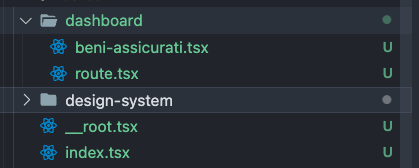
Screenshot_2024-01-24_at_00.48.56.png
Was this page helpful?
