48 Replies
kaplumbanecdet
public partial class MainWindow : Window { public string Text { get; set; } public bool isVisible { get; set; } public string Guess { get; set; } private int randomNumber; public MainWindow() { InitializeComponent(); DataContext = this; isVisible = false; Guess = string.Empty; Random myNumber = new Random(); int randomNumber = myNumber.Next(1, 10); } private void TextBox_TextChanged(object sender, TextChangedEventArgs e) { Debug.Write(randomNumber); try { int guessNum = int.Parse(Guess); if (guessNum == randomNumber) { Text = "You win"; isVisible = true; } else { Text = string.Empty; isVisible = false; } } catch (FormatException) { MessageBox.Show("invalid format please enter a number"); } } } } Here is the markup: <WrapPanel> <TextBlock Text="Number: " FontSize="25"></TextBlock> <TextBox Text="{Binding Guess}" Width="140" TextChanged="TextBox_TextChanged"></TextBox> </WrapPanel> <WrapPanel Margin="0, 10, 0, 0"> <TextBlock Text ="{Binding Text}" Visibility="{Binding isVisible}" Width="150" FontSize="25"></TextBlock> </WrapPanel>
Buddy
Buddy2y ago
$code
MODiX
MODiXOP2y ago
To post C# code type the following: ```cs // code here ``` Get an example by typing $codegif in chat For longer snippets, use: https://paste.mod.gg/
Buddy
Buddy2y ago
Avoid using Parse but prefer TryParse $tryparse
MODiX
MODiXOP2y ago
When you don't know if a string is actually a number when handling user input, use int.TryParse (or variants, e.g. double.TryParse)
if(int.TryParse("123", out int number))
{
var total = number + 1;
Console.WriteLine(total); // output: 124
}
if(int.TryParse("123", out int number))
{
var total = number + 1;
Console.WriteLine(total); // output: 124
}
TryParse returns a bool, where true indicates successful parsing. Remarks: - Avoid int.Parse if you do not know if the value parsed is definitely a number. - Avoid Convert.ToInt32 entirely, this is an older method and Parse should be preferred where you know the string can be parsed. Read more here
Dellibrov
Dellibrov2y ago
Bu arada Random.Shared.Next kullanmanı öneririm Her seferinde Random nesnesi oluşturmana gerek kalmaz
kaplumbanecdet
did it problem is probably Guess isn't a string or i dunno if (int.TryParse(Guess, out int guessNum)) { Debug.WriteLine(guessNum); } else { MessageBox.Show("Couldn't parse"); } it goes the else path
Dellibrov
Dellibrov2y ago
Guess string mi ? int.TryParse()'ın ilk parametresi string alıyor diye biliyorum
kaplumbanecdet
TextBox texti bindladım string olması gerekmiyor mu
Dellibrov
Dellibrov2y ago
TextBox, TextBox'tır TextBox.Text, string
kaplumbanecdet
<TextBox Text="{Binding Guess}" Width="140" TextChanged="TextBox_TextChanged"></TextBox>
Dellibrov
Dellibrov2y ago
WPF unutmasaydım iyiydi be
kaplumbanecdet
Guessi yanlış mı bindladım diyorum da public string Guess { get; set; } yapmışım anlamadım
Dellibrov
Dellibrov2y ago
Bakıyorum şimdi 1 dk @naber top denemedim ama
<TextBox x:Name="GuessTextBox" Width="200" Margin="10" VerticalAlignment="Center" Text="{Binding GuessedNumber}"/>
Bu kısım böyle Buton da böyle
<Button Content="Click Me" Width="100" Height="30" Margin="10" VerticalAlignment="Center" Click="Button_Click"/>
kaplumbanecdet
buton yok
Dellibrov
Dellibrov2y ago
private void Button_Click(object sender, RoutedEventArgs e)
{
if (int.TryParse(GuessTextBox.Text, out var guess))
{
Debug.WriteLine($"Guess: {guess}");
}
else
{
Debug.WriteLine("Invalid input");
}
}
private void Button_Click(object sender, RoutedEventArgs e)
{
if (int.TryParse(GuessTextBox.Text, out var guess))
{
Debug.WriteLine($"Guess: {guess}");
}
else
{
Debug.WriteLine("Invalid input");
}
}
kaplumbanecdet
xd
Dellibrov
Dellibrov2y ago
çalışıyor olması lazım bakayım
kaplumbanecdet
synclemeye çalışıyorum öğrenim diye
Dellibrov
Dellibrov2y ago
Denedim çalışıyor
kaplumbanecdet
butonla yapınca bende de oldu textboxtaki inputu gerçek zamanlı nası kontrol ederim
Dellibrov
Dellibrov2y ago
IPropertyChanged kullanman lazım
kaplumbanecdet
Text="{Binding Guess, UpdateSourceTrigger=PropertyChanged}" şöyle mi yoksa methodda mı
Dellibrov
Dellibrov2y ago
bakayım 1 dk yaptımda
kaplumbanecdet
bunu ekleyince düzeldi ama zaten bindlar çalışmıyormuş
Dellibrov
Dellibrov2y ago
baya zorlandım lan
kaplumbanecdet
if (guessNum == randomNumber) { Debug.WriteLine("You win"); Text = "You win"; isVisible = true; }
Dellibrov
Dellibrov2y ago
public partial class MainWindow : INotifyPropertyChanged
{
private string _textBoxText = string.Empty;

public MainWindow()
{
InitializeComponent();
DataContext = this;
}

public string TextBoxText
{
get => _textBoxText;

set
{
if (_textBoxText == value)
{
return;
}

_textBoxText = value;
OnPropertyChanged();
OnPropertyChanged(nameof(WindowTitle));
}
}

public string WindowTitle => $"Main Window - {TextBoxText}";

public event PropertyChangedEventHandler PropertyChanged;

private void OnPropertyChanged([CallerMemberName] string propertyName = null)
{
PropertyChanged?.Invoke(this, new PropertyChangedEventArgs(propertyName));
}
}
public partial class MainWindow : INotifyPropertyChanged
{
private string _textBoxText = string.Empty;

public MainWindow()
{
InitializeComponent();
DataContext = this;
}

public string TextBoxText
{
get => _textBoxText;

set
{
if (_textBoxText == value)
{
return;
}

_textBoxText = value;
OnPropertyChanged();
OnPropertyChanged(nameof(WindowTitle));
}
}

public string WindowTitle => $"Main Window - {TextBoxText}";

public event PropertyChangedEventHandler PropertyChanged;

private void OnPropertyChanged([CallerMemberName] string propertyName = null)
{
PropertyChanged?.Invoke(this, new PropertyChangedEventArgs(propertyName));
}
}
bu kısım şöyle
<TextBox x:Name="InputTextBox" Width="200" Margin="10" VerticalAlignment="Center" Text="{Binding TextBoxText, UpdateSourceTrigger=PropertyChanged}"/>
kaplumbanecdet
textBlock'u değiştiremiyorum şimdi buraları hallettim galiba if (guessNum == randomNumber) { Debug.WriteLine("You win"); Text = "You win"; isVisible = true; } buraya kadar atıyo ama Text ve isVisible hiçbir işe yaramıyo
Dellibrov
Dellibrov2y ago
Bu kod neyin içinde çalışıyor?
kaplumbanecdet
textchanged methodu
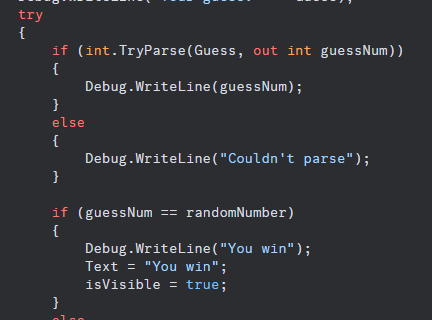
private void TextBox_TextChanged(object sender, TextChangedEventArgs e)
{
Debug.WriteLine("Random Number: " + randomNumber);
Debug.WriteLine("Your guess: " + Guess);
try
{
if (int.TryParse(Guess, out int guessNum))
{
Debug.WriteLine(guessNum);
}
else
{
Debug.WriteLine("Couldn't parse");
}

if (guessNum == randomNumber)
{
Debug.WriteLine("You win");
Text = "You win";
isVisible = true;
}
else
{
Debug.WriteLine("You lose.");
Text = string.Empty;
isVisible = false;
}
}
catch (FormatException)
{
MessageBox.Show("invalid format please enter a number");
}

}
private void TextBox_TextChanged(object sender, TextChangedEventArgs e)
{
Debug.WriteLine("Random Number: " + randomNumber);
Debug.WriteLine("Your guess: " + Guess);
try
{
if (int.TryParse(Guess, out int guessNum))
{
Debug.WriteLine(guessNum);
}
else
{
Debug.WriteLine("Couldn't parse");
}

if (guessNum == randomNumber)
{
Debug.WriteLine("You win");
Text = "You win";
isVisible = true;
}
else
{
Debug.WriteLine("You lose.");
Text = string.Empty;
isVisible = false;
}
}
catch (FormatException)
{
MessageBox.Show("invalid format please enter a number");
}

}
Dellibrov
Dellibrov2y ago
Bir de şöyle bir şey var int.TryParse kısmını loopa alman lazım 2 kere yanlış girerse gene çalışmaz Başka bir methoda refactor et
kaplumbanecdet
niye ki her yazı girdiğinde bu event handler çalışmıyor mu ya da sildiğimde
Dellibrov
Dellibrov2y ago
No description
Dellibrov
Dellibrov2y ago
Parse edemezse else'e düşüyor ama bu sefer guessNum ne?
kaplumbanecdet
he anladım yukarı atamıyor muyuz c++taki gibi elsein içinde
Dellibrov
Dellibrov2y ago
goto mu?
kaplumbanecdet
öyle bir şeydi galiba
Dellibrov
Dellibrov2y ago
c++ çok bilmiyorum
kaplumbanecdet
pointerı yukarı çekiyordu ben de reverse yaptığım kadarıyla hatırlıyorum
Dellibrov
Dellibrov2y ago
goto ile de olur ama do while daha iyi ya
kaplumbanecdet
okey öyle yapayım TryParse'ı başka bir methoda çekicem dimi diğerini değil win condition olanı
Dellibrov
Dellibrov2y ago
Sadece TryParse'ı
kaplumbanecdet
bunu yaptığımda yine o method bir şey returnleyecek yine boşa düşmeyecek mi guessNum? eğer parselayamazsa
Dellibrov
Dellibrov2y ago
Evet başa dönecek Dönmesi lazım zaten
kaplumbanecdet
he tamam tamam ben if'te takılı kaldım do whilela çözeriz onu
Dellibrov
Dellibrov2y ago
neyse ben kaçtım yarın bakarım
kaplumbanecdet
okey görüşürüz

Did you find this page helpful?