
How to display value or data in HTML with Javascript
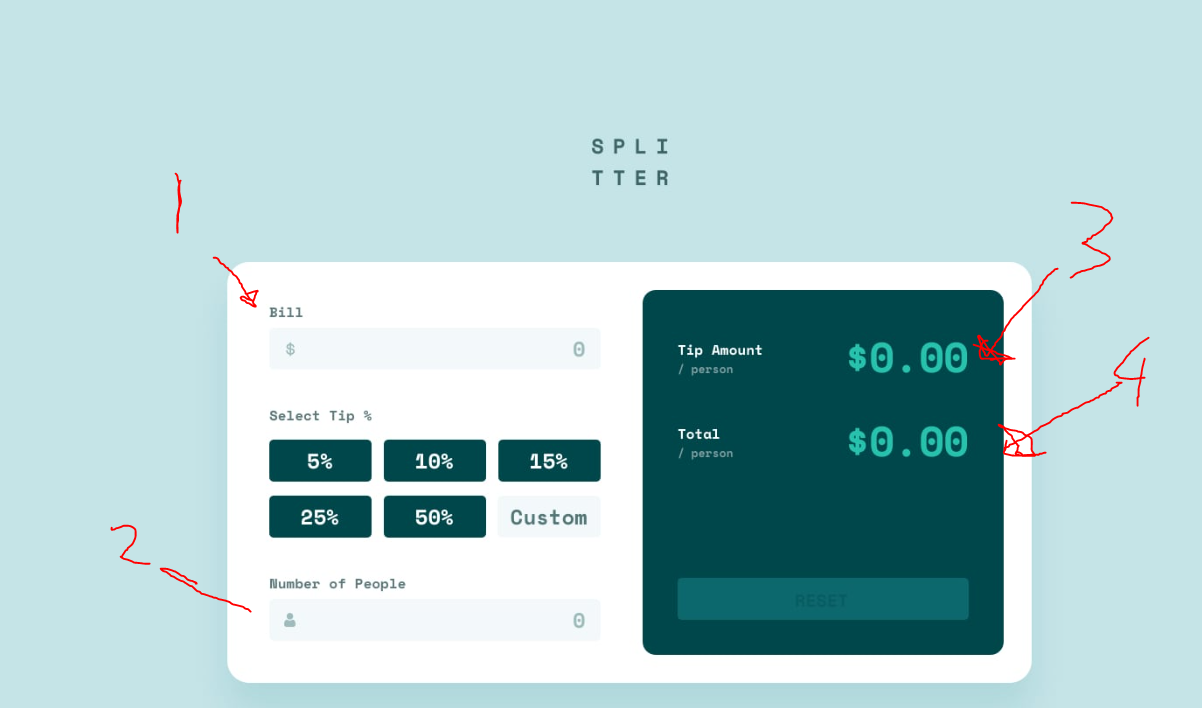
I'm currently struggling with displaying values in HTML. I'm recreating the tip calculator as seen in the image linked below, i've marked the parts to show which labels/inputs im talking about. For now im not using the tip buttons since im mostly focussed on learning how to use the DOM and displaying/working with values that way. This also means the totalAmount is empty since its the same as the bill as there are no tips calculated.
1 The input label called "Bill"
2 The input label called "amountOfPeople"
3 the div was which has <div> 0, 00 </div> in it, which is called "totalPerPerson"
4 the div was which has <div> 0, 00 </div> in it, which is called "totalAmount"
Planning/Flowcharting
1 Put a value in the input label bill
2 obtain/store this value
3 Put a value in the input label amountOfPeople
4 obtain/store this value
5 calculate the formula by adding bill + amountOfPeople
6 store the result of the formula
7 display the formula in the totalPerPerson div, replacing the 0,00
8 display the formula in the totalAmount div, replacing the 0,00
Code
My question is, how can i make it work in the way that if i type the price and amount in both input fields, it automatically shows up in the div without having to use buttons to submit or statically display the value. it not about making the calculator work but more so about the syntax/ways to display or work with the data
1 The input label called "Bill"
2 The input label called "amountOfPeople"
3 the div was which has <div> 0, 00 </div> in it, which is called "totalPerPerson"
4 the div was which has <div> 0, 00 </div> in it, which is called "totalAmount"
Planning/Flowcharting
1 Put a value in the input label bill
2 obtain/store this value
3 Put a value in the input label amountOfPeople
4 obtain/store this value
5 calculate the formula by adding bill + amountOfPeople
6 store the result of the formula
7 display the formula in the totalPerPerson div, replacing the 0,00
8 display the formula in the totalAmount div, replacing the 0,00
Code
My question is, how can i make it work in the way that if i type the price and amount in both input fields, it automatically shows up in the div without having to use buttons to submit or statically display the value. it not about making the calculator work but more so about the syntax/ways to display or work with the data

A friendly place for developers to meet other devs, ask questions, get help, and just have a good time 🙂.
36,263Members
Resources
Was this page helpful?
