Miku-Tideshift
Miku-TideShift
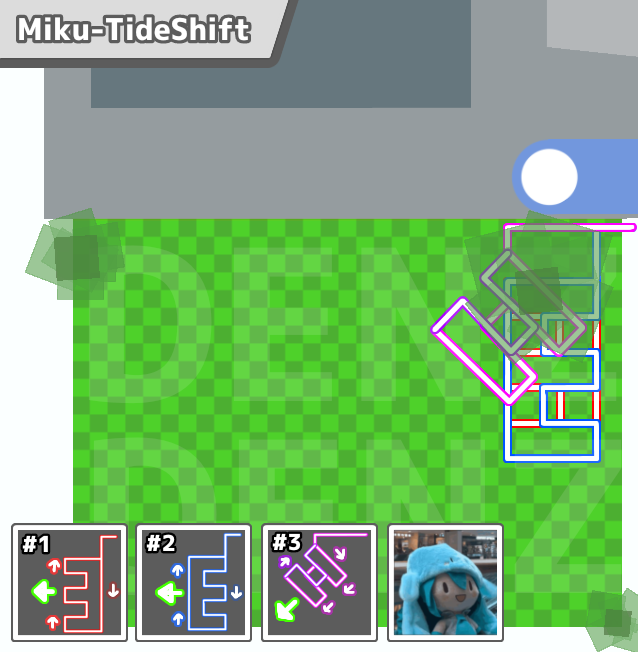
Description: This is a better version of Kirara-TideShift with bug fixes and Camera Rotation, Which is compatible with Natro Macro 1.0.0.1+ and not lower than version 0.9.9.3.
This pattern has an (E, Ǝ and H) shaped collection and uses a corner alignment.
How to use Miku-TideShift: This pattern has a feature that makes Cycles/Reps (How many times it goes in the shape before re-aligning to the corner) Ranging from 1-9, You can modify it with the [Width] found besides [Pattern Shape].
Notes:
* This pattern will start near the center of the build and you don't need to worry about if it will eventually make a way towards the corner.
* Camera faces on Hives/Rose Field and faces Camera in Cactus Afterwards.
* Requires Shift Lock
* Doesn't require drift comp on.
* Recommended to use 5 (if Drifting) or 7 Cycles/Reps for the [Width]
* Recommended with Tide Popper or Petal Wand.
* Highly recommended to have ATLEAST 25+ Fps to avoid the possibility of Drifting out of the field.
* Have Supreme Saturator.
Pinetree info: This pattern collects in the corner of Pinetree and closely under the tree and rotates the camera by 45° angle to maximize popping bubbles.
Credits: Huge thanks towards Testers ,BSGH and More!
Importants:
* Remember to use "Original wf-pinetree Path" if you replaced the "wf-pinetree Path (from redux)" before, Since Miku-TideShift only works with "Original wf-pinetree".
* If you can't fix the "wf-pinetree path" just reinstall Natro Macro.
* Copy the settings PROPERLY before asking why the pattern is not working as intended.
Made By: @Soup / denz_777
Description: This is a better version of Kirara-TideShift with bug fixes and Camera Rotation, Which is compatible with Natro Macro 1.0.0.1+ and not lower than version 0.9.9.3.
This pattern has an (E, Ǝ and H) shaped collection and uses a corner alignment.
How to use Miku-TideShift: This pattern has a feature that makes Cycles/Reps (How many times it goes in the shape before re-aligning to the corner) Ranging from 1-9, You can modify it with the [Width] found besides [Pattern Shape].
Notes:
* This pattern will start near the center of the build and you don't need to worry about if it will eventually make a way towards the corner.
* Camera faces on Hives/Rose Field and faces Camera in Cactus Afterwards.
* Requires Shift Lock
* Doesn't require drift comp on.
* Recommended to use 5 (if Drifting) or 7 Cycles/Reps for the [Width]
* Recommended with Tide Popper or Petal Wand.
* Highly recommended to have ATLEAST 25+ Fps to avoid the possibility of Drifting out of the field.
* Have Supreme Saturator.
Pinetree info: This pattern collects in the corner of Pinetree and closely under the tree and rotates the camera by 45° angle to maximize popping bubbles.
Credits: Huge thanks towards Testers ,BSGH and More!
Importants:
* Remember to use "Original wf-pinetree Path" if you replaced the "wf-pinetree Path (from redux)" before, Since Miku-TideShift only works with "Original wf-pinetree".
* If you can't fix the "wf-pinetree path" just reinstall Natro Macro.
* Copy the settings PROPERLY before asking why the pattern is not working as intended.
Made By: @Soup / denz_777

Miku-TideShift.ahk2.43KB