Kevin Powell - CommunityKP-C
Kevin Powell - Community17mo ago
5 replies
vic

need help in grid and flex css in responsive

Codepen :

https://codepen.io/Vicky-clowdy/pen/Bagejre

<div id='container'>  
        <div id='header'>
            <p>Tomato</p>
         </div>
        <div id='input'>
            <input type='text' />
         </div>
        <div id='buttons'>
            <button> button1 </button>
            <button> button2 </button>
         </div>
</div>


#container {
    background-color: white;
    min-height: 15dvh;
    max-height: 20dvh;
    height: auto;
    width: 100%;
    margin: auto;
    display: flex;
    justify-content: space-around;
    align-items: center;
    flex-direction: row;
}

#header {
    color: black;
    font-weight: bold;
    font-size: 30px;
    transform: skewX(-15deg);
}
#input input{

    width: 300px;
    height: 50px;
    padding-left: 50px;
    outline: none;
    border: 1px solid black;
    border-left: unset;
}
#buttons{
    display: flex;
    flex-direction: row;
    justify-content: space-evenly;
    width: 20%;
}


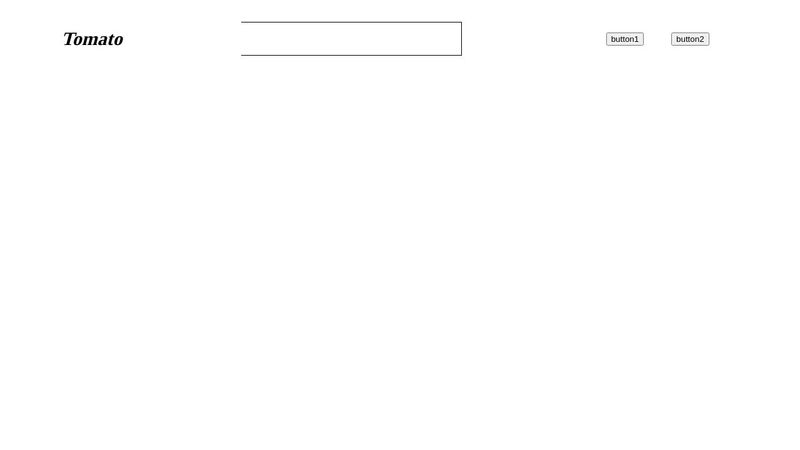
So it wil be like :

Tomato input box button1 button2

But now in resposnive i want it to like this :

Tomato button1 button2
input box

@media screen and (min-width:320px) and (max-width:480px) {
    #container {
        background-color: white;
        min-height: 15dvh;
        max-height: 20dvh;
        height: auto;
        width: 100%;
        display: grid;
        grid-template-columns: 1fr 1fr;
        grid-template-rows: auto auto;
    }
    #header {
        grid-column: 1;
        display: inline;
    }
    #buttons {
        grid-column: 2;
        display: flex;
        flex-direction: row;
        justify-content: space-around;
        align-items: center;
        background-color: green;
    }
    #input {
        grid-row: 2;
    }
}


the buttons goes beyond that 100% width
Was this page helpful?
