Change base path when self hosting
Hi,
I followed https://supabase.com/docs/guides/self-hosting/docker, and managed to get it working just fine.
I prefer not to mess up with kong so i have added a simple nginx container to the compose to manage https certs. This config works just fine
I do not want supabase to run on /, I will host my react app on /
So in order to do this I have updated the location as following
I decently familiar with nginx, I am used to do this whenever i want to rewrite the path.
Ok so now navigating to https://mydomain/supabase, redirects to to https://mydomain/projects/default. This i can understand.
https://mydomain/supabase is calling kong that returns a 301 on https://mydomain/projects/default that is blocked by nginx so i receive a 502.
I suppose that this could be fixed messing up with kong but it's not that important.
If i navigate instead directly to https://mydomain/supabase/projects/default the GET works and the HTML is received but every other subsequent api call fails.
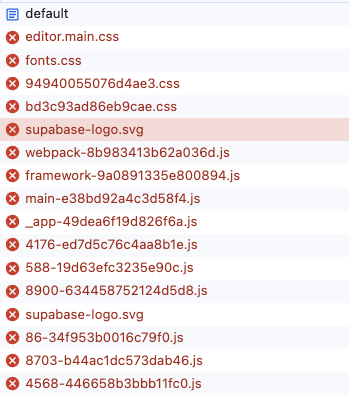
This is because supabase studio SPA is trying to reach resources still on https://mydomain and not https://mydomain/supabase.
I have attached an image of this.
So after all of this I saw that studio has some variables like
I tried changing all of this in my compose but result is the same.
Any idea on this?
Thanks
I followed https://supabase.com/docs/guides/self-hosting/docker, and managed to get it working just fine.
I prefer not to mess up with kong so i have added a simple nginx container to the compose to manage https certs. This config works just fine
I do not want supabase to run on /, I will host my react app on /
So in order to do this I have updated the location as following
I decently familiar with nginx, I am used to do this whenever i want to rewrite the path.
Ok so now navigating to https://mydomain/supabase, redirects to to https://mydomain/projects/default. This i can understand.
https://mydomain/supabase is calling kong that returns a 301 on https://mydomain/projects/default that is blocked by nginx so i receive a 502.
I suppose that this could be fixed messing up with kong but it's not that important.
If i navigate instead directly to https://mydomain/supabase/projects/default the GET works and the HTML is received but every other subsequent api call fails.
This is because supabase studio SPA is trying to reach resources still on https://mydomain and not https://mydomain/supabase.
I have attached an image of this.
So after all of this I saw that studio has some variables like
I tried changing all of this in my compose but result is the same.
Any idea on this?
Thanks