
Alignment issue: Extra space on the left and right side of a horizontal list when stacked.
https://codepen.io/Mcoding-300/pen/NPWKJMK this preview may show the list vertically but it actually looks horizontal in browsers
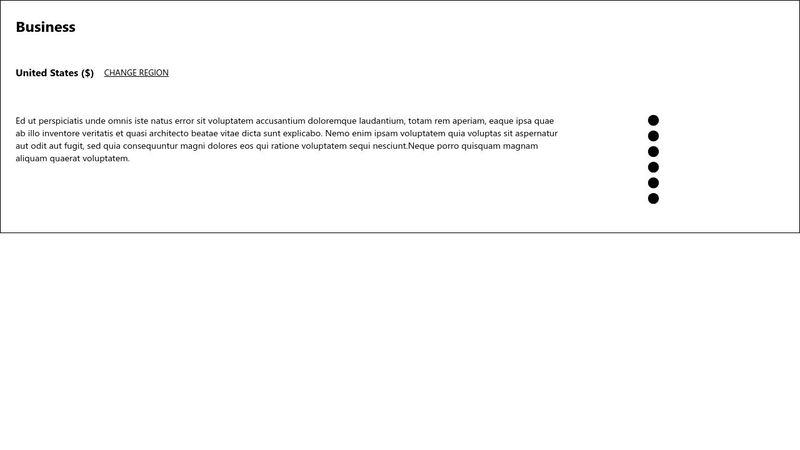
I placed a border around a list of (what will be icons when I'm done getting alignment right) to observe how much space the list may have on the left and right sides of itself
1) How do I get this list to stack without the extra space on the left side so that it lines up with the items above it when the screen is reduced for smaller screen sizes?
I've used a media query. I’ve also tried removing all padding and margins from the left of it by setting to 0 as you can see in my code.
2) When my screen is reduced horizontally for smaller screens, I can tell there's a lot of space on the right side of my paragraph. How do I get rid of that?
(I realize part of it might come from space around the list on the right side but I'm not sure how to get rid of that either.
I've tried removing all padding and margins from the right of it by setting to 0 as you can see also).
If you need more info, this is the site I was attempting to emulate and in particular the bottom of its footer https://www2.hm.com/en_us/index.html
It is the footer of the H&M site I shot for, for practicing creating footers (I know everything that I wrote is in the main section. I just didn't know if going straight to the footer without having content in main would have caused any problems later, so I practiced everything in the main).
I tried this to help me learn to create this kind of layout with flexbox and grid + practice with fb and grid in general
I placed a border around a list of (what will be icons when I'm done getting alignment right) to observe how much space the list may have on the left and right sides of itself
1) How do I get this list to stack without the extra space on the left side so that it lines up with the items above it when the screen is reduced for smaller screen sizes?
I've used a media query. I’ve also tried removing all padding and margins from the left of it by setting to 0 as you can see in my code.
2) When my screen is reduced horizontally for smaller screens, I can tell there's a lot of space on the right side of my paragraph. How do I get rid of that?
(I realize part of it might come from space around the list on the right side but I'm not sure how to get rid of that either.
I've tried removing all padding and margins from the right of it by setting to 0 as you can see also).
If you need more info, this is the site I was attempting to emulate and in particular the bottom of its footer https://www2.hm.com/en_us/index.html
It is the footer of the H&M site I shot for, for practicing creating footers (I know everything that I wrote is in the main section. I just didn't know if going straight to the footer without having content in main would have caused any problems later, so I practiced everything in the main).
I tried this to help me learn to create this kind of layout with flexbox and grid + practice with fb and grid in general

A friendly place for developers to meet other devs, ask questions, get help, and just have a good time 🙂.
36,263Members
Resources
Was this page helpful?
