© 2026 Hedgehog Software, LLC

TwitterGitHubDiscord
More
CommunitiesDocsAboutTermsPrivacy
Search
Star
Setup for Free
C#C
C#•11mo ago•
4 replies
VoidPointer

Project Subfolder Remains Hidden in Rider

I have a project with the following structure:
C:\DEVELOPMENT\CODINGAUTOMATION\CODINGAUTOMATION.METADATA
│   CodingAutomation.Metadata.csproj
│   README.md
│   
├───bin
...
├───obj
...
├───Reflection
│       ClassReflector.cs
│       
└───Roslyn
        ClassSyntaxTree.cs
        Example1-Program.cs
C:\DEVELOPMENT\CODINGAUTOMATION\CODINGAUTOMATION.METADATA
│   CodingAutomation.Metadata.csproj
│   README.md
│   
├───bin
...
├───obj
...
├───Reflection
│       ClassReflector.cs
│       
└───Roslyn
        ClassSyntaxTree.cs
        Example1-Program.cs

The
Roslyn
Roslyn
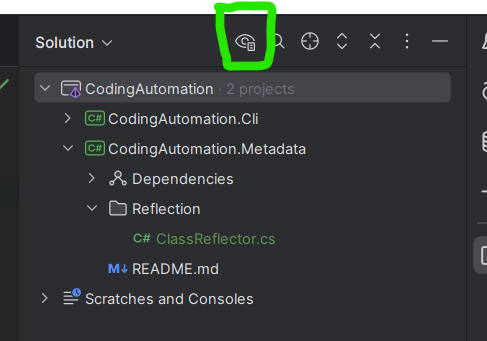
folder always remains hidden, except if I switch on Show All Files in Explorer, unlike the
Reflection
Reflection
folder which behaves normally.

The pics are Explorer with Show All Files switched off and then on.

I have tried deleting the
Roslyn
Roslyn
folder, saving the solution, and restarting Rider, but this folder remains hidden when other such project sub-folders, like
Reflection
Reflection
are all visible.

The
Roslyn
Roslyn
folder is always visible when I open the project in Visual Studio.

There is nothing untoward in the project file, like a
<Compile Remove
<Compile Remove
directive or anything:
<Project Sdk="Microsoft.NET.Sdk">

    <PropertyGroup>
        <TargetFramework>net9.0</TargetFramework>
        <ImplicitUsings>enable</ImplicitUsings>
        <Nullable>enable</Nullable>
    </PropertyGroup>

    <ItemGroup>
      <PackageReference Include="Microsoft.CodeAnalysis" Version="4.13.0" />
      <PackageReference Include="Microsoft.CodeAnalysis.Common" Version="4.13.0" />
    </ItemGroup>

</Project>
<Project Sdk="Microsoft.NET.Sdk">

    <PropertyGroup>
        <TargetFramework>net9.0</TargetFramework>
        <ImplicitUsings>enable</ImplicitUsings>
        <Nullable>enable</Nullable>
    </PropertyGroup>

    <ItemGroup>
      <PackageReference Include="Microsoft.CodeAnalysis" Version="4.13.0" />
      <PackageReference Include="Microsoft.CodeAnalysis.Common" Version="4.13.0" />
    </ItemGroup>

</Project>

I have tried the Report a Bug command on the Help menu, but that just collected and submitted logs, without any opportunity for me to explain anything about the bug.
hidden_folder_explorer-1.png
hidden_folder_explorer-2.png
C# banner
C#Join
We are a programming server aimed at coders discussing everything related to C# (CSharp) and .NET.
61,871Members
Resources
Was this page helpful?

Similar Threads

Recent Announcements

Similar Threads

❔ Project is not specified on Rider
C#CC# / help
4y ago
✅ Using git in rider
C#CC# / help
12mo ago
❔ Class Designer in Rider?
C#CC# / help
4y ago
✅ Project not found when trying to add migration in rider
C#CC# / help
12mo ago
