
Drive w/ Bazzite Not Recognized As Bootable?
I'm new to Linux and have just installed Bazzite on my secondary drive. I had to shrink part of my secondary drive in order to make room for the Bazzite installation but otherwise everything went smoothly.
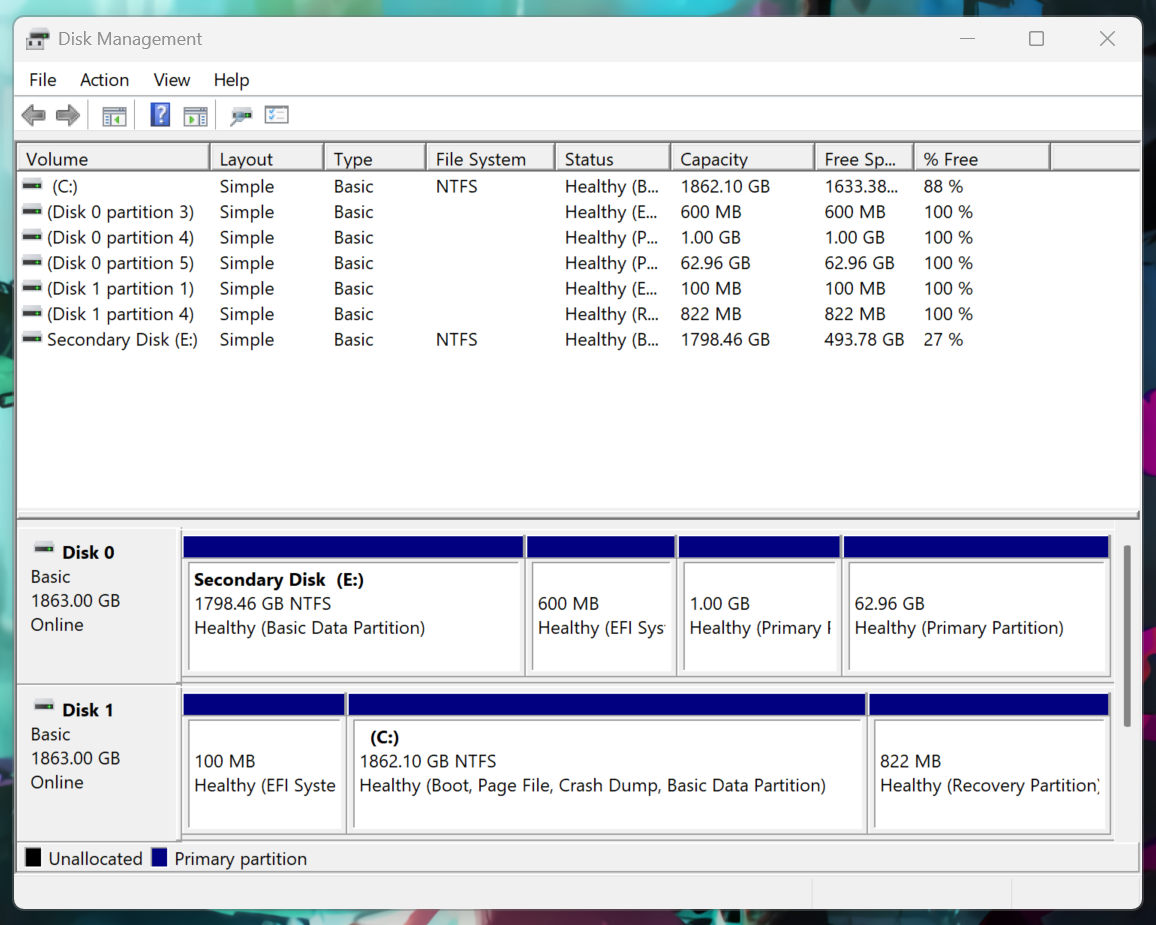
However, I can't seem to boot into Bazzite at all. In my Bios (MSI B650 Tomahawk Wifi) I don't see my second drive (Samsung 980 Pro) as a boot option, and Disk Management doesn't show my E: drive as a Boot drive either. I can still access it as normal and run games off it, but it's as if I never installed Bazzite at all.
Would appreciate if someone could help me to understand how to get Bazzite to boot or installed properly if I did something wrong.
However, I can't seem to boot into Bazzite at all. In my Bios (MSI B650 Tomahawk Wifi) I don't see my second drive (Samsung 980 Pro) as a boot option, and Disk Management doesn't show my E: drive as a Boot drive either. I can still access it as normal and run games off it, but it's as if I never installed Bazzite at all.
Would appreciate if someone could help me to understand how to get Bazzite to boot or installed properly if I did something wrong.
Solution
In the Click 5 Bios Settings I went to "UEFI Hard Disk BBS Priorities" and it allowed me to choose which drive to boot from. I can't set a boot order so that if Linux fails to boot it will go to Windows though.

