RTX PRO 6000 ComfyUI CUDA problem
Description:
Hello!
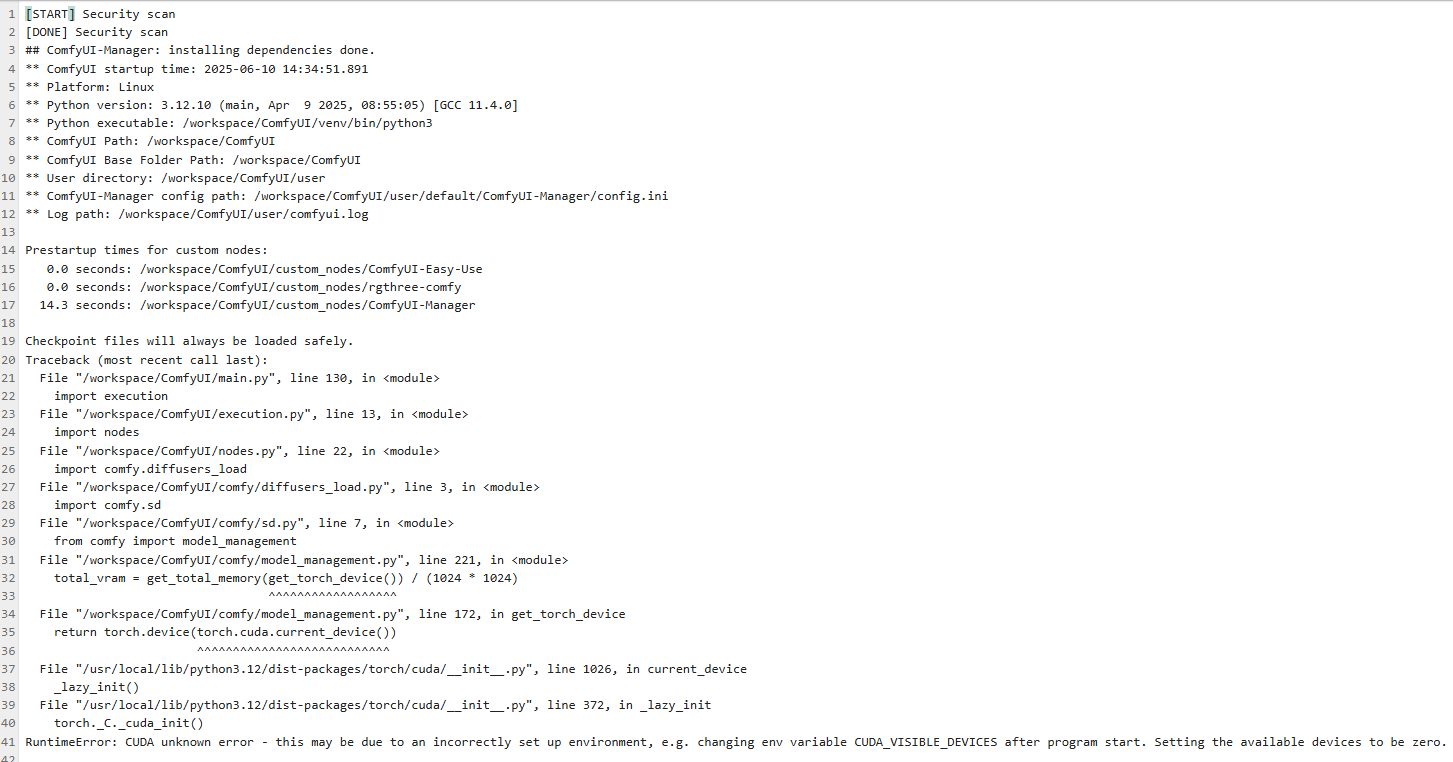
I am using a Blackwell RTX PRO 6000 GPU on a cloud server (RunPod). The GPU is correctly detected by the system (nvidia-smi works, no errors), the driver and CUDA runtime are installed. However, PyTorch cannot see any available CUDA devices and fails to initialize the GPU.
System Details:
GPU: NVIDIA RTX PRO 6000 Blackwell
Template: ComfyUI RTX 5090 – Python 3.12
Also tried PyTorch 2.2 and 2.8 templates.
nvidia-smi output:
Driver: 575.51.03
CUDA Version: 12.9
GPU is visible, no active processes, no errors.
CUDA toolkit: 12.8 / 12.9
Python: 3.12.10
PyTorch: 2.7.0+cu128 (nightly, installed via pip for CUDA 12.8)
LD_LIBRARY_PATH: /usr/local/cuda/lib64
CUDA_VISIBLE_DEVICES: 0
Problem:
When running any PyTorch CUDA code, for example:
python
Copy
import torch
print(torch.cuda.is_available())
print(torch.cuda.get_device_name(0))
I get:
pgsql
Copy
UserWarning: CUDA initialization: CUDA unknown error - this may be due to an incorrectly set up environment, e.g. changing env variable CUDA_VISIBLE_DEVICES after program start. Setting the available devices to be zero.
Is Available: False
Device: None
The libcuda.so library is found via ctypes and links correctly.
nvidia-smi shows the GPU and no active processes.
Environment variables appear normal.
I have tried:
Restarting the server/container.
Reinstalling/updating PyTorch (nightly + cu128).
Verifying LD_LIBRARY_PATH.
Verifying CUDA toolkit and driver versions.
Creating a fresh Python venv.
Using both the ComfyUI RTX 5090 – Python 3.12 template and the PyTorch 2.2 / 2.8 templates.
Question:
Is there anything else I can do to make PyTorch detect and initialize the Blackwell GPU?
Are there additional libraries, drivers, or configuration steps required for PyTorch to support Blackwell GPUs with CUDA 12.8/12.9?
Any advice or troubleshooting steps would be greatly appreciated!
Let me know if you want to add more logs or specifics!
Hello!
I am using a Blackwell RTX PRO 6000 GPU on a cloud server (RunPod). The GPU is correctly detected by the system (nvidia-smi works, no errors), the driver and CUDA runtime are installed. However, PyTorch cannot see any available CUDA devices and fails to initialize the GPU.
System Details:
GPU: NVIDIA RTX PRO 6000 Blackwell
Template: ComfyUI RTX 5090 – Python 3.12
Also tried PyTorch 2.2 and 2.8 templates.
nvidia-smi output:
Driver: 575.51.03
CUDA Version: 12.9
GPU is visible, no active processes, no errors.
CUDA toolkit: 12.8 / 12.9
Python: 3.12.10
PyTorch: 2.7.0+cu128 (nightly, installed via pip for CUDA 12.8)
LD_LIBRARY_PATH: /usr/local/cuda/lib64
CUDA_VISIBLE_DEVICES: 0
Problem:
When running any PyTorch CUDA code, for example:
python
Copy
import torch
print(torch.cuda.is_available())
print(torch.cuda.get_device_name(0))
I get:
pgsql
Copy
UserWarning: CUDA initialization: CUDA unknown error - this may be due to an incorrectly set up environment, e.g. changing env variable CUDA_VISIBLE_DEVICES after program start. Setting the available devices to be zero.
Is Available: False
Device: None
The libcuda.so library is found via ctypes and links correctly.
nvidia-smi shows the GPU and no active processes.
Environment variables appear normal.
I have tried:
Restarting the server/container.
Reinstalling/updating PyTorch (nightly + cu128).
Verifying LD_LIBRARY_PATH.
Verifying CUDA toolkit and driver versions.
Creating a fresh Python venv.
Using both the ComfyUI RTX 5090 – Python 3.12 template and the PyTorch 2.2 / 2.8 templates.
Question:
Is there anything else I can do to make PyTorch detect and initialize the Blackwell GPU?
Are there additional libraries, drivers, or configuration steps required for PyTorch to support Blackwell GPUs with CUDA 12.8/12.9?
Any advice or troubleshooting steps would be greatly appreciated!
Let me know if you want to add more logs or specifics!