Thanks for reaching out to us. Please carefully read this message and follow the recommended actions. This will help us be more effective in our support effort and leave more time for building Immich :immich:.
:ballot_box_with_check: reviewed the FAQs for known issues.
:ballot_box_with_check: reviewed Github for known issues.
:ballot_box_with_check: tried accessing Immich via local ip (without a custom reverse proxy).
:ballot_box_with_check: uploaded the relevant information (see below).
:ballot_box_with_check: tried an incognito window, disabled extensions, cleared mobile app cache, logged out and back in, different browsers, etc. as applicable
(an item can be marked as "complete" by reacting with the appropriate number)
Information
In order to be able to effectively help you, we need you to provide clear information to show what the problem is. The exact details needed vary per case, but here is a list of things to consider:
Your docker-compose.yml and .env files.
Logs from all the containers and their status (see above).
All the troubleshooting steps you've tried so far.
Any recent changes you've made to Immich or your system.
Details about your system (both software/OS and hardware).
Details about your storage (filesystems, type of disks, output of commands like
fdisk -l
fdisk -l
and
df -h
df -h
).
The version of the Immich server, mobile app, and other relevant pieces.
Any other information that you think might be relevant.
Please paste files and logs with proper code formatting, and especially avoid blurry screenshots. Without the right information we can't work out what the problem is. Help us help you ;)
PostgreSQL Database directory appears to contain a database; Skipping initialization
2025-06-11 23:23:59.238 GMT [1] LOG: skipping missing configuration file "/var/lib/postgresql/data/postgresql.override.conf" 2025-06-11 23:23:59.240 GMT [1] LOG: skipping missing configuration file "/var/lib/postgresql/data/postgresql.override.conf" 2025-06-11 23:24:00.059 UTC [1] LOG: starting PostgreSQL 14.17 (Debian 14.17-1.pgdg120+1) on x86_64-pc-linux-gnu, compiled by gcc (Debian 12.2.0-14) 12.2.0, 64-bit 2025-06-11 23:24:00.059 UTC [1] LOG: listening on IPv4 address "0.0.0.0", port 5432 2025-06-11 23:24:00.059 UTC [1] LOG: listening on IPv6 address "::", port 5432 2025-06-11 23:24:00.064 UTC [1] LOG: listening on Unix socket "/var/run/postgresql/.s.PGSQL.5432" 2025-06-11 23:24:00.083 UTC [29] LOG: database system was shut down at 2025-06-11 23:23:07 UTC 2025-06-11 23:24:00.114 UTC [1] LOG: database system is ready to accept connections
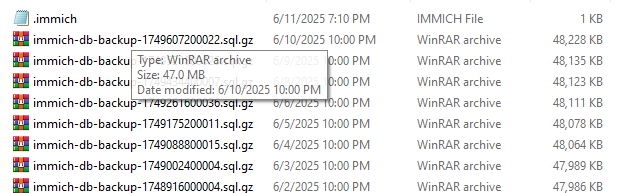
Put the latest backup tar.gz file somewhere it's accessible inside the postgres container (might have to add another volume)
Then run docker exec -it immich_postgres bash
This puts you inside the container
Then run the cat command (change "cat" to "gunzip --stdout"), update the first argument to the path to the backup, and changing the username/password to whatever's in your compose/env file.